
The comprehensive guide to setting up the unsubscribe link | Community
Skip to main content
Grégoire_Miche2
New Participant
January 25, 2017

The comprehensive guide to setting up the unsubscribe link

  • January 25, 2017
  • 74 replies
  • 87208 views

As this is a recurrent request in this community, here are the various ways of setting up the unsubscribe links in Marketo, and when one should use them.

0-Summary

The following table summarizes the possible approaches, when to use them and what chapter you should read:

IfRecommended implementation steps
You want a quick and minimal version that works well and guarantees compliance
  1. Customize the default code (See 2)
  2. Customize the default page (See 3)
You want to properly brand your unsubscribe landing page, and continue using Marketo default or system token
  1. Create a new Unsubscribe page with your own template. Place it preferably in a marketing activities program together with it's follow-up page and any smart campaign you may need
  2. Redirect the /UnsubscribePage.html URL to your page (See 4)
  3. If you plan to use it, customize the default code (See 2)
You need various unsubscribe pages for different audiences (segments, language, ...)
  1. Create your various unsubscribe pages. Place them preferably in marketing activities programs together with their follow-up pages and any additional smart campaigns you may need
  2. Add a snippet element in a dedicated module at the bottom of your email templates (or a text element if you are still using email 1.0)
  3. Deactivate the default link (6)
  4. Create unsubscribe snippets using the customized URL (See 5 ). You can even make these snippets dynamic if the various Unsub LP's are linked to segments.

1-The 3 ways to add an unsubscribe link to an email

There are 3 ways to get the unsub link added to an email:

  1. just ignore the problem. When you send an email, Marketo will detect that no unsubscribe link is included and will automatically add it's default one, that is defined in the admin -> email section and which code is:
    • <p><font face="Verdana" size="1">This email was sent to {{lead.Email Address}}. If you no longer wish to receive these emails you may <a href="%mkt_opt_out_prefix%UnsubscribePage.html?mkt_unsubscribe=1&mkt_tok=##MKT_TOK##">unsubscribe</a> at any time. </font></p>

  2. add the {{system.unsubscribeLink}} to your emails as the href in an <a> tag. This can be done in the template (even hard coded there) or left to the user. That will be enough and Marketo will automatically understand that it should replace the token with the proper link and that it should not add the default unsubscribe link. So <a href="{{system.unsubscribeLink}}">my unsub link</a> will become <a href="mktolpsubdomain.company.com/UnsubscribePage.html?mkt_unsubscribe=1&mkt_tok=##MKT_TOK##">my unsub link</a> at runtime.
  3. Add a link towards any LP in Marketo, with "?mkt_unsubscribe=1&mkt_tok=##MKT_TOK##" at the end of the href. This will be enough for Marketo to know not to add the default link to the email.

2-Customize the Marketo default code

The default admin-> email code can be customized by anyone who knows some rudiments of HTML. Text, fonts, colors, layout, etc.. can be changed. Just always make sure you do not remove the "?mkt_unsubscribe=1" from the link href.

Typically:

<table align="center" width="600">
     <tr>
          <td style="font-family: helvetica; font-size:10px; color:#555;">
               This email was sent to {{lead.Email Address}}. In order to stop receiving our spammy emails <a href="
http://mktolpsubdomain.company.com/myniceunsubpage.html?mkt_unsubscribe=1&mkt_tok=##MKT_TOK##" class="mktNoTrack" target="_blank">click here.</a>
          </td>
     </tr>
</table>

will work perfectly well.

Please note that, in order to prevent Marketo to track the click on the link, you will have to add class="mktNoTrack" to the <a> tag.

3-Customize the Marketo Default page

By default, all Marketo instances come up with an unsubscribe page that use the ugly akward Standard free form template:
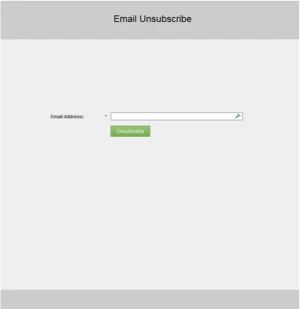
This page will be located in the design studio, and it's name will be localized in the language in which you instance was initially created.

The most obvious and simplest move is to customize this page and make it a little more looking like a page from your company

You can also move this page in a program in the marketing activities. As long as it's URL keeps being UnsubscribePage.html (see below) it will continue to work.

4-Redirect the default link to another, nicer, page

Now, maybe you would like to use another template for your landing page. Or maybe you want to replace this unsubscribe page with a thoroughly designed subscription center. But you want to keep the usability for your Marketo users, so you would like to keep the {{system.unsubscribeLink}} token or the Marketo Default driving the visitors to your nicer LP.

For this, you need to know that, whatever the config of your instance, the {{system.unsubscribeLink}} token always direct to /UnsubscribePage.html. So you will just need to have this URL reassigned to your new and nice unsubscribe page. This is again quite easy using Marketo URL tools. Once your new unsubscribe page is ready and tested:

  1. Go to your old unbsubscribe page. In Marketo UI, click the Landing Page actions -> URL Tools -> Edit URL settings:
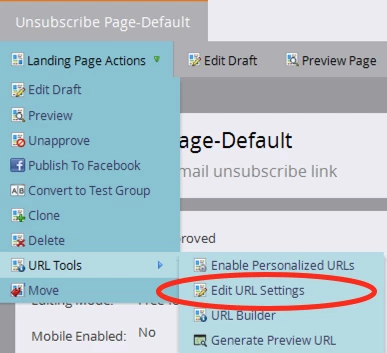
  2. In the dialog box, change the URL to anything (I personally simply add "old" to the end of it.

    Tip: What is important here is to throw away to previous URL so that the URL becomes available
  3. Then go to your new unsubscribe page and do exactly the same thing, granting this new page the UnsubscribePage.html URL

To run this process, wait until a moment when no email has been sent in the past hours, since you will have no unsub page available between steps 2 and 3.

5-Use a different URL for the unsubscribe page

May be you want to use a different URL for this page, or even have various URLs for various contexts. In fact, nothing mandates you to always use the {{system.unsubscribeLink}} or the /UnsubscribePage.html URL. Any Marketo LP URL will do the job here, as long as it is appended with the "?mkt_unsubscribe=1" to indicate to Marketo that this is an unsubscribe link. You should also add the &mkt_tok=##MKT_TOK## to make the click on the link carry the token value and enable cookie value reconciliation. Please also note that, in order to prevent Marketo to track the click on the link, you will have to add class="mktNoTrack" to the <a> tag.

The following is a perfect unsubscribe link in an email template:

<tr><td>This email was sent to {{lead.Email Address}}. In order to stop receiving our spammy emails <a href="http://mktolpsubdomain.company.com/myniceunsubpage.html?mkt_unsubscribe=1&mkt_tok=##MKT_TOK##" class="mktNoTrack" target="_blank">click here.</a></td><tr>

As you can see, it takes no token and not event the /UnsubscribePage.html URL.

This method will be necessary in a multi language / international roll out: you will need to have multiple, different Unsubscribe pages for each language and the Marketo default or {{system.unsubscribeLink}} token can only link to one of them.

Also please note that the unsub code can be added to snippets, which in turn can be added to the emails for maximum flexibility.

6-Disable the default Marketo unsub link.

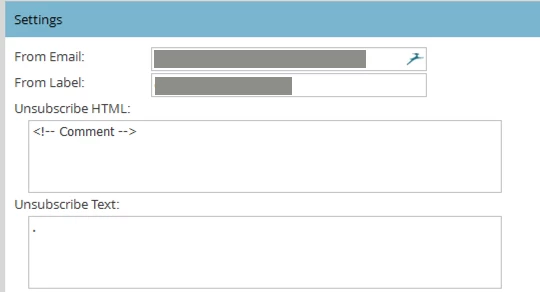
If you are sure that your email templates always include the necessary links and you want to avoid Marketo adding it's own link just replace the default unsubscribe links with HTML comments in admin->email
Hope this helps,

-Greg

74 replies

New Participant
May 19, 2020

5-Use a different URL for the unsubscribe page

May be you want to use a different URL for this page, or even have various URLs for various contexts. In fact, nothing mandates you to always use the {{system.unsubscribeLink}} or the /UnsubscribePage.html URL. Any Marketo LP URL will do the job here, as long as it is appended with the "?mkt_unsubscribe=1" to indicate to Marketo that this is an unsubscribe link. You should also add the &mkt_tok=##MKT_TOK## to make the click on the link carry the token value and enable cookie value reconciliation. Please also note that, in order to prevent Marketo to track the click on the link, you will have to add class="mktNoTrack" to the <a> tag.


The following is a perfect unsubscribe link in an email template:


<tr><td>This email was sent to {{lead.Email Address}}. In order to stop receiving our spammy emails <a href="mktolpsubdomain.company.com/myniceunsubpage.html?mkt_unsubscribe=1&mkt_tok=##MKT_TOK##" class="mktNoTrack" target="_blank">click here.</a></td><tr>


As you can see, it takes no token and not event the /UnsubscribePage.html URL.

This method will be necessary in a multi language / international roll out: you will need to have multiple, different Unsubscribe pages for each language and the Marketo default or {{system.unsubscribeLink}} token can only link to one of them.


Also please note that the unsub code can be added to snippets, which in turn can be added to the emails for maximum flexibility.


This method does not auto-populate email address. How can I use this method but also make it so when a user clicks the link that their email address is auto-filled?

New Participant
May 19, 2020

"Redirect the /UnsubscribePage.html URL to your page (See 4)"


we created a new unsubscribe page and then used a redirect rule on /unsubscribepage.html


the only problem now is that when someone goes to the new unsubscribe page the user's email address does not auto-populate. how can we fix this?

New Participant
October 3, 2019

If I have a custom unsubscribe page that DOES NOT use a Marketo form, but my link includes "?mkt_unsubscribe=1&mkt_tok=##MKT_TOK##" should I expect to see unsubscribe stats in the campaign dashboard? I ran myself through the program, opened the email and only clicked on the unsub link and filled out the form. In the campaign dashboard, that click was recorded as ONLY a general click. I kind of expected for the click to record in the general click stats as well as the unsub status. 

Can someone let me know if there is a way to record unsubscribe metrics with a non-marketo unsubscribe page. 

New Participant
September 27, 2019

Hi Michael, yes, that is how I have the params, at the end of my unsubscribe page url. 

So I think I found the issue, I was testing on a browser where I was already cookied, so I tried clicking the link from a different device and it worked. I am still going to do some more testing, but I think it should work now!

Michael_Florin-2
New Participant
September 27, 2019

Just to make sure we're talking about the same thing: You are using the ?mkt_unsubscribe=1&mkt_tok=##MKT_TOK## parameter at the end of your email links that lead to the unsubscribe page, right? As in 

yourdomain.com/unsubscribe?mkt_unsubscribe=1&mkt_tok=##MKT_TOK##

If you have form prefill enabled on your unsubscribe form and you're clicking that link from a real email send, you should see the email address field be prefilled. And if that email address exists in your database already, you'll see that form submission in the lead's activity. And yes, if you submit the form with an email address that is not known to Marketo, a new lead is going to be created.

But you're also saying "the unsubscribe page for one of our workspaces". Do you have Person Partitions alongside your workspaces? If so, things might be a little different. I'm not an expert for Partitions, but I assume that if the unsubscribe form lives in Workspace A which is associated to Partition A, and your sample lead does not live in Partition A, it will be created there as new, even if they already existed in Partition B.

New Participant
September 27, 2019

Hi @Grégoire Michel‌ - great post, thank you! I have a question for emails with Open Tracking Disabled

I used the ?mkt_unsubscribe=1&mkt_tok=##MKT_TOK## parameter at the end of my unsubscribe landing page, but it doesn't seem to be working. Is there another parameter I should add to my unsubscribe landing page so that the lead is associated with the unsubscribe form fill when they click "Unsubscribe"? It is a Marketo landing page and form I made to use as the unsubscribe page for one of our workspaces. Right now a new lead is being created when they fill the unsubscribe page. 

Jake_Robertson
New Participant
September 4, 2019

What we decided to do for our process is add a redirect in Admin --> Landing Pages to use the unsubscribe token that sends all traffic to the current unsubscribe page in Marketo and then immediately to the new unsubscribe page created on our company's site that houses a Marketo form. All thanks to this post.

SanfordWhiteman
New Participant
April 2, 2019

Greg/Sanford - How does the custom Marketo Unsubscribe link populate the right email address in the email address field? I don't see any email address token in the URL as a parameter. E.g. If I click the unsubscribe link from my gmail, the awkward Standard free form template populates my gmail address and if I click the unsubscribe link from my work email, it populates my work email address without having to clear any cookies etc.

The mkt_tok query parameter is a pointer to the lead in Marketo. (No, you can't read anything from the token, but Marketo can on the back end.)

Right now, when I click "Manage Preferences" the email address that populates in the email address field is neither my gmail or work email but a test email address that Marketo cookie remembers because I visited the page using that particular test email address.

Is there a ​mkt_tok ​in the URL after clicking it?

New Participant
April 2, 2019

We have a very similar problem, and it's creating a serious gap in our ability to understand how our audience is engaging with our emails.

Has anyone been able to hack together a way to leverage the native dashboard reporting to effectively report on custom unsubscribe links?

I wonder if it's possible to take some of the tracking parameters used in the native Marketo unsubscribe links, and tack this on to custom unsubscribe links in a way where they would be tracked similarly on the email dashboards?

Or, perhaps set up any custom unsubscribe pages to also trigger the Marketo unsubscribe? But then I guess you'd need to reconcile any inconsistencies b/t who should really be receiving messages and who Marketo thinks should be receiving messages.

I'd be interested to hear if anyone has been able to find a good workaround for this problem.

Ira_Manandhar
New Participant
March 1, 2019

Greg/Sanford - How does the custom Marketo Unsubscribe link populate the right email address in the email address field? I don't see any email address token in the URL as a parameter. E.g. If I click the unsubscribe link from my gmail, the awkward Standard free form template populates my gmail address and if I click the unsubscribe link from my work email, it populates my work email address without having to clear any cookies etc.

I am building a preference center page with Marketo form + LP. This preference center landing page link will be included in the footer of my emails as "Manage Preferences." How do I make sure, the correct email address populates in the email address field in the form based on which how I got to the page either via gmail or my work email.

Right now, when I click "Manage Preferences" the email address that populates in the email address field is neither my gmail or work email but a test email address that Marketo cookie remembers because I visited the page using that particular test email address.

Thank you in advance.