
To use reserved Marketo syntax (like ${variable}) in Landing Pages, tap {{my.tokens}} | Community
Skip to main content
SanfordWhiteman
New Participant
June 24, 2023

To use reserved Marketo syntax (like ${variable}) in Landing Pages, tap {{my.tokens}}

  • June 24, 2023
  • 4 replies
  • 1824 views

Marketo’s ${variable} syntax conflicts with other languages using the same dollar-single-curly-quote syntax, like good ol’ JavaScript.


So if you try to use a JS template literal in the LP Editor...

<script> let a = `Report ID ${report} for ${this.name}`; </script>


... Marketo naturally thinks you’re referring to missing variables and throws an error:
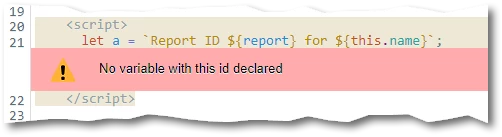
 

Officially, there’s no alternate syntax in Marketo (and there’s definitely no way to change the delimiter in JS). But the workaround is easy. Create a global Text token {{my.d}} just containing the single character $:



(Why {{my.d}}? Just copying Velocity’s $esc.d, which also escapes the dollar sign. You could use another name if you want, but this should be easy to remember.)


Use that token to escape the $ sign:

<script> let a = `Report ID {{my.d}}{report} for {{my.d}}{this.name}`; </script>


Marketo will render this as:

<script> let a = `Report ID ${report} for ${this.name}`; </script>


Presto!

This post is no longer active and is closed to new replies. Need help? Start a new post to ask your question.

4 replies

SanfordWhiteman
New Participant
September 22, 2023

That’s the expected behavior when you escape the variable syntax. As far as I can see you have no reason to use the method in this post. You want Marketo to use the standard ${variable} syntax, not ignore it. This method is for people who need to use ${variable} for another purpose and don’t want Marketo interfering.

New Participant
September 22, 2023

<meta class="mktoBoolean" id="livewebinar2" mktoName="Live webinar?" default="true" true_value="LIVE WEBINAR" true_value_name="Live" false_value="ON-DEMAND WEBINAR" false_value_name="On-demand">

<script>


if ("{{my.q}}{livewebinar2}" == "LIVE WEBINAR") {
MktoForms2.whenReady(function (form){
form.onSuccess(function(vals, page){
form.getFormElem().hide();
var confirm = document.getElementById('confirmation');
confirm.style.display = 'inline-block';
confirm.setAttribute('aria-hidden', false);
return false;
});
});
}
</script>


When I publish my page and view source, the variable doesn't show the value. Instead, it shows: if ("${livewebinar2}" == "LIVE WEBINAR"). So I was assuming it was a problem with the variable not posting the value?


SanfordWhiteman
New Participant
September 13, 2023

You’d have to show your code. Not sure what you mean by ${{variable}} as that’s no Marketo or JS syntax.

New Participant
September 13, 2023

Hi - I couldn't get this to work. My landing page was still showing ${{variable}} in the Javascript, rather than the value. Any advice on how to make it work as part of an 'if' statement?