
Tokens for specfic document download links based on email address | Community
Skip to main content
Grace_Ramon
New Participant
November 10, 2016
Solved

Tokens for specfic document download links based on email address

  • November 10, 2016
  • 1 reply
  • 2258 views

I'm trying to figure out a way to use Tokens to create specific document download links based on the email address/company.  I've already created each specific tokens to reference the different documents for each company... but I'm having difficulty figuring out how to get the token associated with the company name.

For example:

If email contains XYZ, then use My Token XYZ

If email contains ABC, then use My Token ABC

I'm thinking I need to create an email script - but this "velocity" scripting is above my understanding... Does anyone know of a simpler way of doing this or have sample email script that I can use to make this happen?

This post is no longer active and is closed to new replies. Need help? Start a new post to ask your question.
Best answer by SanfordWhiteman

Unless you have already segmented by email domain (which is going to be impossible if you have > 100 domains and 100 different documents) you must use Velocity.

You don't need any separate tokens but a single Velocity token like so:

#define( $formatLink )<a href="http://${document}">Click to get your document!</a>#end

#set( $documentDomainMap = {

  "googlemail.com|gmail.com" : "www.example.com/google.pdf",

  "yahoo.com" : "www.example.com/yahoo.pdf",

  "hotmail.com" : "www.example.com/hotmail.pdf",

  "" : "www.example.com/default.pdf"

} )

## No need to edit below this line!

#foreach( $domainList in $documentDomainMap.keySet() )

#if( $lead.Email.matches( ".*@(${domainList})$" ) )

#set( $document = $documentDomainMap[$domainList] )

#break

#end

#end

## Use default if domain not found

#if( !$document )

#set( $document = $documentDomainMap[""] )

#end

${formatLink}

As you can see, at the top of the code, you list the domains (the $documentDomainMap variable that maps domains to their documents) and you set up the final output link (<A> tag). You don't need to edit anything else. Also note the domain can be a pipe-delimited list of domains (if some domains will get the same document).

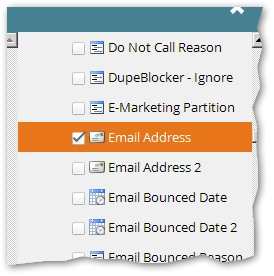
When you create this token make sure Email Address is selected in the right-hand tree (if you don't do this then Velocity can't see the value of lead.Email).

1 reply

SanfordWhiteman
SanfordWhitemanAccepted solution
New Participant
November 11, 2016

Unless you have already segmented by email domain (which is going to be impossible if you have > 100 domains and 100 different documents) you must use Velocity.

You don't need any separate tokens but a single Velocity token like so:

#define( $formatLink )<a href="http://${document}">Click to get your document!</a>#end

#set( $documentDomainMap = {

  "googlemail.com|gmail.com" : "www.example.com/google.pdf",

  "yahoo.com" : "www.example.com/yahoo.pdf",

  "hotmail.com" : "www.example.com/hotmail.pdf",

  "" : "www.example.com/default.pdf"

} )

## No need to edit below this line!

#foreach( $domainList in $documentDomainMap.keySet() )

#if( $lead.Email.matches( ".*@(${domainList})$" ) )

#set( $document = $documentDomainMap[$domainList] )

#break

#end

#end

## Use default if domain not found

#if( !$document )

#set( $document = $documentDomainMap[""] )

#end

${formatLink}

As you can see, at the top of the code, you list the domains (the $documentDomainMap variable that maps domains to their documents) and you set up the final output link (<A> tag). You don't need to edit anything else. Also note the domain can be a pipe-delimited list of domains (if some domains will get the same document).

When you create this token make sure Email Address is selected in the right-hand tree (if you don't do this then Velocity can't see the value of lead.Email).

Grace_Ramon
New Participant
November 11, 2016

Thank you, thank you, thank you!  I think this will definitely work - I am testing it now.