Tokens in Calender Event Token not Working | Community
Skip to main content
New Participant
September 10, 2020
Solved

Tokens in Calender Event Token not Working

  • September 10, 2020
  • 1 reply
  • 3854 views

Dear all,


I'm facing the issue that the calendar event token offers the option adding another token into the description area. But if I'm adding {{member.webinar url}} into the calender event token it's never added. By sending an E-Mail the token name is still displayed and isn't replaced by any content.


Without this functionality I'm not able to provide my registrants unique links for attending a GoToWebinar event.
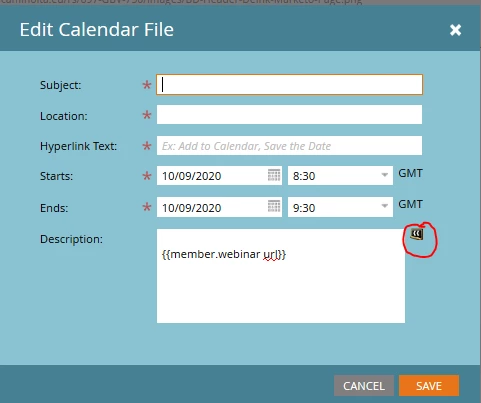
 

Looking forward to your solutions and support.


Many thanks!

Carolin


This post is no longer active and is closed to new replies. Need help? Start a new post to ask your question.
Best answer by AbhinavSa2

Although you have mentioned that you are sure it'll work. however, this token will work with live emails (Not in sample draft) and make sure program is connected with webinar ID. 


It should have been working if you are checking in live email. 

1 reply

SanfordWhiteman
New Participant
September 10, 2020

The first question I'd ask is whether you tested including the {{member.webinar url}} in the body of that same email at the exact same time — that is, are you sure the token was populated at all at the time?


But overall you'd have a much better outcome if you used Agical (see https://blog.teknkl.com/tag/agical) to create your ICS files. There's an upcoming Champion blog post about Agical (by @amy_goldfine) as well.

New Participant
September 11, 2020

I'm sure that the {{member.webinar url}} is already populated by sending the email and I'm also sure, that the contacted person is contained in the registration list (form-fulfilled) of the program. Within the email I have another CTA button with a direct link to {{member.webinar url}}. There I can reach the target URL without any problems.


The {{member.webinar url}} is used in a calendar event and the calendar event is embedded into the same email body. It seems that any other tokens besides {{member.webinar url}} weren't replaced by content as well.


Many thanks for sharing https://blog.teknkl.com/tag/agical! I'll check it in detail.

AbhinavSa2Accepted solution
Employee
September 11, 2020

Although you have mentioned that you are sure it'll work. however, this token will work with live emails (Not in sample draft) and make sure program is connected with webinar ID. 


It should have been working if you are checking in live email.