
Tracking effecting custom hyperlink styles in Outlook Mac 16.69.1 "New Outlook" | Community
Skip to main content
jrent
New Participant
February 13, 2023
Question

Tracking effecting custom hyperlink styles in Outlook Mac 16.69.1 "New Outlook"

  • February 13, 2023
  • 2 replies
  • 4078 views

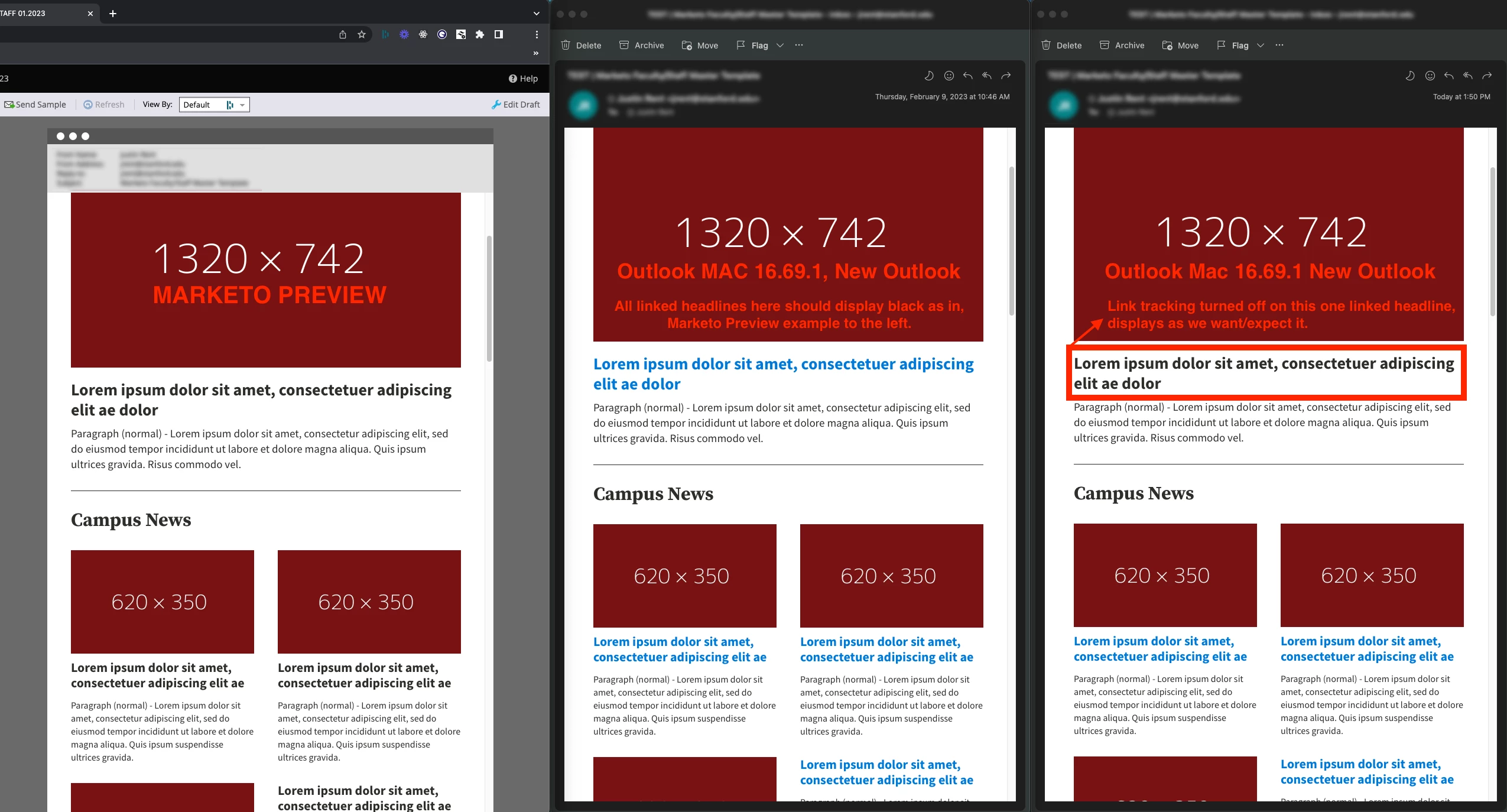
We're testing templates that have custom (non-default) hyperlink styling applied. When tests are viewed in Outlook Mac 16.69.1 with the "New Outlook" setting turned on the custom styles (color, it seems, specifically) are omitted or overridden by Outlook – see attached screen grabs. We've found that if we turn off link tracking on these links that the custom styles are applied and they display as expected.
 

This post is no longer active and is closed to new replies. Need help? Start a new post to ask your question.

2 replies

SanfordWhiteman
New Participant
February 14, 2023

Can you show the HTML markup of those links, their immediate parent elements (please not the entire email, just a few levels up), and any separate CSS styles affecting those links?

jrent
jrentAuthor
New Participant
February 14, 2023

Hi Sanford –

Below is the code for that top section in my screen grabs – the large image, linked heading, and body copy. A copy of the templates inline <style> tag is also below.

The <h2> is an example of where we're seeing this issue.

Yesterday we found that if we add an empty class or a class with no styles attached to it (either class="" or class="ol-link") to the <a> inside the <h2> that it could be a workaround to resolve the problem as our tests coming through display as we want them to. Very odd but maybe you have advice to offer.


Thanks for taking a look!

Justin

HTML from template section:

<!--[if IE | mso]><!-- -->

<tbody>

<tr style="display:noneIE | important;">

<td align="center">

<div class="mktoImg img-full mob-align-default" id="single-col-image.imgcac55064-d3e0-436d-95de-42111ad01152" style="max-width:660px;" mktolockimgsize="true" mktolockimgstyle="true">

<a href="https://www.stanford.edu" target="_blank"> <img class="img-full" src="https://dummyimage.com/1320x742/791212/fff" alt="placeholder alt text" width="660" style="display:block; width:100% !important; max-width:660px;" border="0" /> </a>

</div>

<div style="line-height:20px; height:20px; font-size:0px;">

&nbsp;

</div>

</td>

</tr>

<!--<![endif]-->

<!--[if IE | mso]><!-- -->

<tr style="display:noneIE | important;">

<td>

<h2 class="mktoText mob-text-default" id="single-col-image.h4-1871ad513-cfee-42df-8877-c0aae84a116a" style="font-family:'Source Sans Pro', Helvetica, Arial, sans-serif; font-size:28px; line-height:34px; font-weight:bold; text-align:left; color:#2E2D29;">

<a href="https://www.stanford.edu" target="_blank" id="">Lorem ipsum dolor sit amet, consectetuer adipiscing elit ae dolor</a>

</h2>

<div style="line-height:10px; height:10px; font-size:0px;">

&nbsp;

</div>

</td>

</tr>

<!--<![endif]-->

<!--[if IE | mso]><!-- -->

<tr style="display:noneIE | important;">

<td>

<div role="paragraph" class="mktoText mob-text-default" id="single-col-image.p-173c93b76-2fea-4b4b-93be-1b78c01c2d5e" style="font-family:'Source Sans Pro', Helvetica, Arial, sans-serif; font-size:19px; line-height:26px; font-weight:normal; text-align:left; color:#2E2D29;">

Paragraph (normal) - Lorem ipsum dolor sit amet, consectetur adipiscing elit, sed do eiusmod tempor incididunt ut labore et dolore magna aliqua. Quis ipsum ultrices gravida. Risus commodo vel.

</div>

<div style="line-height:0px; height:0px; font-size:0px;">

&nbsp;

</div>

</td>

</tr>

<!--<![endif]-->

<!--[if !mso]><!-- -->

<tr style="display:none!important;">

<td align="center">

<table role="presentation" class="mob-align-default" border="0" cellpadding="0" cellspacing="0" style="width:174px;">

<tbody>

<tr>

<td class="flex-button-a">

<div class="mktoText" id="single-col-image.cta-1094e7311-6121-40f9-a0f4-73385d6938fd" style="font-family:'Source Sans Pro', Helvetica, Arial, sans-serif;"></div>

</td>

</tr>

</tbody>

</table>

</td>

</tr>

<!--<![endif]-->

</tbody>

Inline <style> tag at top of document:

<style type="text/css">

* {-webkit-font-smoothing: antialiased; -moz-osx-font-smoothing: grayscale;}

html, body {margin: 0; padding: 0;}

body {margin: 0 auto!important; padding: 0; font-family: Arial, sans-serif; -webkit-text-size-adjust: 100%!important; -ms-text-size-adjust: 100%!important; -webkit-font-smoothing: antialiased!important;}

.mktoText a, .mktoSnippet a, a:link, a:visited {color: #006CB8; text-decoration: underline;}

a[x-apple-data-detectors] {color: inherit!important; text-decoration: none!important; font-size: inherit!important; font-family: inherit!important; font-weight: inherit!important; line-height: inherit!important;}

img {border: 0!important; outline: none!important; max-width:100%;}

table {border-spacing: 0; mso-table-lspace: 0px; mso-table-rspace: 0px;}

th {margin: 0; padding: 0;font-weight: normal;}

div,td,a,span {mso-line-height-rule: exactly;}

ul,ol {Margin-top:0; Margin-bottom:0; padding-left:32px;}

li {Margin-top:0; Margin-bottom:0;}

[owa] .col, .col {display: table-cell!important;}

h1,h2,h3,h4,h5,h6,p {padding:0; Margin:0; mso-line-height-rule: exactly;}

.link-word-break a {word-break: break-all;}

.link-normal-default a, .link-normal-default a:visited, .link-normal-default a:link {color: #006CB8; text-decoration: underline;}

.link-light-default a, .link-light-default a:visited, .link-light-default a:link {color: #FFFFFF; text-decoration: underline;}

.link-alt-default a, .link-alt-default a:visited, .link-alt-default a:link {color: #2E2D29; text-decoration: underline;}

.link-normal-default a:hover, .link-normal-default a:focus {color:#006CB8; text-decoration:none;}

.link-light-default a:hover, .link-light-default a:focus {color:#FFFFFF; text-decoration:none;}

.link-alt-default a:hover, .link-alt-default a:focus {color:#8C1515; text-decoration:none;}

.link-normal-hover a, .link-normal-hover a:visited, .link-normal-hover a:link {color: #006CB8; text-decoration:none;}

.link-light-hover a, .link-light-hover a:visited, .link-light-hover a:link {color: #FFFFFF; text-decoration:none;}

.link-alt-hover a, .link-alt-hover a:visited, .link-alt-hover a:link {color: #2E2D29; text-decoration:none;}

.link-normal-hover a:hover, .link-normal-hover a:focus {color:#006CB8; text-decoration:underline;}

.link-light-hover a:hover, .link-light-hover a:focus {color:#FFFFFF; text-decoration:underline;}

.link-alt-hover a:hover, .link-alt-hover a:hover {color:#8C1515; text-decoration:underline;}

.flex-button-a {

margin:12px 10px; font-size:19px; background-color:#B1040E; border:2px solid #B1040E; border-radius:0px; border-collapse:collapse; text-align:center;

}

.flex-button-a a, .flex-button-a a:visited, .flex-button-a a:link {

padding:12px 10px; display:block; text-align:center; color:#FFFFFF; font-weight:normal !important; text-decoration:none;

}

.flex-button-a:hover, .flex-button-a:focus {

background-color:#2E2D29;

border:2px solid #2E2D29;

}

.flex-button-a a:hover, .flex-button-a a:focus {

background-color:#2E2D29;

color:#FFFFFF;

text-decoration:underline;

}

.flex-button-b {

margin:12px 10px; font-size:19px; background-color:#FFFFFF; border:2px solid #B1040E; border-radius:0px; border-collapse:collapse; text-align:center;

}

.flex-button-b a, .flex-button-b a:visited, .flex-button-b a:link {

padding:12px 10px; display:block; text-align:center; color:#B1040E; font-weight:normal !important; text-decoration:none;

}

.flex-button-b:hover, .flex-button-b:focus {

background-color:transparent;

border:2px solid #2E2D29;

}

.flex-button-b a:hover, .flex-button-b a:focus {

background-color:transparent;

color:#2E2D29;

text-decoration:underline;

}

@media only screen and (max-width:699px) {

.mob-center {margin: 0px auto!important; float: none!important;}

.mob-full {min-width: 100%!important; width: 100%!important; height: auto!important;}

.img-full {width:100%!important; max-width:100%!important; height:auto!important;}

.img-scale {width:100%!important; height:auto!important;}

.col {display: block!important;}

.mob-text-center {text-align: center!important;}

.mob-text-default {}

.mob-align-center {margin: 0 auto!important; float: none!important;}

.mob-align-default {}

.mob-hide {display:none!important; visibility: hidden!important;}

.mob-padsides-20 {padding-left:20px!important; padding-right:20px!important;}

.mob-padvert-20 {padding-top:20px!important; padding-bottom:20px!important;}

}

@media yahoo {

* {overflow: visible!important;}

.y-overflow-hidden {overflow: hidden!important;}

}

</style>
Dave_Roberts
New Participant
February 15, 2023

I did a quick Google search and found this article: https://github.com/hteumeuleu/email-bugs/issues/107

Looks like it's an open issue which can be resolved by wrapping the text in a <span> in the short-term.


I noticed the example here also did not include a class on the link, curious how that impacts the display -- but maybe not so much if you consider Outlook's history with needing special treatment to do perfectly run-of-the-mill things that work everywhere else in the email universe. 

Community Manager
February 13, 2023

You might want to do some digging in your template to see if you have specific code relevant to Outlook that's causing the override. 


We recently had another user with a similar (though obviously not the same) issue, and you might want to start there if you can.

jrent
jrentAuthor
New Participant
February 14, 2023

Thanks for the heads up Christiane!