Tracking Link Clicks in Marketo Email via SFDC | Community
Skip to main content
Danielle_Wong
Community Manager
April 12, 2016
Solved

Tracking Link Clicks in Marketo Email via SFDC

  • April 12, 2016
  • 4 replies
  • 5078 views

I am sending out an email with 4 links. I want to be able to pull the list of people who clicked each link in SFDC. Is there a way to do this? I know that Marketo records clicks and opens 2x a day per lead, so it's possible that Marketo will not send all the link clickers to SFDC.

Let me know if you need more details to help me out.

Thanks

This post is no longer active and is closed to new replies. Need help? Start a new post to ask your question.
Best answer by Grégoire_Miche2

Hi Danielle,

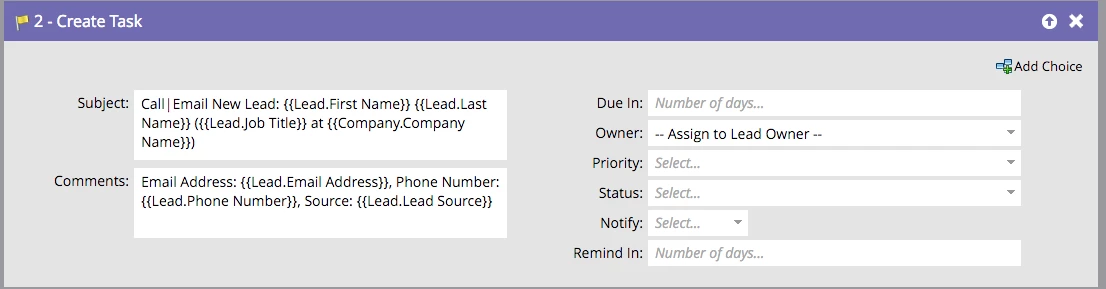
You just need a smart campaign with a "clicks link in email" trigger and a "create task" flow step:

You will be able to assign the task and set some values. But you will also stuff you salesforce DB with so many tasks that it will ultimately overload it and the users. Finally, my experience is that no one looks at them.

-Greg

4 replies

Iryna_Zhuravel4
New Participant
April 13, 2016

If you need to be able to run reports on this in SFDC I would rather do it through sfdc campaigns, i.e. create a campaign per link, add leads to a corresponding campaign depending on what link they clicked. This will be cleaner and will allow you to run reports.

As others said creating a task for each email click would be very cumbersome, it is only worth doing if you want your sales reps to follow up on each one of these activities, otherwise they just might get frustrated with so many tasks coming their way.

If you are using MSI, I would also recommend adding email clicks to your interesting moment, this gives salesreps a nice snapshot of how leads engage with your company. We log interesting moment for every email click:

Here is how this will look like in SFDC:

Danielle_Wong
Community Manager
April 13, 2016

Okay, the interesting moments idea is nice! I'll look into doing that for mine. Thanks Iryna!

Robb_Barrett
New Participant
April 12, 2016

But you could create a text field called ClickedEmails and have a workflow like:

"Clicks link in EMAIL link name is any"

And then an flow step like this:

Change data value: ClickedEmails

New value:

{{system.date}}: {{trigger.Trigger Name}}: {{trigger.name}} {{lead.ClickedEmails}}

Have this run all the time.  Then at the end of the day run a one-time sync with this field.

Robb Barrett
Robb_Barrett
New Participant
April 12, 2016

Hold up -

According to the docs: "Only one open event per email, per lead, per smart campaign is logged. If they open the same email from their inbox twice, it will not be logged more than once."

A click is logged: "

Is logged every time a decorated URL from the email is loaded in the browser (the result of clicking the link). Usually this is the recipient clicking, but can also be a cut/paste.

Where do you get that a click is only logged once?  I think the spamtrap analysis I did shows otherwise.

Robb Barrett
SanfordWhiteman
New Participant
April 12, 2016

It's not about about the logging to Marketo. The Clicked Link in Email and other activities are only synced once per day per lead to SFDC.

SanfordWhiteman
New Participant
April 12, 2016

Once per day per lead.

The only way to do this would be to forcibly use the Create (SFDC) Task flow step to make every click a new task.  Otherwise, as you said, you can't expect to get all the clicks.

This isn't something I would recommend leaving in place for all campaigns.

Danielle_Wong
Community Manager
April 12, 2016

Okay, thanks so much for the info and for clarifying about the once per day per lead.

Are you able to provide more detail into the "Create SFDC Task" flow step to make every click a new task? Is it possible to create a SFDC lead history item is that what the SFDC task is?

Grégoire_Miche2
Grégoire_Miche2Accepted solution
New Participant
April 12, 2016

Hi Danielle,

You just need a smart campaign with a "clicks link in email" trigger and a "create task" flow step:

You will be able to assign the task and set some values. But you will also stuff you salesforce DB with so many tasks that it will ultimately overload it and the users. Finally, my experience is that no one looks at them.

-Greg