Transition Rules | Community
Skip to main content
New Participant
December 11, 2019
Question

Transition Rules

  • December 11, 2019
  • 5 replies
  • 7540 views

Hi 

Sorry if it's a already spoken but I don't find the subject. 

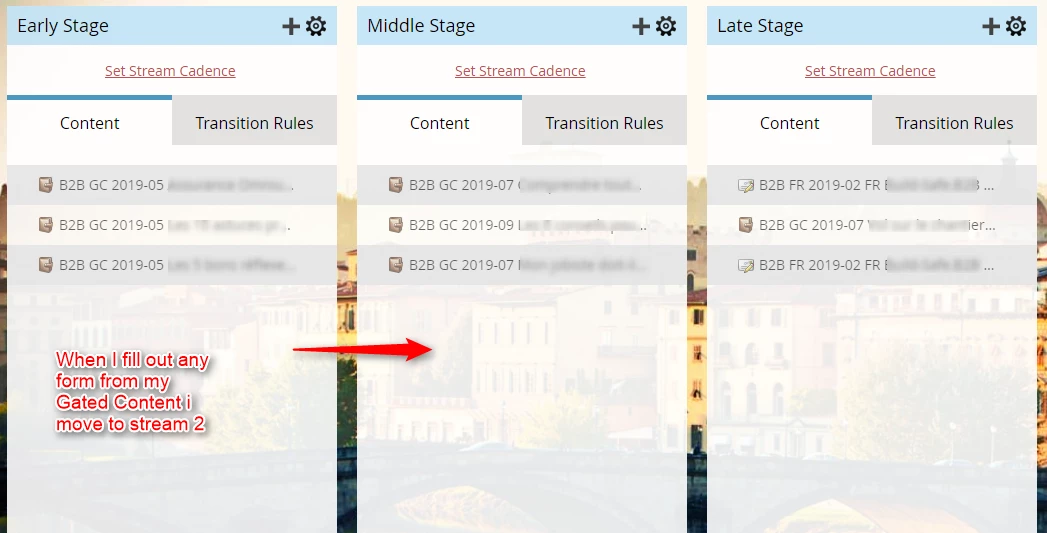
There's my problem; I want use transition rules for my streams in a nurturing program. I have done printscreen

When someone fill out any of the 3 forms in stream 1, I want move them to stream 2. Easy rule, but I can't fix it...  

So for my Triggers in the stream 2 it would be the following trigger, 
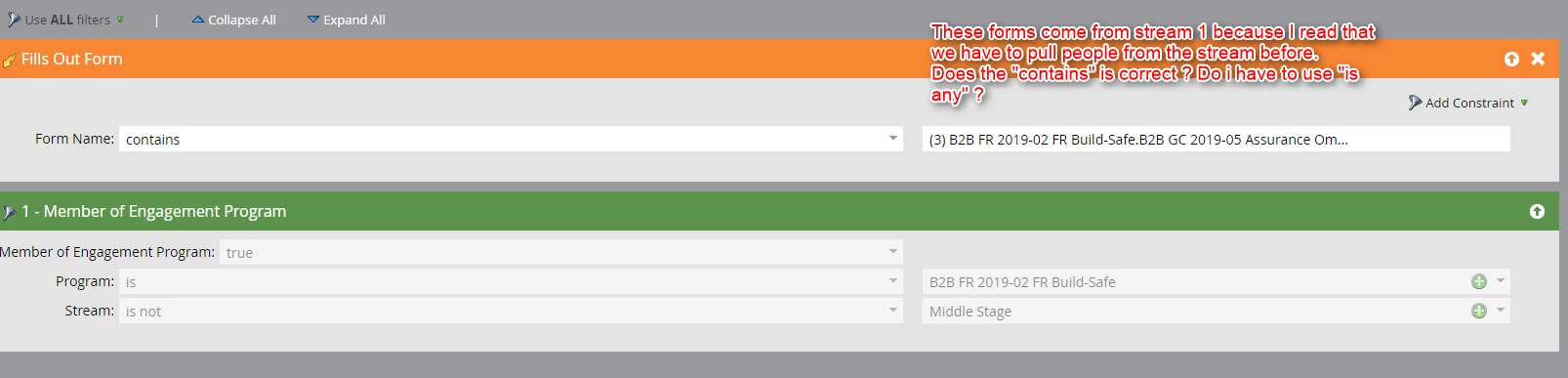
Is it correct ? Thank you for your help. 

This post is no longer active and is closed to new replies. Need help? Start a new post to ask your question.

5 replies

IgnaceKeAuthor
New Participant
December 12, 2019

Ok nice, for setting the stream cadence, I also need to do a smart campaign ? 

I would name my smart campaign : Stream Cadence early stage

Send email from gated contend program 1

Wait 2 weeks

Send email from gated contend program 2

Wait 2 weeks 

Send email from gated contend program 3


But if the users fills out form in any the program he moves to the following stream

so I would creat an another smart campaign called : Trigger Early to Middle Stage

But if someone fills out form from the gated contend programe 2, how I don't send him the last email from the gated contend program 3 ??? 

New Participant
December 12, 2019

@Ignace Kervyn de Meerendré‌ - 

Stream cadence can be defined on the stream itself - you do not need to set a smart campaign separately. However, you can create a smart campaign to trigger entry into the engagement program. To push the leads towards other streams, just use transition rules within the streams.

You would want to define the audience to consider specific stream members to qualify for the push. 

But if someone fills out form from the gated contend programe 2, how I don't send him the last email from the gated contend program 3 ??? 

If you don’t want to send emails in stream 3, if a user fills out a form in stream 2 - you can just remove/pause them from the program.

Refer to https://www.youtube.com/watch?v=9JejHs8i0ww it will help you to explore more on Engagement Programs.

IgnaceKeAuthor
New Participant
December 12, 2019

Thank you every one, 

so the best way is to make smart campaigns with the following label

Use ANY filter (because when someone fills out a form, whatever the order, whether it is the first, second, third, I want move them to the following stream)

"fills out form

Form name : is (selection of 3 forms)

Right ?

Thank you

Balkar_Singh
Community Manager
December 12, 2019

Do apply the filter member of engagement program - not doing so could qualify records from other programs as well.

The "ANY/ALL" is redundant for triggers - those are only applicable if you have 2, or more filters added to the smart list.

Balkar_Singh
Community Manager
December 12, 2019

While you can use "is any" if you are doing this within the transitions rules tab (these apply the mandatory filters by default - member of this program and not a member of stream you are moving them to), but certainly there are benefits in terms of flexibility as @Vladislav Vagner‌ mentions! You may still need to define the stream they are currently in though.

Vladislav_Vagn1
New Participant
December 11, 2019

You wouldn't want to use "is any" here as that will trigger anytime anybody fills out any of the forms in your instance. In this case, you can do "contains" or "is" as long you as you are pointing to the right forms.

Also worth noting, that you can use trigger smart campaigns instead of transition rules. There was a Marketo breakout session that mentioned the benefits of this at the marketing nation a while back.

Basically it adds more flexibility in terms of what you can do. You can add wait steps, write to certain fields when somebody is added, etc. Plus it is a little easier to manage if you stack all of your smart campaigns in one folder.

bjohnson-5
New Participant
December 23, 2021

@vlad_g I'm glad this is an option! I was just setting up a campaign and was thinking it would be so much easier to set up smart campaigns instead of using the limiting options in the transition rules. 😆🙌

Amit_Jain
Community Manager
December 11, 2019

This should work. You can test it using the Test stream functionality available.  See this documentation:

Test an Engagement Stream - Marketo Docs - Product Documentation 

Just to clarify, you are applying this trigger in 2nd stream's transition rules right?