Trigger Campaign to Remove Certain Leads from a Program | Community
Skip to main content
Danielle_Wong
Community Manager
July 18, 2016
Solved

Trigger Campaign to Remove Certain Leads from a Program

  • July 18, 2016
  • 1 reply
  • 2438 views

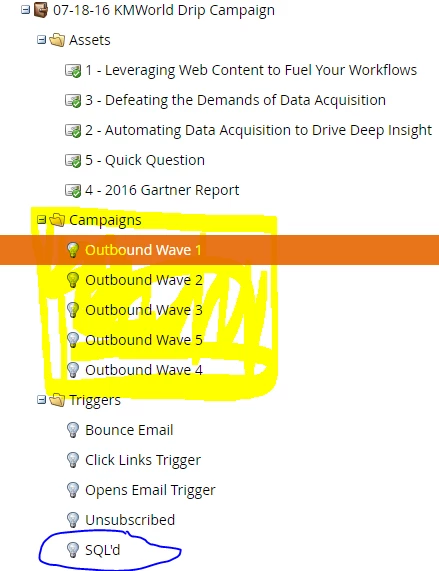
I have a program with 5 emails, scheduled to send 1 week apart.

However, once a lead that is part of this program becomes an SQL, I want to set up a trigger campaign to remove the SQL from receiving the rest of the emails in the program.

So far in my trigger campaign, I have the Data Value Changes filter. But what would be the appropriate Flow action to include so that the lead is removed from receiving all emails?

Thank you.

This post is no longer active and is closed to new replies. Need help? Start a new post to ask your question.
Best answer by Dory_Viscoglio

Okay, I have the email sends in 5 different smart campaigns within my Program Folder. The Remove from Flow action only allows me to choose one campaign and not multiple. So would I have to use the Remove from Flow action 5 times to ensure that the SQL'd lead is removed from all emails? I greatly appreciate your help on this one.


Are all of your outbound waves triggered by one master campaign? Or are they batched? If they're batched, then you would want to make sure that they're excluded from the smart list if they get to SQL. If it's a master campaign that triggers all of the outbound waves to run at once and they all have wait steps, then you'd want to remove from all outbound waves.

1 reply

Dory_Viscoglio
New Participant
July 18, 2016

Hi Danielle, you would use a "Remove from Flow" action.

Then, select the campaign from which you would like them to be removed.

Danielle_Wong
Community Manager
July 18, 2016

Hi Dory!

Thanks for the answer. If I choose that action, and set it to Campaign: is this campaign. that will remove the person from receiving all the emails within the program?  I'm not sure what "campaign" is referring to, but assuming it's to the program folder with the 5 emails.

Dory_Viscoglio
New Participant
July 18, 2016

Hey Danielle, it really depends on how you have things set up, but it's that specific smart campaign. The program is just something to house all of your smart campaigns, assets, etc. If they're automatically in multiple smart campaigns, then you need to have multiple remove from flow steps. If it's just one smart campaign with lots of wait steps, then just one removal will suffice.

But, it sounds like you have this as a separate triggered campaign (which would make sense), so you need to not select "this campaign" but whichever campaign is sending the actual emails.