Triggered Alert contains previous value | Community
Skip to main content
New Participant
September 17, 2021
Solved

Triggered Alert contains previous value

  • September 17, 2021
  • 3 replies
  • 4020 views

Hi,


Can anyone help.  I have set up a form on a landing page, with selection to contact, request demo, request trial.  I noticed that the same value field is populating my alert with old data value if they don't select anything.  Below is the form details I use on the form for asset download.  Further requirements contains the contact us, demo or trial request.  But if person previously requested demo and this time they didn't demo still shows on the new alert, even if it's a new form on a new campaign.

any ideas on how I can stop the old data pulling through the new form alert?

Thanks


Name: Person

Company: 

Email: 
Job Title: 

Country: 

Phone Number: 
Further Requirements? Product Demo 

Comments:  

This post is no longer active and is closed to new replies. Need help? Start a new post to ask your question.
Best answer by SanfordWhiteman

@sanfordwhiteman 

I am not as advanced as you by the looks of it.

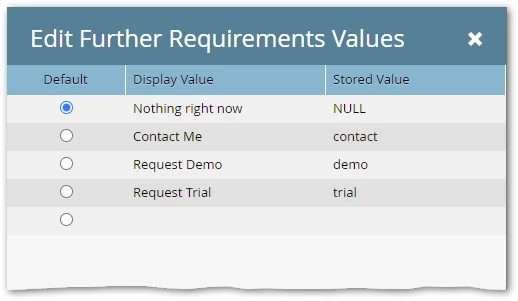
So how do I go about  this - You have to send the 4-letter string “NULL“ as the value if you want to clear the stored value in the database.


You‘d set up the options like this:


3 replies

SanfordWhiteman
New Participant
September 17, 2021

@edward_rumsey and@lucasmachado doesn’t seem like you’re understanding the case.


If an empty value (empty string) is posted for a form field, that field is not updated in the Marketo database. This is the expected behavior! Marketo treats an empty value as if the field were not present on the form at all.


If the special string value “NULL” (without quotes) is posted, that will empty an already-filled field.


@patricia_mercha what is the form field type for the field Further Requirements? Surely not a text field — is it a Select?

New Participant
September 17, 2021

hi @sanfordwhiteman Yes its a select from a pick- list. 

And you are right - if no selection then 'null' - but if previous 'contact us' pick list then it will appear again even if they have not selected that from the pick list this time round.


SanfordWhiteman
New Participant
September 17, 2021

And you are right - if no selection then 'null' - but if previous 'contact us' pick list then it will appear again even if they have not selected that from the pick list this time round.

I don’t think you’re quite following. The string “NULL” and the empty string are very, very different.


You have to send the 4-letter string “NULL“ as the value if you want to clear the stored value in the database.

LucasMachado
New Participant
September 17, 2021

Some content removed by moderator for accuracy.

When the lead sends the forms is the data value changing in the database? or does it remain the same?


If it is changing you probably should just add a wait step in the flow to be sure the data has time to be updated.

New Participant
September 17, 2021

@lucasmachado 

For example I complete a form last week and I select 'demo' from the pick-list - The alert shows me I selected 'demo'.

If I complete another form this week, so download an asset for example, but this time round I don't select anything from the pick-list - the alert will still show that I selected 'demo. 


So when looking at the alerts - I don't know if it's a new request or the request from previous week.

Edward_Rumsey
New Participant
September 17, 2021

Could likely be the form not pushing the data back to the Database, have you checked the data is correct in the Database for a lead in this instance you described? 

Best,Edward Rumsey