Triggers in Marketo | Community
Skip to main content
New Participant
November 2, 2020
Question

Triggers in Marketo

  • November 2, 2020
  • 1 reply
  • 3531 views

Hello Community!


If the smart list rule logic is set to All when using more than one trigger, which one would be true as far as executing the actions defined in the flow step per the screenshot below:

1. Both of these triggers should be true

2. Only one of these can be true
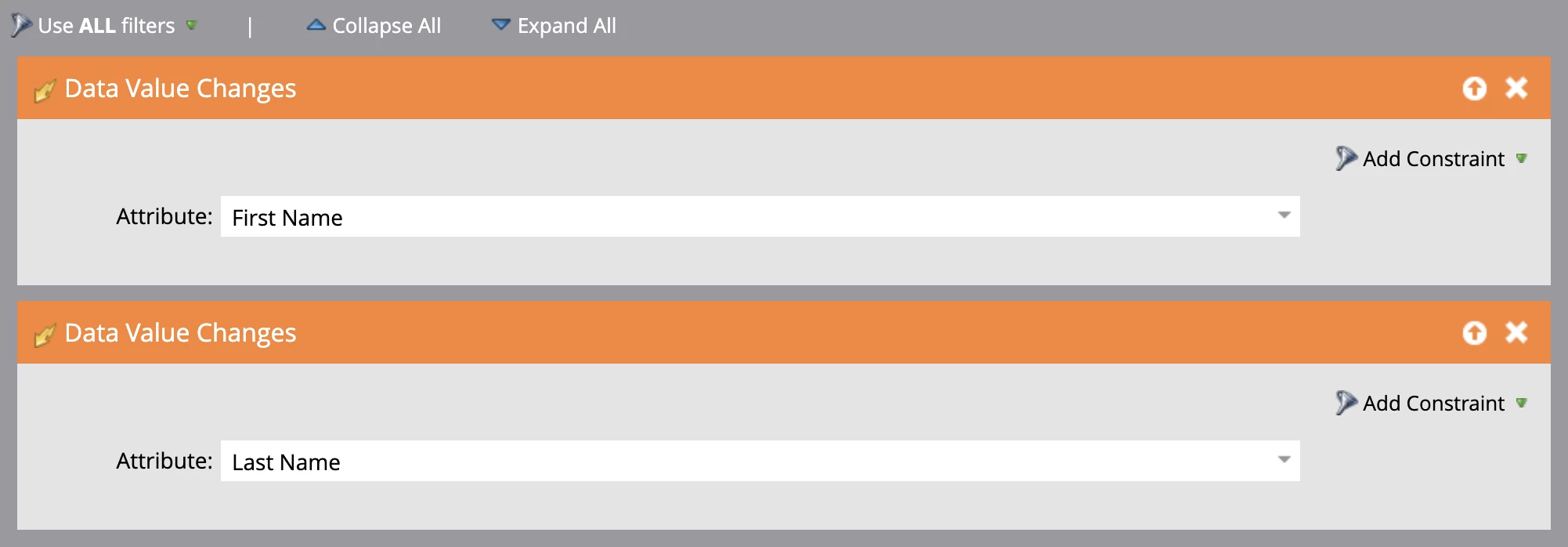
 

Let me know, thanks!

This post is no longer active and is closed to new replies. Need help? Start a new post to ask your question.

1 reply

Matt_Tonkin-RP
New Participant
November 2, 2020

If either of those conditions are met then it will trigger the campaign. So in this case if either first or last name is changed. 


If you are looking to have it so that both have to have changed you'll want to add some Data Value Changed filters with some recent time constraints (maybe 1 minute or 1 hour) for each first and last name.


SanfordWhiteman
New Participant
November 2, 2020

Unfortunately that DVC activity log lookback isn't guaranteed to work.


To truly interlock multiple fields you need to maintain a 3rd field, which concatenates the others, and trigger on changes to that field.

Matt_Tonkin-RP
New Participant
November 2, 2020

Hey @sanfordwhiteman ,

Just wanting to clarify. So if I only wanted to trigger if both first and last names were changed recently (for some reason). Are you saying that there is risk of using a setup like this:


Triggers:

Data Value Changes - First Name

Data Value Changes - Last Name

Filters (Use all filters)

Data Value Changed (In Past 1 hour) - First Name

Data Value Changed (In Past 1 hour) - Last Name