TUTORIAL REQUEST: URL Parameters in visible fields and/or HTML | Community
Skip to main content
Robb_Barrett
New Participant
July 1, 2014
Solved

TUTORIAL REQUEST: URL Parameters in visible fields and/or HTML

  • July 1, 2014
  • 14 replies
  • 4392 views
Hello all,

I'd like to build a confirmation page.  To do this, I have a link in an email.  They click on the link and it takes them to a page where it askes to confirm name and email (passed via parameters).

I've read through everything I can find on this site and none of the articles seem to work.  Does anyone have a working model they can share, or explain the process?

Best answer by Justin_Cooperm2
Hey Robb,

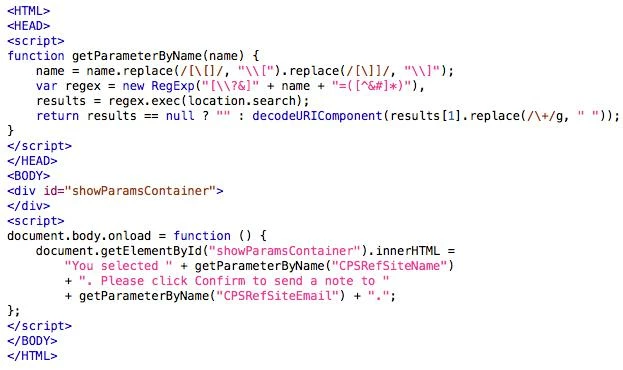
I can't go through your whole page, but I tested out this simple example and it works fine:


Good luck!

Justin

14 replies

Robb_Barrett
New Participant
July 10, 2014
Bumping on this.  This works when I put it in as an HTML block but when I put a form on the page as well it doesn't work.  Any thoughts?  Do I need to submit this as a ticket?
Robb Barrett
Robb_Barrett
New Participant
July 2, 2014
Sorry to bug you again Justin....

The coode works great, but when I put a form on the page it quits working.  I took the HEAD part and put it on the page headers and it worked fine, then I put the form in and it quit working.
Robb Barrett
July 2, 2014
<script type="text/javascript" src="//ajax.googleapis.com/ajax/libs/jquery/1/jquery.min.js"></script>
<script type="text/javascript">
if (/[?&]CPSRefSiteName=/.test(location.href)){
$("#sitename").text(getUrlVar('CPSRefSiteName'));
} else {
$("#sitename").text('Fallback Text'); }
if (/[?&]CPSRefSiteEmail=/.test(location.href)){
$("#siteemail").text(getUrlVar('CPSRefSiteEmail'));
} else {
jQ("#siteemail").text('Fallback Text'); }
</script>
 
<p>You selected <span id="sitename"></span>. Please click Confirm to send a note to <span id="siteemail">.</p>


Try this exactly.
July 2, 2014
You added a # to the span IDs, remove that and try.
Justin_Cooperm2
Justin_Cooperm2Accepted solution
New Participant
July 2, 2014
Hey Robb,

I can't go through your whole page, but I tested out this simple example and it works fine:


Good luck!

Justin
Robb_Barrett
New Participant
July 2, 2014
Jason and Justin, neither of those methods work.

Here's the page.
Robb Barrett
July 1, 2014
<script>
if (/[?&]CPSRefSiteName=/.test(location.href)){
$("#sitename").text(getUrlVar('CPSRefSiteName'));
} else {
$("#sitename").text('Fallback Text'); }

if (/[?&]CPSRefSiteEmail=/.test(location.href)){
$("#siteemail").text(getUrlVar('CPSRefSiteEmail'));
} else {
$("#siteemail").text('Fallback Text'); }
</script>

<p>You selected <span id="sitename"></span>. Please click Confirm to send a note to <span id="siteemail">.</p>


Try this... btw replace $ with whatever your jQuery variable is (maybe jQ).
Justin_Cooperm2
New Participant
July 1, 2014
Just add a simple JavaScript function on your page and call it when the page loads to grab it from the query string and display it in a string above the form.

function getParameterByName(name) {
    name = name.replace(/[\[]/, "\\[").replace(/[\]]/, "\\]");
    var regex = new RegExp("[\\?&]" + name + "=([^&#]*)"),
        results = regex.exec(location.search);
    return results == null ? "" : decodeURIComponent(results[1].replace(/\+/g, " "));
}
Robb_Barrett
New Participant
July 1, 2014
OK, so how do I show that <name> field? That's the part I can't figure out.
Robb Barrett
Justin_Cooperm2
New Participant
July 1, 2014
You can use a Forms 2.0 form on this confirmation page and include CPSRefSiteName and CPSRefSiteEmail as hidden fields. You can then dynamically set those hidden fields via Forms 2.0 (see https://community.marketo.com/MarketoArticle?id=kA050000000LH7uCAG) and also show a string that says " You selected <name>. Please click Confirm to send a note to <email>." When they submit the form, those fields will be stored in Marketo.