Unsettling: Sales Alert Email Populates with Lead Email in Unsubscribe Line | Community
Skip to main content
Spencer_Philli1
New Participant
November 21, 2017
Solved

Unsettling: Sales Alert Email Populates with Lead Email in Unsubscribe Line

  • November 21, 2017
  • 3 replies
  • 3296 views

Hello,

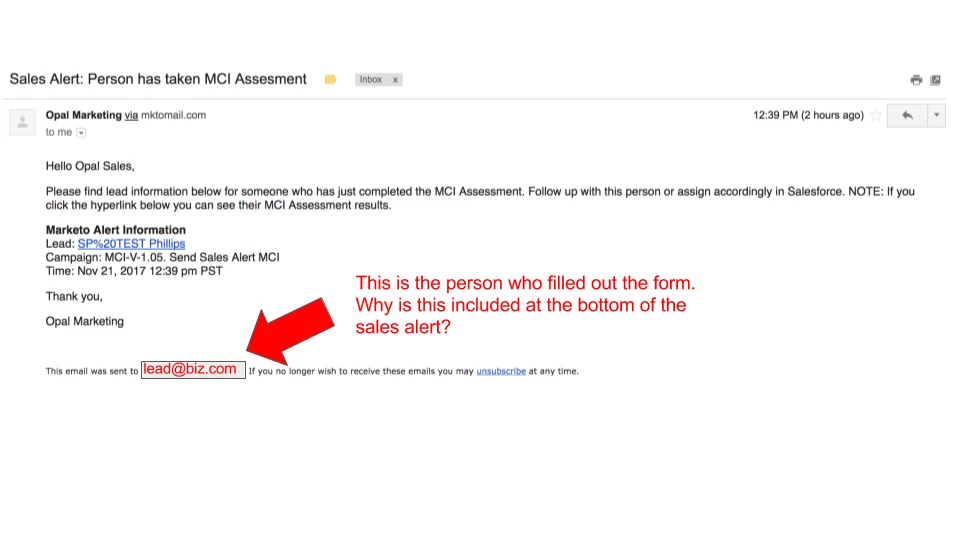
My Sales Alert email includes a concerning line at the bottom. The "unsubscribe line" at the bottom is automatically pulling in the email address of the lead who filled out the form...Upon testing with my own personal email I can confirm that as the lead I do not receive the sales alert. However, it is definitely unsettling to see this.

Does anyone know why Marketo is pulling in the lead email and where I can find the code to delete this... It's not in the email template I used... Thanks in advance.
This post is no longer active and is closed to new replies. Need help? Start a new post to ask your question.
Best answer by SanfordWhiteman

Look in the Unsubscribe section in Admin.

This occurs for the same reason that you can embed {{lead.tokens}} in Alerts, which is to say: the email is sent in the context of the lead, regardless of the recipient address.

3 replies

Grégoire_Miche2
New Participant
November 21, 2017

HI Spencer,

This is expected. Every lead token in the alert will populate with lead information. There is no reason why a alert email should contain an unsubscribe link, though. But in order to be able to create emails without such a link, it will take to override Marketo default behavior. See here : The comprehensive guide to setting up the unsubscribe link

-Greg

Spencer_Philli1
New Participant
November 21, 2017

Thank you very much @Grégoire Michel​! A great document indeed!

Spencer_Philli1
New Participant
November 21, 2017

Update on my end and quick fix here: Edit the Unsubscribe Message - Marketo Docs - Product Documentation

I removed the token which inserts Lead Email. I left the line in about Unsubscribe. While this will effect all emails sent out, my sales team will rest easy.

Please let me know if anyone has come across this, or has figured out an alternative fix.

Thanks,

Spencer

Spencer_Philli1
New Participant
November 21, 2017

@Sanford Whiteman​ You beat me to the punch. Check out my previous post

SanfordWhiteman
SanfordWhitemanAccepted solution
New Participant
November 21, 2017

Look in the Unsubscribe section in Admin.

This occurs for the same reason that you can embed {{lead.tokens}} in Alerts, which is to say: the email is sent in the context of the lead, regardless of the recipient address.