Update the field | Community
Skip to main content
New Participant
December 10, 2020
Solved

Update the field

  • December 10, 2020
  • 1 reply
  • 2128 views

Hello Community,


In the recent import of contacts that I did on our instance, I mistakenly mapped one of the fields to an incorrect field in Marketo.

So for instance, instead of mapping the import field to Field A it was mapped to Field B in Marketo. All the individual imports have been made to static lists. Is there anyway that I can update the Field A using the same values as Field B.


Thanks!
This post is no longer active and is closed to new replies. Need help? Start a new post to ask your question.
Best answer by AbhinavSa2

Hi Yash,


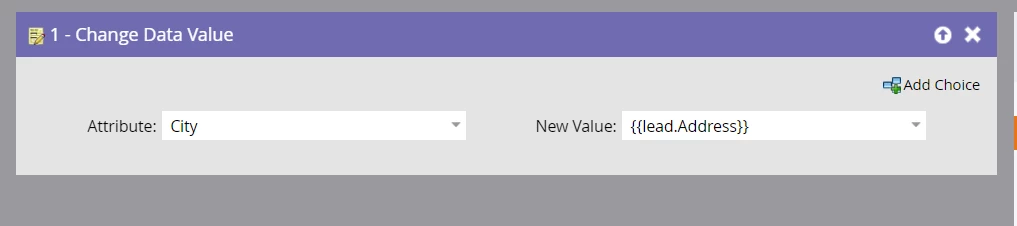
Yes, you can run a smart campaign for same list and just add change data value filter as below in flow.

Here Field A = City & Field B = {{Lead.Address}} 

Please make sure to use token value for field B so whatever the value B field have will be updated for field A. 


1 reply

AbhinavSa2Accepted solution
Employee
December 10, 2020

Hi Yash,


Yes, you can run a smart campaign for same list and just add change data value filter as below in flow.

Here Field A = City & Field B = {{Lead.Address}} 

Please make sure to use token value for field B so whatever the value B field have will be updated for field A. 


Yash-3Author
New Participant
December 10, 2020

This is exactly what I was looking for. Thanks so much for your response @abhinavsa2 !