Updating landing page content: system error | Community
Skip to main content
February 7, 2018
Solved

Updating landing page content: system error

  • February 7, 2018
  • 4 replies
  • 4190 views

Hello,

I'm trying to update landing page content using the same body as the one provided on the website here:

http://developers.marketo.com/rest-api/assets/landing-page-templates/#create_and_update

This is the query I'm sending:
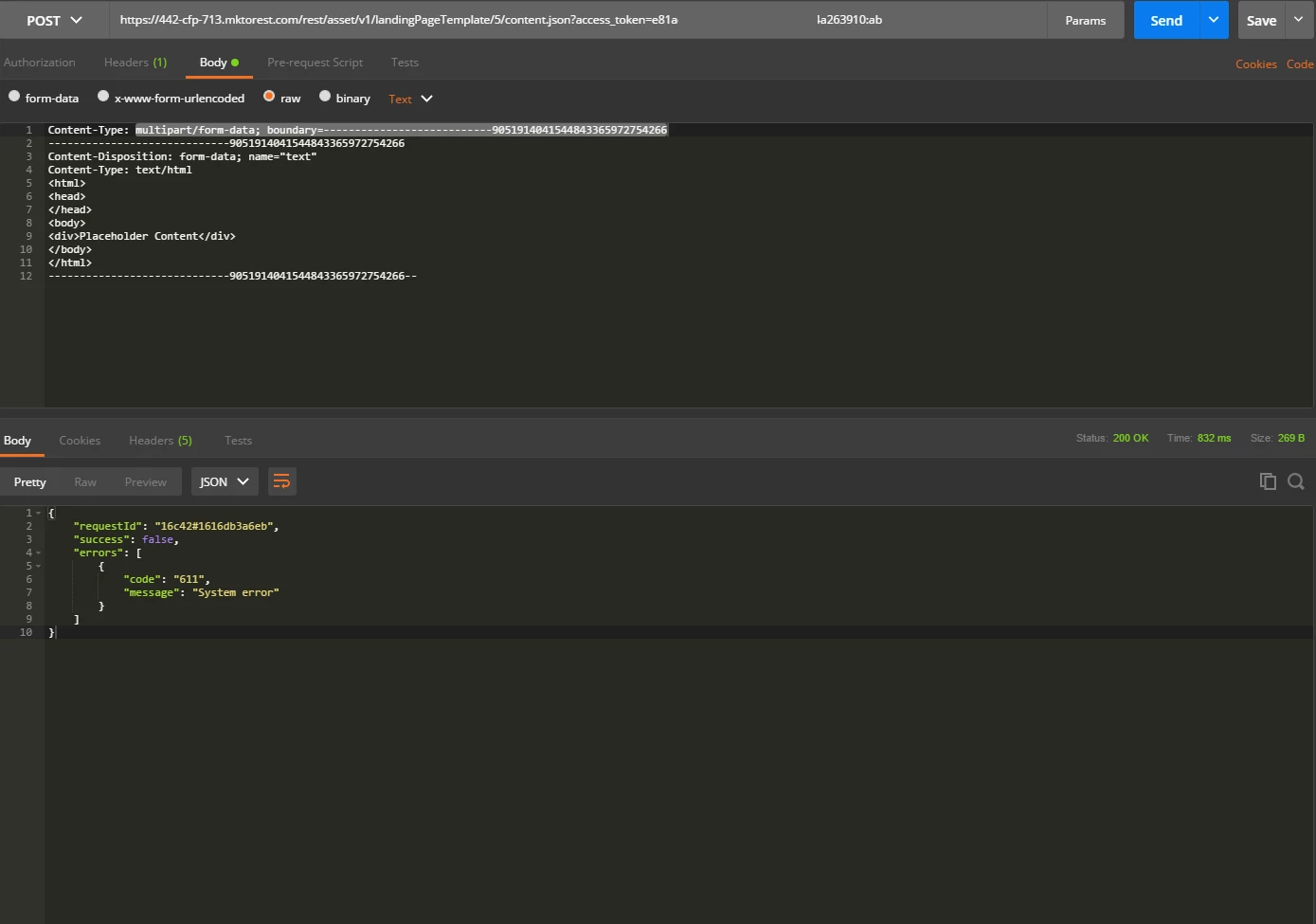
I've tried both with and without the header:

Content-Type: multipart/form-data; boundary=---------------------------9051914041544843365972754266

in the header section

But I'm getting system error either way.

The landing page template with Id 5 is in draft mode and has just been created.

Any feedback will be appreciated,

Thanks.
This post is no longer active and is closed to new replies. Need help? Start a new post to ask your question.
Best answer by everly

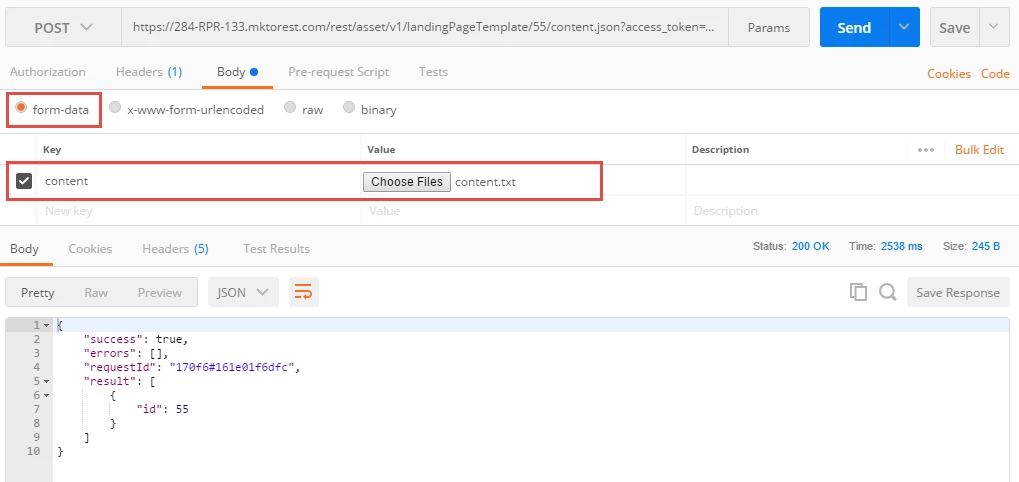
The issue was that the example request body was incorrect.  You need to specify name="content" (instead of name="text").  Also need to specify filename="name_of_file".  Something like this:

content-type: multipart/form-data; boundary=--------------------------435851813185237176536801

----------------------------435851813185237176536801

Content-Disposition: form-data; name="content"; filename="content.txt"

Content-Type: text/plain

<html>

<head>

</head>

<body>

<div>Placeholder Content</div>

</body>

</html>

----------------------------435851813185237176536801--

And here is  Postman screenshot using "form-data" (instead of "raw"):

4 replies

March 1, 2018

Hello,

Thanks for the response.   Is there a way to send the body for the query without using a file (just sending the text directly), since it would be more difficult for a driver to support getting files through a stored procedure?

SanfordWhiteman
New Participant
March 2, 2018

In Postman, the form-data option is the same as the raw option with the appropriate headers and message-body.

everlyAccepted solution
Employee
March 1, 2018

The issue was that the example request body was incorrect.  You need to specify name="content" (instead of name="text").  Also need to specify filename="name_of_file".  Something like this:

content-type: multipart/form-data; boundary=--------------------------435851813185237176536801

----------------------------435851813185237176536801

Content-Disposition: form-data; name="content"; filename="content.txt"

Content-Type: text/plain

<html>

<head>

</head>

<body>

<div>Placeholder Content</div>

</body>

</html>

----------------------------435851813185237176536801--

And here is  Postman screenshot using "form-data" (instead of "raw"):

SanfordWhiteman
New Participant
March 1, 2018

The sample should really separate the HTTP header from the message body, IMO... it makes it seem like you should just put the header in the body.

February 21, 2018

Hello,

does anyone have any insights on why this results in a system error? I tried the constant prefix -- and adding line breaks after the header, but unfortunately still got system error.

Thanks.

SanfordWhiteman
New Participant
February 21, 2018

Please post your exact request payload, syntax-highlighted as Plain.

February 23, 2018

Body:

-----------------------------9051914041544843365972754266
Content-Disposition: form-data; name="text"
Content-Type: text/html

<html>
<head>
</head>
<body>
<div>Placeholder Content</div>
</body>
</html>
-------------------------------9051914041544843365972754266--

Header:

Content-Type: multipart/form-data; boundary=---------------------------905191404154484336597275426

Url:

rest/asset/v1/landingPageTemplate/{id}/content.json

SanfordWhiteman
New Participant
February 7, 2018

The outer Content-Type certainly needs to be in the HTTP header (and only there) not in the body of the request (otherwise, there's nothing describing the body).

What's the output when you GET the current content?

February 7, 2018