uploading an image through Marketo API into Design Studio: 611 System Error | Community
Skip to main content
New Participant
September 13, 2023
Solved

uploading an image through Marketo API into Design Studio: 611 System Error

  • September 13, 2023
  • 2 replies
  • 2407 views

I am trying to get the teams to upload the image via a Microsoft Form, and through a PowerAutomate flow, I am trying to do an HTTP request to upload that file into Marketo.
I managed to get the file content as base64 string. 
And here is my API request.
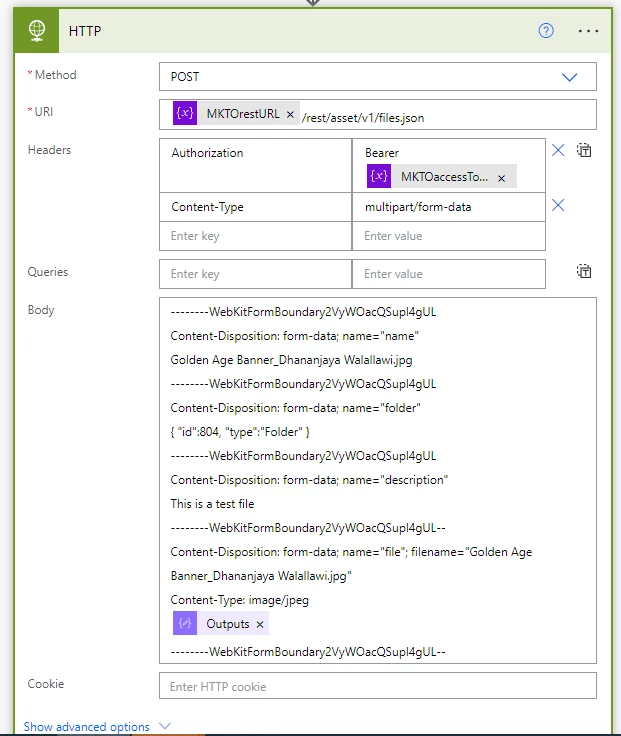
Here's the body of the API request.

--------WebKitFormBoundary2VyWOacQSupl4gUL Content-Disposition: form-data; name="name" Golden Age Banner_Dhananjaya Walallawi.jpg --------WebKitFormBoundary2VyWOacQSupl4gUL Content-Disposition: form-data; name="folder" { "id":804, "type":"Folder" } --------WebKitFormBoundary2VyWOacQSupl4gUL Content-Disposition: form-data; name="description" This is a test file --------WebKitFormBoundary2VyWOacQSupl4gUL-- Content-Disposition: form-data; name="file"; filename="Golden Age Banner_Dhananjaya Walallawi.jpg" Content-Type: image/jpeg @{outputs('Compose')} --------WebKitFormBoundary2VyWOacQSupl4gUL--

I keep getting the 611 system error.
Any idea what I've got wrong here? It's my first time trying to use this API call.

This post is no longer active and is closed to new replies. Need help? Start a new post to ask your question.
Best answer by SanfordWhiteman

Well, that’s clearly an invalid multipart/form-data payload. (Whether you copied it from the docs or not!)


multipart/form-data always has two line breaks after the header of each part. Yours has one. And the next-to-last boundary is formed incorrectly.


An example of a valid payload, where [binary data here] is your binary — not Base64-encoded, raw binary — data:

--------WebKitFormBoundary2VyWOacQSupl4gUL Content-Disposition: form-data; name="name" Golden Age Banner_Dhananjaya Walallawi.jpg --------WebKitFormBoundary2VyWOacQSupl4gUL Content-Disposition: form-data; name="folder" { "id":11357, "type":"Folder" } --------WebKitFormBoundary2VyWOacQSupl4gUL Content-Disposition: form-data; name="description" This is a test file --------WebKitFormBoundary2VyWOacQSupl4gUL Content-Disposition: form-data; name="file"; filename="Golden Age Banner_Dhananjaya Walallawi.jpg" Content-Type: image/png [binary data here] --------WebKitFormBoundary2VyWOacQSupl4gUL--


2 replies

SanfordWhiteman
SanfordWhitemanAccepted solution
New Participant
September 14, 2023

Well, that’s clearly an invalid multipart/form-data payload. (Whether you copied it from the docs or not!)


multipart/form-data always has two line breaks after the header of each part. Yours has one. And the next-to-last boundary is formed incorrectly.


An example of a valid payload, where [binary data here] is your binary — not Base64-encoded, raw binary — data:

--------WebKitFormBoundary2VyWOacQSupl4gUL Content-Disposition: form-data; name="name" Golden Age Banner_Dhananjaya Walallawi.jpg --------WebKitFormBoundary2VyWOacQSupl4gUL Content-Disposition: form-data; name="folder" { "id":11357, "type":"Folder" } --------WebKitFormBoundary2VyWOacQSupl4gUL Content-Disposition: form-data; name="description" This is a test file --------WebKitFormBoundary2VyWOacQSupl4gUL Content-Disposition: form-data; name="file"; filename="Golden Age Banner_Dhananjaya Walallawi.jpg" Content-Type: image/png [binary data here] --------WebKitFormBoundary2VyWOacQSupl4gUL--


JayWAuthor
New Participant
September 14, 2023

Thanks for the help @sanfordwhiteman but I still get the 611 system error.
Attached is the input call.


Am I at least close to getting this right? Is there any documentation (other than the not-so-helpful Marketo documentation on this) that I can read to learn more about this? 

SanfordWhiteman
New Participant
September 15, 2023

Not sure what you want us to do with that payload — it’s obviously not the real payload but a JSON representation in another app. It does look like you’re sending Base64-encoded binary (otherwise, it wouldn’t be human-readable at all). That’s not right, the image data needs to be the actual binary bytes.


Is there any documentation (other than the not-so-helpful Marketo documentation on this) that I can read to learn more about this? 

There’s always the RFC. It’s a very standard format, same one sent by multipart/form-data forms. (In fact, you can post images from a vanilla HTML form directly to the REST API for this reason. Obviously not something you’d ever publish to the outside world but you can use it to play around. Include the access_token as a query param.)

Jo_Pitts1
Community Manager
September 14, 2023

@jayw , how big is the image.  I worked on a project a while ago where large images caused problems.

Frustratingly, these same images could be uploaded through the UI.