
Uploading Lead Owner with List | Community
Skip to main content
Amanda_Thomas6
New Participant
December 4, 2015
Solved

Uploading Lead Owner with List

  • December 4, 2015
  • 2 replies
  • 2765 views

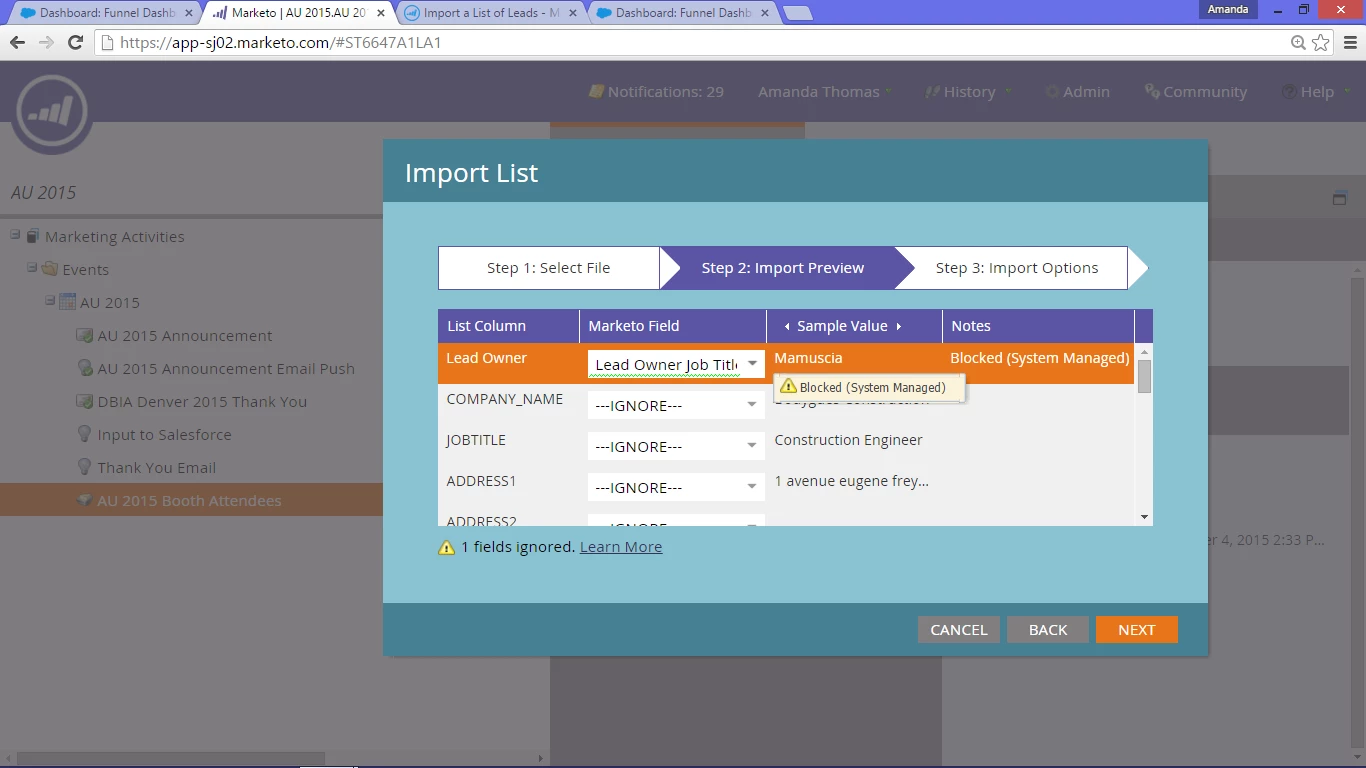
Can I over ride the "Blocked (System Managed)" error that appears when you try to upload and assign at the same time? Just wondering why it's an option if we can't choose it.

Thanks!
This post is no longer active and is closed to new replies. Need help? Start a new post to ask your question.
Best answer by Grégoire_Miche2

Hi Amanda,

If you are not in a CRM-enabled Marketo subscription, you can use the new Sales Person API (Marketo REST APIs: Sales Person Objects » Marketo Developers )

-Greg

2 replies

Grégoire_Miche2
Grégoire_Miche2Accepted solution
New Participant
December 4, 2015

Hi Amanda,

If you are not in a CRM-enabled Marketo subscription, you can use the new Sales Person API (Marketo REST APIs: Sales Person Objects » Marketo Developers )

-Greg

Raul_Cano2
New Participant
December 4, 2015

This is not possible via a list import in Marketo. You will have to either do it in your CRM or create a smart campaign that updates the records' owner. This can be time consuming if there are multiple owners in your list.

Raul

Amanda_Thomas6
New Participant
December 7, 2015

There were two different lead owner's in one column. So, I just separated the list like normal and ran the change owner step in the flow. Just thought there might have been another way since they have the owner field available in the drop down.
