
Use Cases for Marketo Measure (Bizible) Suppression Logic
I was recently asked for some examples of what to use Marketo Measure's Touchpoint Suppression functionality for so below are the most common I see across Marketo Measure users. Keep in mind though that Suppression is your tool to “clean up” your Marketo Measure data so you might have scenarios that are completely unique to your company!
Example 1: Suppressing based on the email domain
Why?
It’s common for employees to fill out forms on your site, maybe to download a new whitepaper they want to read, and that’s totally fine but you probably don’t want a touchpoint for that.
Build Idea:
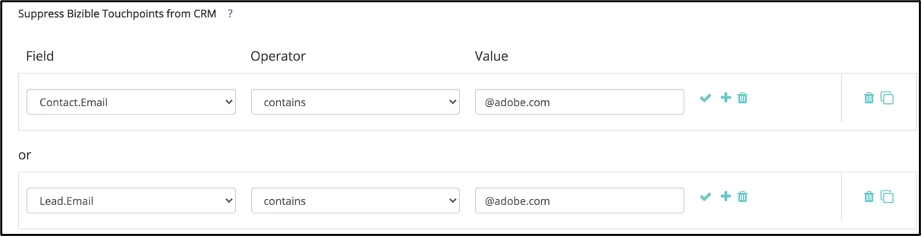
Note: In situations like this, it makes sense to suppress both the Lead and Contact value.
Example 2: Suppressing unsubscribe forms, password reset forms, career application forms, customer login forms
Why?
If the Marketo Measure JavaScript is properly attached to a form, people filling out that form will result in a touchpoint. Most customers do not want Touchpoints for things like the above where it’s just not the type of interaction we’re looking for when it comes to attribution reporting.
Build Idea:

Important Note: Use the matches any operator when you want Marketo Measure to look out for multiple values. The double asterisks creates “contains” logic. Your rule logic will also depend on your URL structure.
Example 3: Suppressing Buyer Attribution Touchpoints (BATs) that happened a defined number of days before the Opportunity is Opened/Created
Why?
Sometimes customers want to set up a “look-back window” to basically say that if a Touchpoint happened a certain number of days prior to the Opp being created, that it shouldn’t be eligible for attribution. Most clients align this to the length of their Sales cycle.
Build Idea:

Pro Tips:
- Usually when you’re setting up suppression logic, you’ll want to do it for both the Buyer Touchpoint (BT) and the Buyer Attribution Touchpoint (BAT). Check out this resource for a refresher on the two objects.
- Remember that Suppression gets rid of the Touchpoint in both CRM and Discover, whereas Removal will only remove the Touchpoint in the CRM, it will still be reportable in Discover. Suppression is most commonly used and Removal is usually only used in situations where CRM storage is a concern.
Last Updated 4/5/2024