Use existing Smart List in Report | Community
Skip to main content
New Participant
December 29, 2017
Solved

Use existing Smart List in Report

  • December 29, 2017
  • 1 reply
  • 2199 views

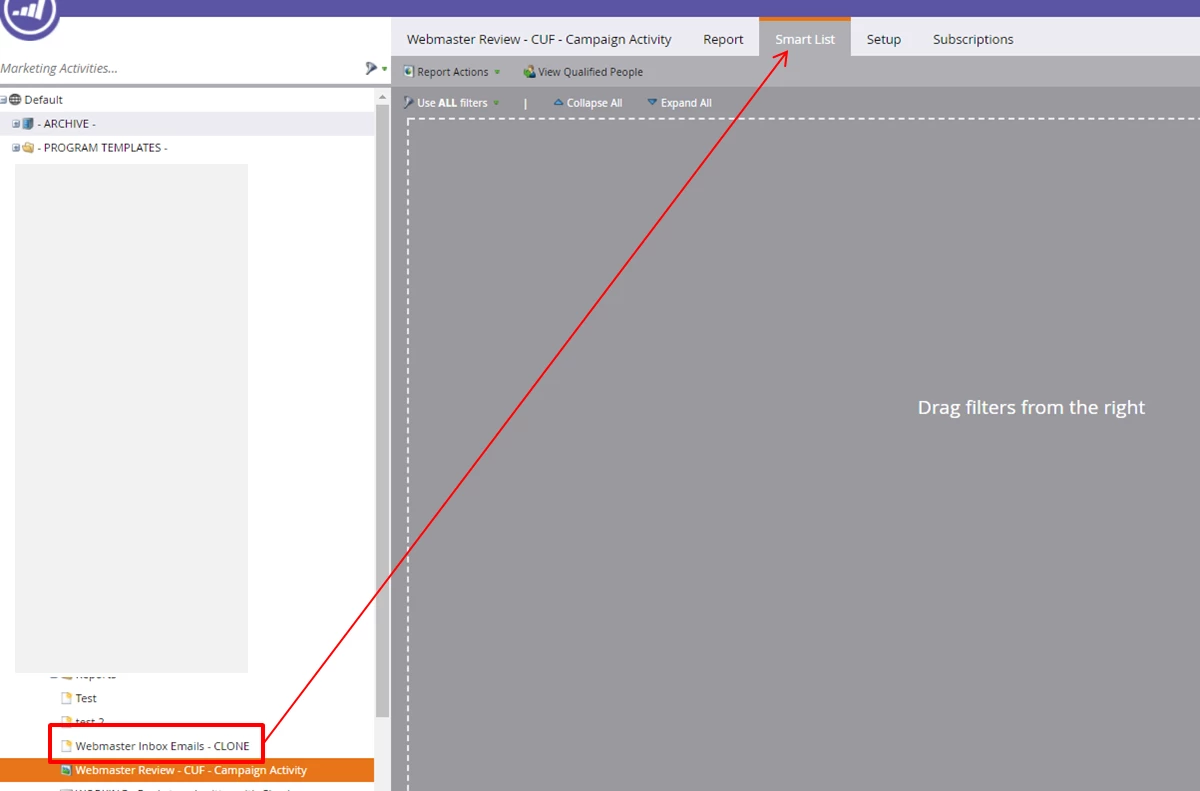
Is it possible to use an existing Smart List as the "Smart List" when creating a new Report?  It seems inefficient to have to recreate the Smart List in the Report setup if such already exists.

In the attached image, I want to use the existing Smart List, "Webmaster Inbox Emails - CLONE" in the report "Webmaster Review - CUF - Campaign Activity"

TIA!

e
This post is no longer active and is closed to new replies. Need help? Start a new post to ask your question.
Best answer by JDNelson1

just add a filter of "member of smart list" and choose the one from the left you have in red

1 reply

JDNelson1Accepted solution
Community Manager
December 29, 2017

just add a filter of "member of smart list" and choose the one from the left you have in red

EricaDo4Author
New Participant
December 29, 2017

Thanks, JD!

Community Manager
December 29, 2017

happy to help -- don't forget to mark as correct and close out the discussion if it resolves it. Thanks.