Users cannot fill out certain fields in the form | Community
Skip to main content
April 17, 2018
Solved

Users cannot fill out certain fields in the form

  • April 17, 2018
  • 1 reply
  • 1863 views

Hi everyone,

Have an issue with a form which was working just last week.

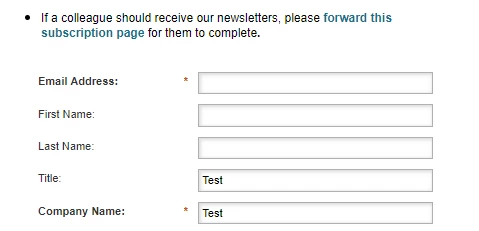
  • In the form, we ask for the following fields, of which 2 work and 3 do not work. (See the image below.)
  • The user is unable to enter in data for email address, first name, or last name. When you hover the cursor over these fields, nothing happens. All users are experiencing this issue.
  • I've tried to fix the issue by editing the form. I went in and deleted the 3 broken fields, and re-added them. Issue is still there.

Any help would be greatly appreciated! 
This post is no longer active and is closed to new replies. Need help? Start a new post to ask your question.
Best answer by SanfordWhiteman

You have 2 Free-Form page elements dragged on top of the form (the element Thank_you_for_your_interest_in_receiving_Amazon_Launchpad_newsletters_These_newsletters_are_for_Ama, for example).

They're simply overlaying a blank area on top of the form, nothing special. You have to shrink them down or change the order of the layers.

1 reply

SanfordWhiteman
New Participant
April 17, 2018

Please supply your URL. Can't troubleshoot a screenshot.

April 17, 2018

Hi Sanford,

Thanks for the reply. Here is the URL. Newsletter Subscribe

Jay

SanfordWhiteman
SanfordWhitemanAccepted solution
New Participant
April 17, 2018

You have 2 Free-Form page elements dragged on top of the form (the element Thank_you_for_your_interest_in_receiving_Amazon_Launchpad_newsletters_These_newsletters_are_for_Ama, for example).

They're simply overlaying a blank area on top of the form, nothing special. You have to shrink them down or change the order of the layers.