Using a lead token in a search filter | Community
Skip to main content
June 30, 2016
Solved

Using a lead token in a search filter

  • June 30, 2016
  • 1 reply
  • 1734 views

Hi community,

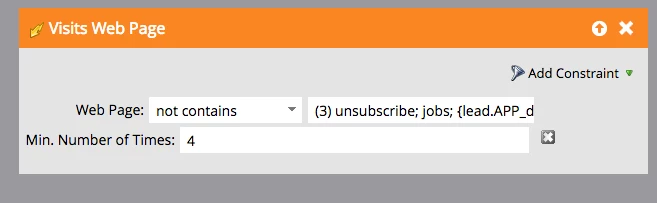
I'm trying to use a lead token to filter visitors to our website. This is the filter:
In more detail, the lead token that I'm trying to use in this filter appears below:
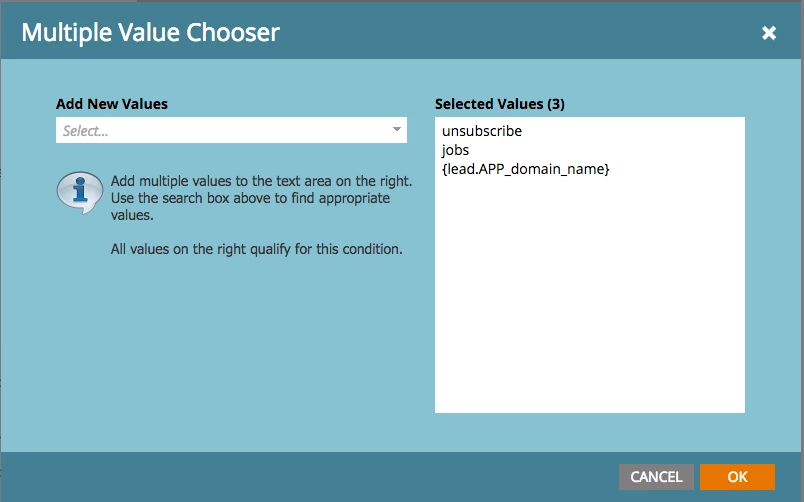
The reason I'm trying to filter out this token is that when people use our app, their URL on our website is {lead.APP_domain_name}.kennasecurity.com. An example is if the lead's domain name is TechCorp, their app would be hosted on TechCorp.kennasecurity.com. I'm trying to run a campaign to MQL leads based on leads visiting 4 significant web pages, and if they're using our app, that isn't a significant page.

One solution I've thought of is to remove the Munchkin scripts from the branded domains, which would exclude these app uses from Marketo's activity logs. The issue with this is that it's useful for Sales to see how often a prospect is using our app.

Any suggestions?

Thanks,

Dan

This post is no longer active and is closed to new replies. Need help? Start a new post to ask your question.
Best answer by SanfordWhiteman

You can't use a lead token in this context.

You'll have to flag on something else that's predictably in the URL. Don't the non-app URLs always start with a small set of predictable hostnames (www, pages, etc.)?

1 reply

SanfordWhiteman
SanfordWhitemanAccepted solution
New Participant
June 30, 2016

You can't use a lead token in this context.

You'll have to flag on something else that's predictably in the URL. Don't the non-app URLs always start with a small set of predictable hostnames (www, pages, etc.)?

June 30, 2016

Thanks for clarifying that.

That's a good point. Our non-app URLs generally start with www, and our app does not have www. I'll try implementing a filter based on that criteria.