
Using a Text Field To Exclude Leads From A Program
Happy Friday, Community friends - I seem to always manage to have a question at the end of the week so I shall continue my Friday Question theme 😋
We have a general Contact Us form that gets a lot of junk submissions - a common one is offers to clean our office (we're an entirely remote company so it's annoying AND comical that these continue to come in). Because this form is an Instant Qualifier for us (makes a lead MQL in Score and Lifecycle Stage), I'd like to make sure these don't get through to our BDR Team as they're a time waste to have to review and delete.
I usually exclude employee submissions from the program, and thought I could do the same for anyone that adds specific keywords to the text box that's included on that form - however, all my tests are failing and I can't figure out why.
Here's how I have the filters set up in the form Smart Campaign:
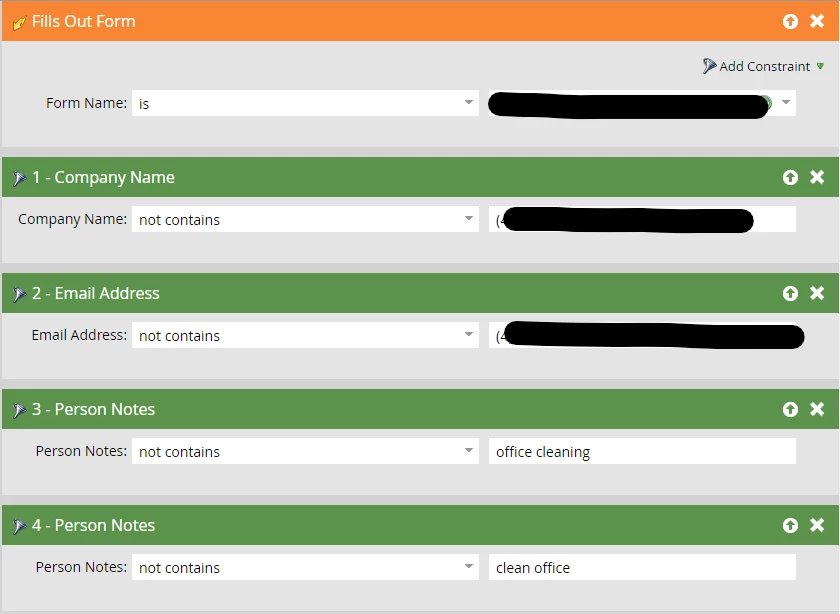
I've used two versions of the logic (neither achieved what I wanted):
- (1 or 2) or (3 or 4)
- Use ANY filters (because I wasn't sure if the first set of filters were considering "or" across all filters or per group, and basically ANY of these scenarios should be excluded from entering the program)
Also, because I can't stop the form itself being filled out and that Marketo will still see it, even if it doesn't add the lead to the program, I adjusted our Instant Qualifier campaign to include the keyword filters and updated logic:
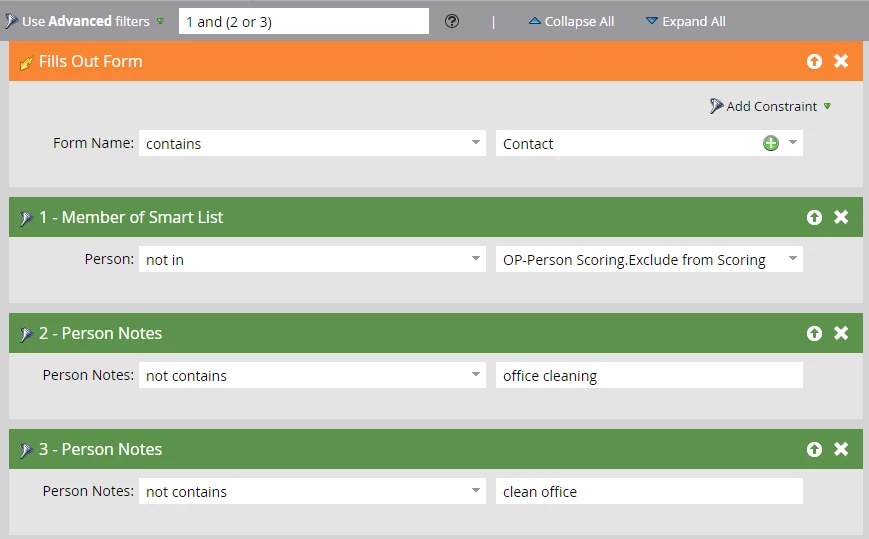
My colleague did her own test with a Marketo LP and fresh form that she used a single keyword to exclude herself from and it also failed, so I'm wondering if there's no way to exclude by keywords or (hoping) that there's a better way to do so.
Any insight is always appreciated and if there's a much better way to do this, then I'm also open to hearing about it!
TIA 😀
Michelle
