Using Calendar Token for Event (Not Webinar) | Community
Skip to main content
New Participant
January 5, 2022
Question

Using Calendar Token for Event (Not Webinar)

  • January 5, 2022
  • 1 reply
  • 3003 views

Our Marketing Team has a big sale coming up and would like to provide a way for our members to "Save the Date" in their calendars.


I have tested using the Calendar Token but must be missing something in the setup because the link doesn't work in the email.


Here is what I've entered for the token:
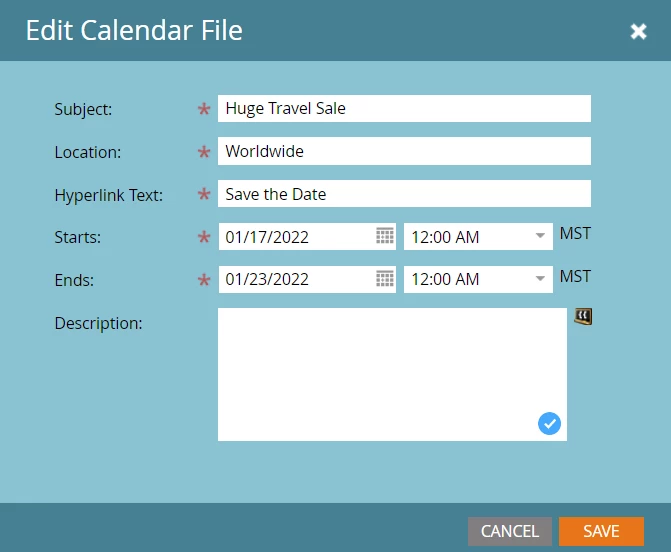


I know that the documentation shows information added to the Description field, but I'm not sure what info to enter since this is not a webinar event.
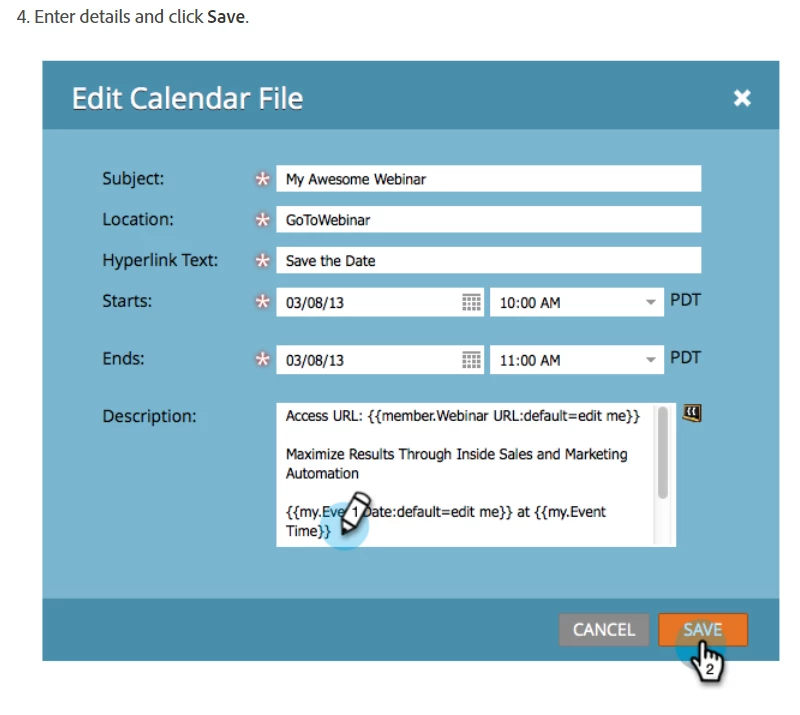
 

Do I need to create a field that will populate the URL for the sale website ({{lead.Brand Website:default=edit me}}/sunshine) and then place the token for that field in the Description? 


Or is there something else I need to do to make this token work?


Thank you,

LK

This post is no longer active and is closed to new replies. Need help? Start a new post to ask your question.

1 reply

New Participant
January 5, 2022

For clarification, when I click on the link this is the error message I get:


SanfordWhiteman
New Participant
January 5, 2022
Do you have your Marketo LP domain routed through your own CDN/reverse proxy? This is not an error coming from Marketo itself. Looks more like an intermediate error operated by your company that doesn’t allow requests for .ics files.
New Participant
January 5, 2022

Hi Sanford,


I created a support ticket and they just got back to me.  They said that our domain does not have a CANME record and this is causing a redirect to the page showing an error. They've suggested I work with our IT team to add a CNAME record pointing to [ACCOUNT STRING].mktoweb.com/iceenterprise.mktoweb.com. I will work on doing that in a bit.In the meantime, I have been seeking other solutions and came across your blog article on your Agical smarter ics file generator: https://blog.teknkl.com/introducing-agical-io-the-smarter-ics-file-generator/


I created two links, one for ics and one for Google calendar:


Ics:

https://ics.agical.io/?subject=Sunshine%20Sale&description=Semi-Annual%20Cruise%20and%20Travel%20Sale%202022&reminder=45&location=https://{{lead.brand website}}sunshine&dtstart=2022-01-17T14:00:00Z&dtend=2022-01-23T14:00:00Z&attach=https://{{lead.brand website}}/sunshine


Google Cal:

https://ics.agical.io/?subject=Sunshine%20Sale&description=Semi-Annual%20Cruise%20and%20Travel%20Sale%202022&reminder=30&format=gcal&location=https://{{lead.brand website}}sunshine&dtstart=2022-01-17T14:00:00Z&dtend=2022-01-23T14:00:00Z&attach=https://{{lead.brand website}}sunshine


They both work great, however, is there any possibility of a single link that would work for either ics or Gcal (or other calendars)? Does the Calendar token work for most calendar types?


Also, I tested clicking on both the ics and Gcal links and they aren't working too well on my iphone. I am not given the option to open either my Outlook calendar app or my Gmail app. I'm concerned our customers may encounter this issue as well.


Any possible workarounds for this?


Thank you,


LK