
Using drill-down capabilities in Email Analysis reports in Revenue Cycle Explorer (RCE) | Community
Skip to main content
Dan_Stevens_
New Participant
March 10, 2016
Solved

Using drill-down capabilities in Email Analysis reports in Revenue Cycle Explorer (RCE)

  • March 10, 2016
  • 4 replies
  • 3842 views

We're currently experiencing an issue with the drill-down capabilities in RCE.  Hopefully someone can identify what the issue might be.

Many of our marketers constantly ask our team "why can't we drill down into the basic reports in Marketo to view the leads behind the individual metrics?"   I realize you can create a smart list for this additional level of insight, but it requires extra effort (and many are used to having this capability in other platforms).  Also, many of our marketers aren't that familiar with Marketo - so ease-of-use and self-service are key here.  So the next best thing is to use the Email Analysis reports in RCE - with "cell drill-through" enabled:
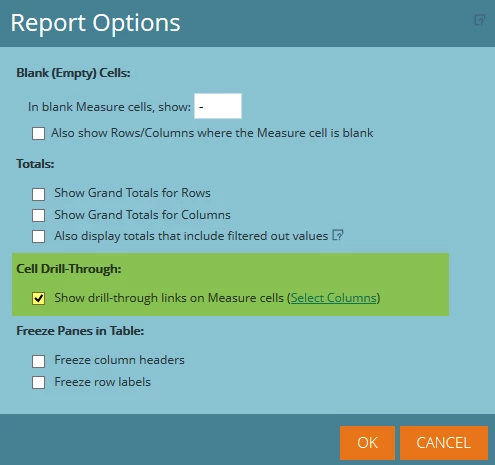
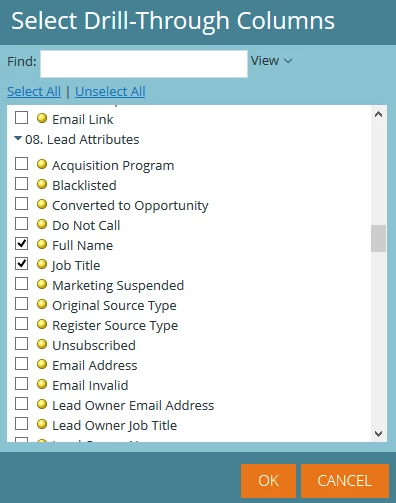
We then select the attributes that we want to appear:
You can now see each metric is a clickable link:
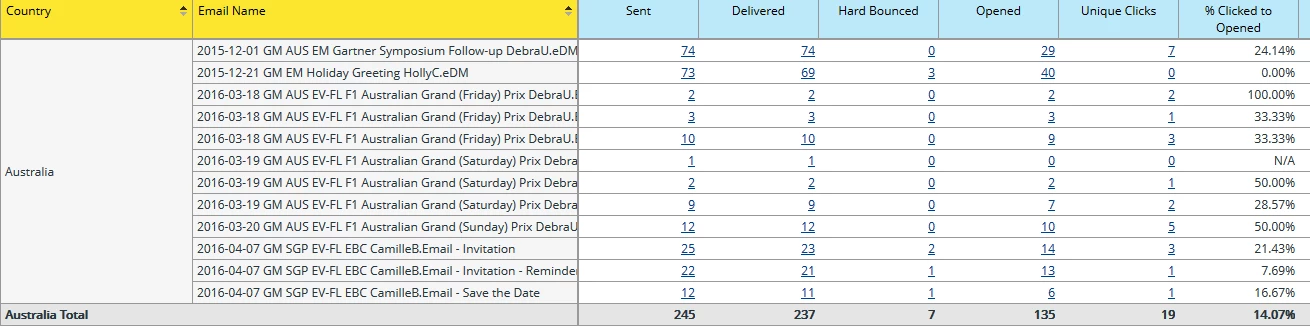
Here's where the problem lies (unless I'm doing something wrong).  When I click on the number "7" under "unique clicks" for the first email, this is the underlying data:
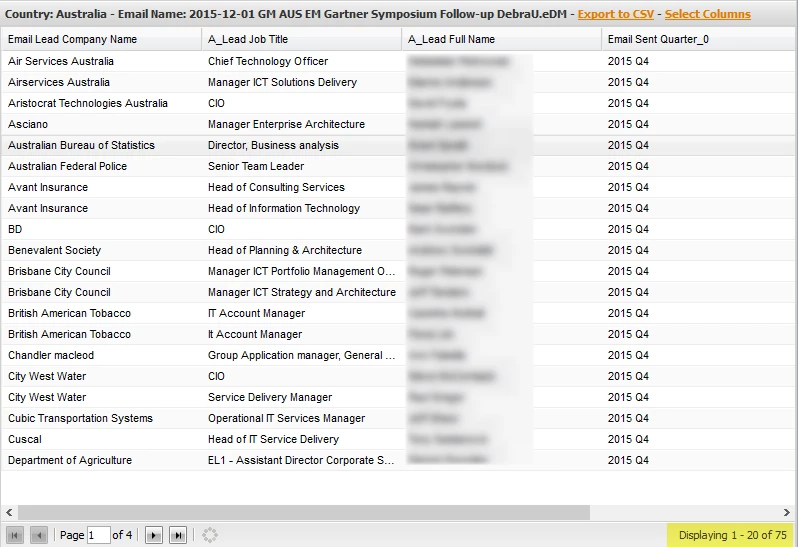
Why is it displaying every lead that was sent the email instead of the 7 that I clicked on?   I expect to see the seven leads that clicked.  I tried looking in the Product Docs section, but there's nothing that explains how to properly configure this.  Anyone have any suggestions?

This post is no longer active and is closed to new replies. Need help? Start a new post to ask your question.
Best answer by Dan_Stevens_

I just learned from Support that the drill-down capabilities in RCE aren't built to work like this.  According to Support:

"The Drill down report will show you all the columns that you selected in the cell drill through selection screen. So if you picked 3 columns when you click any column it will generate a report for the columns you selected. For example, if I selected Opens, Delivered and Clicked as your columns and then clicked on the number for "Clicked" the Drill down will show me all three columns not just the number for Clicked. If you only wanted to see clicked on the drill down report you would only select Clicked for the columns in the Cell Drill Through selection screen."

So what this is saying is clicking on any metric within a row will show the exact same data/results (based on the drill-down columns - in our case name, title, company) for all columns in the report - not specific to each metric (like "opens", "unique clicks", etc.).  And it will always show the complete set of leads that was sent the email, regardless if they are included in that metric.  Definitely not the expectation of a proper drill-down feature.

Please up-vote this idea: Provide proper report drill-down capabilities within Revenue Cycle Explorer (RCE)

4 replies

New Participant
March 30, 2022

six years later and its still better faster and easier to export the results of the email and just make a pivot table in excel...

March 12, 2016

I've been having the similar. Hair is grey now over this issue!

Dan_Stevens_
New Participant
March 12, 2016

Justin, please vote up this idea:

March 11, 2016

Uggh - just when we got done singing the praises of RCE, we come across this limitation (still no way to drill-down into the individual data behind each metric).  Disappointed

Dan_Stevens_
Dan_Stevens_AuthorAccepted solution
New Participant
March 11, 2016

I just learned from Support that the drill-down capabilities in RCE aren't built to work like this.  According to Support:

"The Drill down report will show you all the columns that you selected in the cell drill through selection screen. So if you picked 3 columns when you click any column it will generate a report for the columns you selected. For example, if I selected Opens, Delivered and Clicked as your columns and then clicked on the number for "Clicked" the Drill down will show me all three columns not just the number for Clicked. If you only wanted to see clicked on the drill down report you would only select Clicked for the columns in the Cell Drill Through selection screen."

So what this is saying is clicking on any metric within a row will show the exact same data/results (based on the drill-down columns - in our case name, title, company) for all columns in the report - not specific to each metric (like "opens", "unique clicks", etc.).  And it will always show the complete set of leads that was sent the email, regardless if they are included in that metric.  Definitely not the expectation of a proper drill-down feature.

Please up-vote this idea: Provide proper report drill-down capabilities within Revenue Cycle Explorer (RCE)