Using lead form values to dictate form field visibility rules | Community
Skip to main content
New Participant
September 16, 2019
Solved

Using lead form values to dictate form field visibility rules

  • September 16, 2019
  • 1 reply
  • 6395 views

Hello! 

I am trying to make a form field visible only if there is a null value for another field in our instance. I have tried to implement using this thread: Form field conditional on current vlaue. However when I test it doesn't seem to work, the form value that I am trying to hide/show ( IS Agency) keeps showing no matter what. 

The form I am trying to do this for has Is agency as the field with visibility rules, based on a hidden field that is "IsAgencyDynamic". Prefill is enabled for both fields, and Is Agency has the below visibility rules. I have implemented this JS and form on this landing page.  Can you help me identify why this is not working? Thanks!
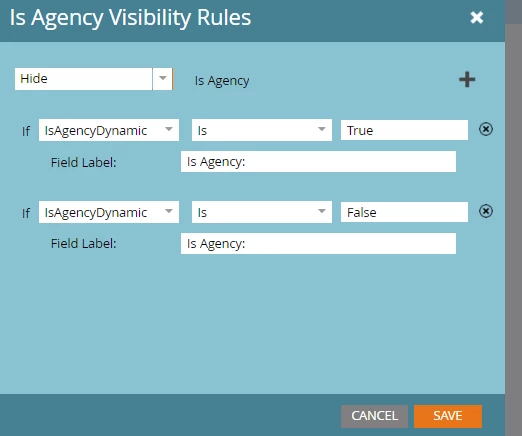
Code I am using: 

<script>
MktoForms2.whenReady(function(form){
form.setValues({
IsAgencyDynamic : form.getValues().IsAgency
});
})
</script> ‍‍‍‍‍‍‍‍‍‍‍‍‍‍
This post is no longer active and is closed to new replies. Need help? Start a new post to ask your question.
Best answer by Jay_Jiang

Thanks- I implemented your solution. Since I really only need to get the hidden field ( isagencydynamic) pre-filled to get the is agency visibility rules to work i just used a shortened version below. Would this work? Or should i remove Sanford's code that I had originally put to getvalues?

<script>
MktoForms2.whenReady(function (form) {
var init_fields = {
"Isagencydynamic":"{{lead.isagency}}",
}});
</script>
<script>
MktoForms2.whenReady(function(form){
form.setValues({
isAgencyDynamic : form.getValues().isAgency
});
}) ‍‍‍‍‍‍‍‍‍‍‍‍‍‍‍‍‍‍‍‍‍‍‍‍‍‍‍‍‍‍‍‍‍‍‍
</script>

This code is live on: build.amazonalexadev.com/Youtube-Integration_DynamicTest.html  and still not working, so obviously still doing something wrong.

Thanks!


try this:

MktoForms2.whenReady(function (form) {
var init_fields = {
"isAgencyDynamic":"{{lead.Is Agency}}", // whatever your Marketo token is supposed to be
}
form.vals(init_fields);
});

1 reply

SanfordWhiteman
New Participant
September 16, 2019

The field name is isAgency (no initial cap).

fordejpAuthor
New Participant
September 16, 2019

Thanks! I was using the import alias instead of what was represented as the name in source code. It looks like both fields have the first i lowercase. 

I made those adjustments and the form is still not working..Any other suggestions? Thanks!

Jay_Jiang
New Participant
September 17, 2019

Marketo forms checkboxes use "yes" or "no" (case sensitive) not True/False