Using System.Date in a Smart List Filter | Community
Skip to main content
Ashley_Henders1
New Participant
May 1, 2018
Solved

Using System.Date in a Smart List Filter

  • May 1, 2018
  • 2 replies
  • 3327 views

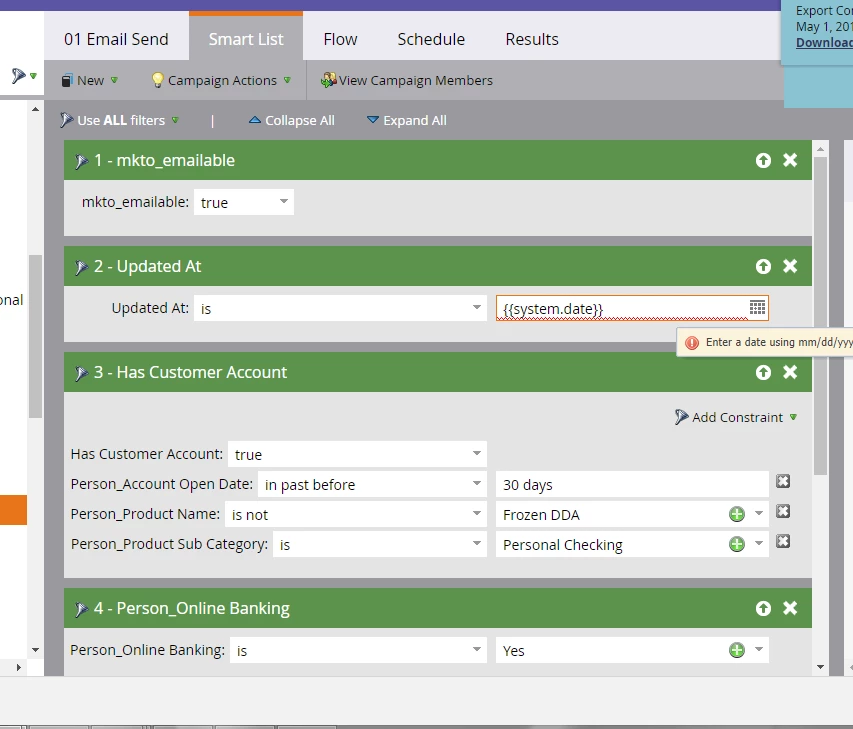
I want to build a smart campaign with a smart list looking for the Updated At field is always today.  When I click today on the calendar it selects today's date (5/1/2018) and tomorrow the 5/1/2018 is still in the filter.  I want this date to be dynamic and always be the current day.  I know system.date is a dynamic date field but the system won't let me put this in the field for the date in the filter.  How can I filter my smart campaign list to accomplish the Updated At is always the current date? I need step by step instructions. 
This post is no longer active and is closed to new replies. Need help? Start a new post to ask your question.
Best answer by Jim_Thao7

Use in past 1 day.

2 replies

Grégoire_Miche2
New Participant
May 1, 2018

That does not work.

Vote:

and, as, suggested by Jim, use the "in past 1 day" setting in the filter.

-Greg

Jim_Thao7
Jim_Thao7Accepted solution
New Participant
May 1, 2018

Use in past 1 day.

Ashley_Henders1
New Participant
May 1, 2018

Thank you.  That worked and I can't believe it was that easy!