Values for Custom Fields not Stamping over Previous Data | Community
Skip to main content
New Participant
May 9, 2024
Solved

Values for Custom Fields not Stamping over Previous Data

  • May 9, 2024
  • 3 replies
  • 3609 views

Ok what am I missing? I have a very simple program set up to stamp UTM values for ungated web visits. The program is working as inspected, triggered by the action and stamping the value to the activity record. However, that's where the success ends. The lead utm_source field is not updating over the previous data in the field. 

  1. Can you not overwrite the information already in the field? 
  2. If you can overwrite it, would an API push of data trump a data change in marketo? 

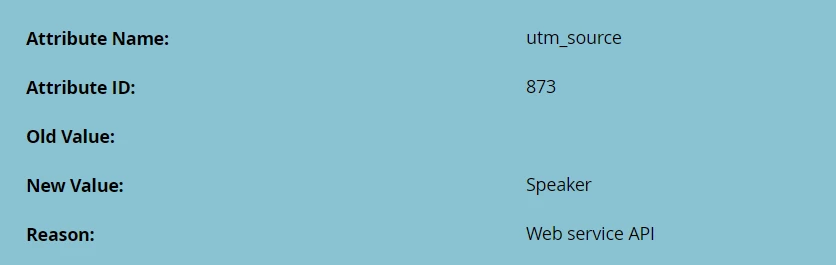
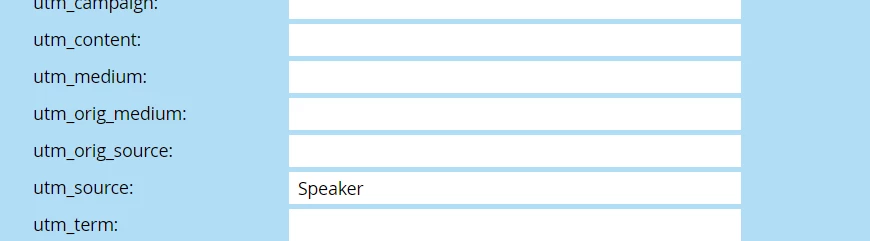
For this scenario May 1st was the initial utm_source stamp "Speaker" and then today May 9th the lead was stamped "Email". The field is essentially supposed to be the last touch so we want it to change as they interact with other channels from us.
 

This post is no longer active and is closed to new replies. Need help? Start a new post to ask your question.
Best answer by AshleighMo1

Fun Fact for everyone following the thread: It appears that Marketo had a strange moment of confusion because all of the leads are stamping correctly and I did not make any changes to the program. So this thread can be an example of UTM stamping for others now (haha).  

3 replies

AshleighMo1AuthorAccepted solution
New Participant
May 15, 2024

Fun Fact for everyone following the thread: It appears that Marketo had a strange moment of confusion because all of the leads are stamping correctly and I did not make any changes to the program. So this thread can be an example of UTM stamping for others now (haha).  

Katja_Keesom
Community Manager
May 15, 2024

In that case I would like to make the case for capturing this data in a completely different and more scalable way.

With your current process you can only capture utm parameters with values you already know. However, you can add the fields as hidden on your forms, setting the capture from a query parameter, so the field will populate with any value for that specific query parameter. So if you add any new values in the future it will capture without you having to make any adjustments.

This solution also is far less of a strain on Marketo processing capacity, as it does not require any flow steps to be processed.

New Participant
May 15, 2024

Hi Katja! 


That is correct, this is for UTM stamping for Ungated campaigns only. Ungated campaigns include tracking for blogs, press releases, etc. that do not have a form. I actually have our forms already set up to capture all of the query parameters from our URLs. I have chatted with Sanford about a workaround to stamp the more unique values for these such as campaign, but that is a long term goal since it is a bigger lift. For anyone reading along that is looking for a solution for extracting those query parameters here is that thread: https://nation.marketo.com/t5/product-discussions/extracting-data-from-activity-record-information-is-this/m-p/347833#M197239

Jo_Pitts1
Community Manager
May 12, 2024

@ashleighmo1 ,

Let's step back a bit.  There is a key question that's not been asked:  How are you trying to write the UTM data to the field?


Can you show us config, code, etc.


Cheers

Jo

AWmindtree
New Participant
May 9, 2024

Hi @ashleighmo1 

This is interesting. My first point to investigate will be to check if this field is Blocked from Updates enabled from Field Management. 
You can check via Admin-> Field Management-> Select the field from the right side and check if Blocked Field Updates is selected for this field.  

If not, could you check to update the field values manually? 

New Participant
May 9, 2024

Great thought! Unfortunately it is set to block updates from: None


In terms of updating manually, what do you mean? Like type the information in? 

michellechopin
Community Manager
May 10, 2024

Are you able to share the Smart Campaign that updates these leads for you?


I notice that the CDV information says "Changed utm_source from [null] to Email" but your post and screenshots show that the field has "Speaker" in it before the new UTM value is generated - wondering if that has something to do with it?


I love a good Friday mystery 😋
