Velocity Script - Connecting to a SFDC object with brackets in its name | Community
Skip to main content
New Participant
November 16, 2023
Solved

Velocity Script - Connecting to a SFDC object with brackets in its name

  • November 16, 2023
  • 1 reply
  • 1745 views

I'm having an issue where I've been unable to google a solution.

I'm trying to set up a script that references a Salesforce Object whose name includes brackets

Is there a way to escape/ encode the brackets in velocity so that I can reference this object? Or is it something else I've got wrong?  The token currently returns nothing.


I have pasted where I am below, I want to extract values stored in the Policy (Policy_Sponsor__c) object. I assume I need to name this were I have xxxxxxxxx in place
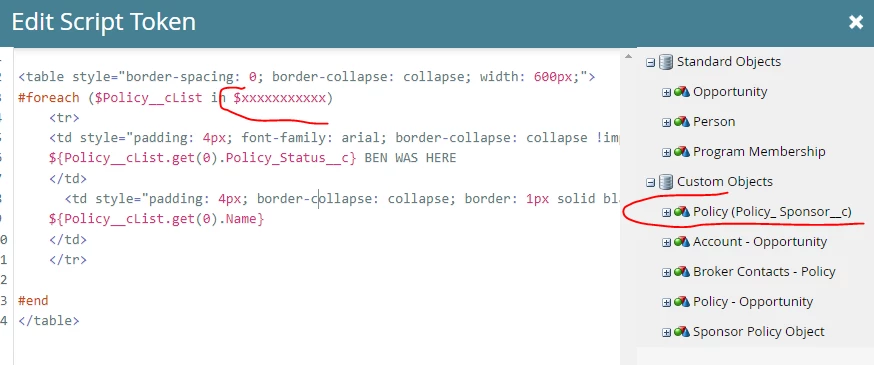


<table style="border-spacing: 0; border-collapse: collapse; width: 600px;">
#foreach ($Policy__cList in $xxxxxxxxxx) <tr> <td style="padding: 4px; font-family: arial; border-collapse: collapse !important; border: 1px solid black"> ${Policy__cList.get(0).Policy_Status__c} BEN WAS HERE </td> <td style="padding: 4px; border-collapse: collapse; border: 1px solid black"> ${Policy__cList.get(0).Name} </td> </tr> #end </table>

This post is no longer active and is closed to new replies. Need help? Start a new post to ask your question.
Best answer by SanfordWhiteman

There’s no need for guesswork. The Velocity name is the name you get when you take a field from the tree and drag it to the canvas.


In your case the name of the object list is $Policy__cList. That’s what you iterate. And yes, you don’t want to keep referencing item 0.

#foreach( $item in $Policy__cList ) ## $item is set to each item in turn #end


1 reply

SanfordWhiteman
New Participant
November 16, 2023

You’re leaving out vital details. What is the name of the object in SFDC, and what is the Velocity name of the object list (which you see when you check off a field in the tree and drag it to the canvas)? 


Marketo attempts to make a valid Velocity name for any object/field that wouldn’t otherwise be compatible. That’s why you can’t actually know for sure what the Velocity name will be outside  of Script Editor. But you haven’t shown the name Marketo is giving to the object list. Unless it’s $Policy__cList, in which case that’s what you should be iterating.

BenjincAuthor
New Participant
November 16, 2023

As far as I'm aware the object name is Policy (Policy_ Sponsor__c), or would Marketo rename this in the Admin interface?


I tried iterating on the $Policy__cList  but while it did print out 4 rows (the user tested has 4 policies), they were all of the most recent policy details.  


... Or could that be due to the fact that its referencing (0) after .get?


Should I be able to actually drag the whole Object into the script builder? When I do this, it just tries to pull in the gif...


SanfordWhiteman
SanfordWhitemanAccepted solution
New Participant
November 16, 2023

There’s no need for guesswork. The Velocity name is the name you get when you take a field from the tree and drag it to the canvas.


In your case the name of the object list is $Policy__cList. That’s what you iterate. And yes, you don’t want to keep referencing item 0.

#foreach( $item in $Policy__cList ) ## $item is set to each item in turn #end