
Velocity Script Error - 5000 lexical error | Community
Skip to main content
Miguel_Board1
New Participant
January 4, 2021
Solved

Velocity Script Error - 5000 lexical error

  • January 4, 2021
  • 2 replies
  • 6413 views

Howdy and Halp!


I'm hoping to find some help with a velocity script I am editing. I am just trying to hobble this together to meet a deadline. I am not a coder and just barely understand all that is happening in this script...just well enough to get into trouble. See below. 🙂


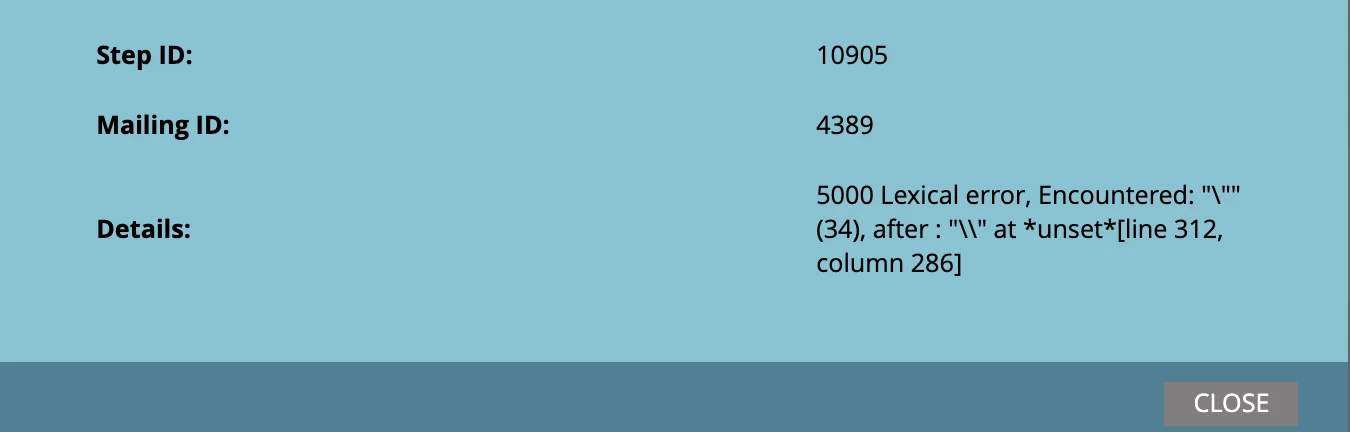
I have added a number of references to the field 'appointmentType'. The script is now producing an error:


This is the script I have in place:


#foreach ($appointmentItem in $appointment_cList) set( $todayCalObj = #$date.toCalendar($date.toDate("yyyy-MM-dd HH:mm",$date.get('yyyy-MM-dd #HH:mm'))) ) set( $nextAppt = $date.toCalendar($date.toDate("yyyy-MM-dd #HH:mm",${appointmentItem.appointmentDateTime})) ) set( $inFuture = ( #$nextAppt.getTimeInMillis() - $todayCalObj.getTimeInMillis() ) / #86400000 ) if ( $inFuture > 1 && $inFuture < 2 && #($appointmentItem.appointmentStatus != "Reschedule" || #$appointmentItem.appointmentStatus != "Cancelled" || #$appointmentItem.appointmentType != "Benefit Renewal" || #$appointmentItem.appointmentType != "Clean and Check" || #$appointmentItem.appointmentType != "Change of Insurance Consult" || #$appointmentItem.appointmentType != "Complimentary Screening" || #$appointmentItem.appointmentType != "Complimentary Screening/Demo" || #$appointmentItem.appointmentType != "Demo Follow Up" || #$appointmentItem.appointmentType != "Diagnostic and Warranty" || #$appointmentItem.appointmentType != "Diagnostic Eval and Demo 3yrs +" || #$appointmentItem.appointmentType != "Diagnostic Eval/HAC(Hearing Test)& Hearing Aid Che" || #$appointmentItem.appointmentType != "Diagnostic Evaluation and Hearing Aid Evaluation" || #$appointmentItem.appointmentType != "Diagnostic Evaluation(Hearing Test)" || #$appointmentItem.appointmentType != "Earmold Fitting" || #$appointmentItem.appointmentType != "Earmold Impression" || #$appointmentItem.appointmentType != "Empire Plan Follow up" || #$appointmentItem.appointmentType != "Final Denial Consult" || #$appointmentItem.appointmentType != "Functional Gain Testing" || #$appointmentItem.appointmentType != "HA Exchange" || #$appointmentItem.appointmentType != "HAC 45 day trial" || #$appointmentItem.appointmentType != "HAC+D-Hearing Aid Check & Demo 3 yrs +" || #$appointmentItem.appointmentType != "HAC-Hearing Aid Check less than 3 yrs." || #$appointmentItem.appointmentType != "HAE-Hearing Aid Evaluation" || #$appointmentItem.appointmentType != "HAE/HAF -Hearing Aid Evaluation & Fitting" || #$appointmentItem.appointmentType != "HAF--Hearing Aid Fitting" || #$appointmentItem.appointmentType != "Hearing Aid Adoption" || #$appointmentItem.appointmentType != "Hearing Aid Consult Follow-Up" || #$appointmentItem.appointmentType != "Hearing Aid Evaluation" || #$appointmentItem.appointmentType != "Home Delivery/Dispense" || #$appointmentItem.appointmentType != "Home Visit" || #$appointmentItem.appointmentType != "Insurance Benefit Renewal Follow Up." || #$appointmentItem.appointmentType != "Insurance consult f/u needs Demo" || #$appointmentItem.appointmentType != "Insurance Consult Follow Up/Fitting Upon Authoriza" || #$appointmentItem.appointmentType != "Insurance Consult Initial W/WO Diagnostics" || #$appointmentItem.appointmentType != "Insurance Final Denial Follow-Up" || #$appointmentItem.appointmentType != "Insurance follow up after Dispense" || #$appointmentItem.appointmentType != "Insurance Resubmit" || #$appointmentItem.appointmentType != "Lost Device" || #$appointmentItem.appointmentType != "New Patient Adult CAE" || #$appointmentItem.appointmentType != "New Patient Pediatric CAE" || #$appointmentItem.appointmentType != "Office Visit/Referral Consult" || #$appointmentItem.appointmentType != "Payment" || #$appointmentItem.appointmentType != "Replacement Pick up" || #$appointmentItem.appointmentType != "Service/Repair" || #$appointmentItem.appointmentType != "Tinnitus Evaluation" || #$appointmentItem.appointmentType != "Warranty" || #$appointmentItem.appointmentType != "Warranty and Demo over 3 years" || #$appointmentItem.appointmentType != "Cancelled" || #$appointmentItem.appointmentStatus != "Warranty and HAC less than 3 years" ) ) #set( $nextAppointment = #$convert.parseDate(${appointmentItem.appointmentDateTime}, #'yyyy-MM-dd HH:mm') ) <p>$date.format('MM/dd/yyyy',$nextAppointment) at $date.format('hh:mm a',$nextAppointment)<br /> <br> #break else end #end


The objective is to exclude the above appointment types and statuses from the email send. I am hoping this just a simple syntax error. Thanks to anyone that is able to have a gander.

Best answer by SanfordWhiteman

Yes, the appointment times being stored in Marketo are being changed in the data load process to reflect the time zone of the end record. I had never previously heard of using the IANA timezone with Marketo as a solution. There was no solution offered by Marketo for incorrect times showing in emails, so we improvised. Your solution certainly sounds like a much more clean way of doing things.


There was no solution offered by Marketo for incorrect times showing in emails, so we improvised. Your solution certainly sounds like a much more clean way of doing things.

How bizarre. I wrote a much-visited post on dates & datetimes in Velocity, showing how to include timezones for input and output.


In any case, incorporating the additional assumption that your converted-to-CST datetimes are in fact Strings with the format "yyyy-MM-ddHH:mm" (ex. "2021-01-0712:34") as suggested somewhere above... it sounds like you want this, or something much like it:


#set( $defaultTimeZone = $date.getTimeZone() ) #set( $defaultLocale = $date.getLocale() ) #set( $calNow = $date.getCalendar() ) #set( $ret = $calNow.setTimeZone($defaultTimeZone) ) #set( $calConst = $field.in($calNow) ) #set( $ISO8601DateOnly = "yyyy-MM-dd" ) #set( $ISO8601DateTime = "yyyy-MM-dd'T'HH:mm:ss" ) #set( $ISO8601DateTimeWithSpace = "yyyy-MM-dd HH:mm:ss" ) #set( $ISO8601DateTimeWithMillisUTC = "yyyy-MM-dd'T'HH:mm:ss.SSSZ" ) ## your corporate datetime formats for both input (parsing) and output #set( $audigyDateTimeInputFormat = "yyyy-MM-ddHH:mm" ) #set( $audigyDateTimeOutputFormat = "MM/dd/yyyy' at 'hh:mma" ) #set( $excludableAppointmentStatuses = ["Reschedule","Cancelled","Rescheduled" ] ) #set( $excludableAppointmentTypes = ["Benefit Renewal","Clean and Check","Change of Insurance Consult","Complimentary Screening","Complimentary Screening/Demo","Demo Follow Up","Diagnostic and Warranty","Diagnostic Eval and Demo 3yrs +","Diagnostic Eval/HAC(Hearing Test)& Hearing Aid Check","Diagnostic Evaluation and Hearing Aid Evaluation","Diagnostic Evaluation(Hearing Test)","Earmold Fitting","Earmold Impression","Empire Plan Follow up","Final Denial Consult","Functional Gain Testing","HA Exchange","HAC 45 day trial","HAC+D-Hearing Aid Check & Demo 3 yrs +","HAC-Hearing Aid Check less than 3 yrs.","HAE-Hearing Aid Evaluation","HAE/HAF -Hearing Aid Evaluation & Fitting","HAF--Hearing Aid Fitting","Hearing Aid Adoption","Hearing Aid Consult Follow-Up","Hearing Aid Evaluation","Home Delivery/Dispense","Home Visit","Insurance Benefit Renewal Follow Up.","Insurance change follow up","Insurance consult f/u needs Demo","Insurance Consult Follow Up/Fitting Upon Authorization","Insurance Consult Initial W/WO Diagnostics","Insurance Final Denial Follow-Up","Insurance follow up after Dispense","Insurance Resubmit","Lost Device","New Patient Adult CAE","New Patient Pediatric CAE","Office Visit/Referral Consult","Payment","Replacement Pick up","Service/Repair","Tinnitus Evaluation","Warranty","Warranty and Demo over 3 years","Warranty and HAC less than 3 years"] ) #foreach( $appointment in $sorter.sort($appointment_cList,"appointmentDateTime:asc") ) #set( $dtAppointment = $convert.parseDate($appointment.appointmentDateTime, $audigyDateTimeInputFormat, $defaultLocale, $defaultTimeZone) ) #set( $calAppointment = $convert.toCalendar($dtAppointment) ) #set( $hoursInFuture = $date.difference($calNow,$calAppointment).getHours() ) #set( $isExcludedStatus = $excludableAppointmentStatuses.contains($appointment.appointmentStatus) ) #set( $isExcludedType = $excludableAppointmentTypes.contains($appointment.appointmentType) ) #if( $hoursInFuture >= 24 && $hoursInFuture <= 48 && !$isExcludedStatus && !$isExcludedType ) #set( $nextQualifiedAppointment = $dtAppointment ) #break #end #end <p>$date.format($audigyDateTimeOutputFormat,$nextQualifiedAppointment)<br><br>


2 replies

SanfordWhiteman
New Participant
January 4, 2021

Hi Miguel,


OK, this code is... I don't know how else to say it... not close to valid Velocity code.   All of those preceding # characters are breaking it horribly, and it has fatal syntax errors all around. Not sure even where the framework of the code came from — the approach of dividing by milliseconds to determine "in future" is def not how you do it, and the generation of Calendar objects is being done in a convoluted way.


Even if the rest of the code were fixed, the long compound condition doesn't seem to match with what you're trying to do.


This condition:


IF variable1 is not equal to value1 OR variable1 is not equal to value2 OR variable1 is not equal to value3


Is going to be true in all of these cases:


variable1 is equal to value1

variable1 is equal to value2

variable1 is equal to value3


Does that make sense?  You probably meant to express the condition


IF variable1 is not equal to value1 AND variable1 is not equal to value2 AND ...

Miguel_Board1
New Participant
January 4, 2021

Hi Sanford,


The code came from a Marketo Consultant that was provided to our company, by Marketo last year. The framework of this script has taken almost a year to have it working and implemented. As Murphy would have it, another requirement (Appointment Type) came into play just before the Christmas break.

You are correct about the condition I was attempting to express. I am attempting to mimic the criteria of this Smart List, within the velocity script.


I was attempting to follow the path that was being used for excluding the 'Appointment Status' of Reschedule, Cancelled and Rescheduled...by simply changing the custom object field being referenced. Is the framework of this script worth trying to piece together?

SanfordWhiteman
New Participant
January 4, 2021

You definitely don't want to do it with a giant compound condition — that's bad practice and creates unmaintainable code.


Use a collection and check to see if values are in/not-in the collection.


For example, here I'm creating lists of the "interesting" Statuses  and Types, then using !List.contains() — not-list-contains being the same as list-not-contains.

#set( $excludableAppointmentStatuses = ["Reschedule","Cancelled", "Warranty and HAC less than 3 years" ] ) #set( $excludableAppointmentTypes = ["Benefit Renewal","Clean and Check","Change of Insurance Consult"] ) #foreach( $appointmentItem in $appointment_cList ) #if( !$excludableAppointmentStatuses.contains($appointmentItem.appointmentStatus) && !$excludableAppointmentTypes.contains($appointmentItem.appointmentType) ) ## ... now do whatever with $appointmentItem #end #end


New Participant
January 4, 2021

Hi! Are you saying you want to use this velocity script to exclude people from receiving an email? Is that not something you can accomplish by adjusting the smart list? 


If you're trying to adjust the value that appears in an email itself and exclude certain values from showing that one particular line, you might be able to build a quick segmentation and use dynamic content. Alternatively perhaps a formula field would do the trick.

Miguel_Board1
New Participant
January 4, 2021

Hi Rachel,


The velocity script is working in conjunction with a Smart List, in order to determine the correct audience. The velocity script is referencing fields that live upon a Marketo Custom Object. In this scenario, solely referencing the exclusion list in the Smart List will not stop the velocity script from yielding results. The same criteria must be referenced within the velocity script.