
Velocity script tokens as an alternative for dynamic content
Following up on @Kristen Carmean's awesome blog post with great examples of Velocity scripting, I’ve got another example of a basic email token Velocity script that allows you to serve up dynamic content without segmentation or snippets.
While Marketo's segmentation functionality is terrific, there are times when it isn't what you need when you want to deliver dynamic content based on the customer's data. Especially when the dynamic content you need isn't based on an either/or scenario like salutations (Mr. v. Ms. or U.S. v. Canada).
I’ve had multiple requests for a use case similar to the following:
A lead fills out a form or otherwise has data in their record indicating interest in multiple products/topics/requests. The lead can choose more than one topic, making segmentation and snippets undesirable, as you can be in only one segment at a time within a segmentation and building a segmentation for each topic area is not always feasible in many Marketo instances. The lead then receives an email response with dynamic content based on the topics they requested.
For our example here, we will be a fictional company offering a variety of dog-related topics (Training Tips, Toys and Accessories, Nutrition and Health and Adoptions) that customers can get a monthly email update about by registering via a form. This data about their interest is captured in individual custom fields in Marketo, though it could also be associated with the lead via CRM fields as well.
We will send out an email auto response confirming the topics they signed up for and providing a brief update on each topic. Only the topics they signed up for will be in the email copy.
To accomplish this, we leverage very basic Velocity #if and #end functionality. (If the value is “X,” make this text appear and then end the script.) You can do this all within one token and have the script address each value one after the other. In this case, our fields = "1" when a lead has selected that topic.
#if (${lead.mktoAdoptionsandRescues} == "1")
Adoptions and Rescues: Meet our latest furry friend, Charlotte, who is available for adoption. Charlotte is a mature, 7-year-old basset hound who would love nothing more than finding her forever home and would do well…
#end

#if (${lead.mktoToys} == "1")
Toys and Products: All of our dog companions here are just wild about the new backyard tug toy from ACME Dog. Your dog gets all of the yanking and pulling play time he love, without the strain on your arms…
#end
#if (${lead.mktoTrainingTips} == "1")
Training Tips: Are you saying "Down" but the rest of your household says "Off"? Consistency is key to your dog understanding what you want. We've got a top 10 list of dog training Dos and Donts …
#end
#if (${lead.mktoNutrition} == “1”)
Nutrition and Health: Dogs can get the flu too – it’s time to start thinking about Fido’s annual vaccination. Talk with your vet about…
#end
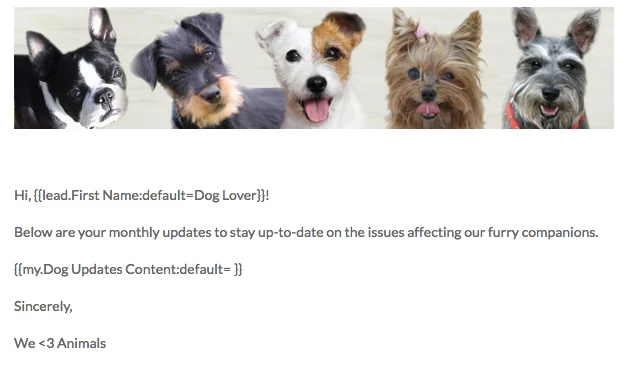
I’ve saved this email script token as {{my.Dog Content Updates}} and have placed the token within the body of the email.Note that in my own record, I have only signed up for the Adoptions and Training topics, and those are the only pieces of content that appear, and without obvious space/breaks between the topic script pieces that don’t apply.
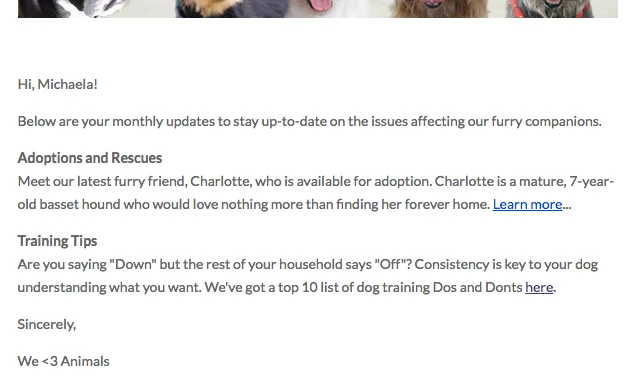
Bonus Tip One: Not strong on html writing? (Neither am I.) Build an email where you write and format the copy as you like it. Embed links, create bolded headlines, etc. Then go into the html of that email and copy the text as formatted. For example, the script piece for Adoptions actually is in my token as
<p><b>Adoptions and Rescues</b><br>
Meet our latest furry friend, Charlotte, who is available for adoption. Charlotte is a mature, 7-year-old basset hound who would love nothing more than finding her forever home. <a href="http://www.cbhr.com" target="_blank">Learn more</a>...</p> (Depending on how your email template is se
Bonus Tip Two: Consider your content carefully. Each topic/brand/request needs to be able to stand alone, as the lead may or may not have requested two that you are tying together. Also consider content length – if each piece is long and the lead signs up for all of them, this could make for a very long, unwieldy email (and depending on your email template, might look a bit clunky). For the same reason, I would be cautious about the total number of topics/brands/requests that can be selected in this type of delivery. It’s a balancing act – the more topics, the shorter the content should be. I might only use 4-5 for a content piece like the above, where you’re delivering almost newsletter “blurb” pieces of content of a few sentences. For an email that is simply listing a customer’s selections without additional content (say, confirming someone’s subscription choices without providing content for them), you might be able to get away with 10-12 choices.
I should add that I'm not in the least fluent in Velocity script - but I suspect many of you may be in the same boat.  This is just a simple script token that I think can be applied in many typical, fairly straightforward use cases for Marketo.