View email performance across multiple static lists
Did you ever wish you could easily compare email performance across your static lists? I thought you might, so here’s a way to make your dream a reality...
1) First you’ll need to create a new segmentation. Name is something like Static List Report.
2) Here’s your chance to name your lists the way you’d like to see them show up in the report. In my example I simply used the same name as the static lists found in the Group Lists in the Lead Database.
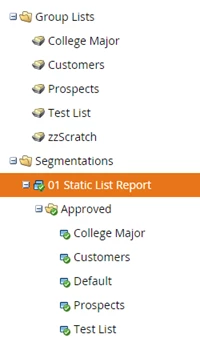
3) For each segment, create a Smart List and choose the static lists you want included in your report.

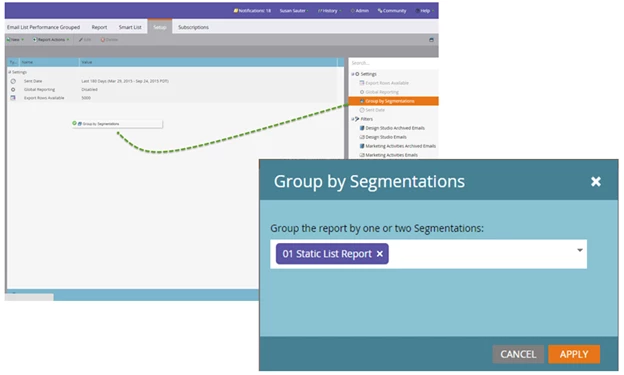
4) In Analytics, click on the Email Performance Report and clone the report (this is a best practice – always save the default report and customize it to meet your reporting needs. Remember to save your report to Group reports if you want to make it available to other users).
5) Pull over the Group by Segmentations filter and select your segmentation.
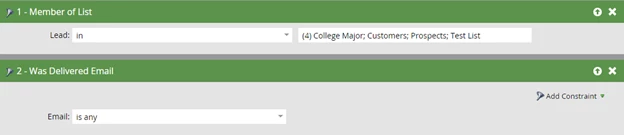
6) Set the Smart List filters Member of List and choose your static lists. Pull over the Was Delivered Email filter and choose Email: is any. Also remember to choose the Sent Date you wish to report on.
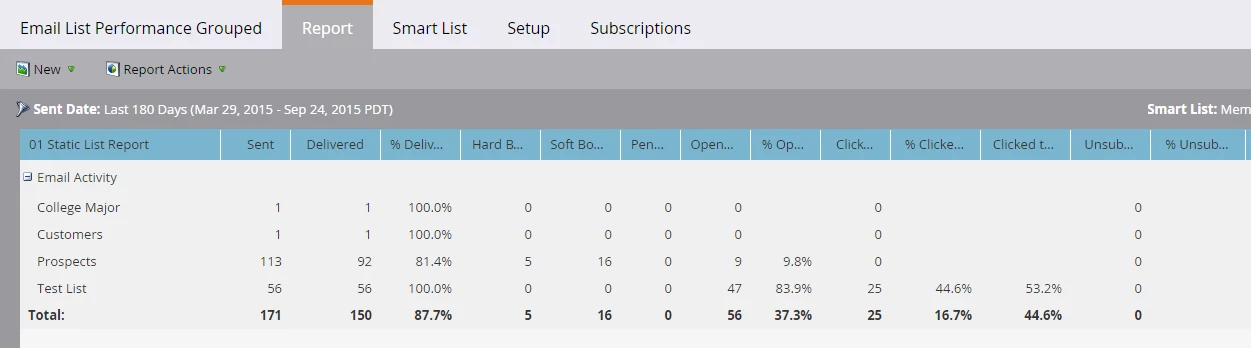
7) View your report
Happy reporting!