Visibility Rules with Multiple Values within Criteria | Community
Skip to main content
Jace_Garside1
New Participant
April 16, 2021
Solved

Visibility Rules with Multiple Values within Criteria

  • April 16, 2021
  • 1 reply
  • 2465 views

Scenario: we are wanting to have rich text appear on a form when certain generic domains are entered into the email address field.  The thinking is that it would discourage personal emails from being submitted without denying the submission altogether.  I am attempting to use the concept of visibility rules as outlined on this blog: https://nation.marketo.com/t5/Product-Blogs/In-Visibility-Rules-Contains-means-a-regular-expression-not-a/ba-p/242987


Here's a screenshot of how the visibility rules are set up:
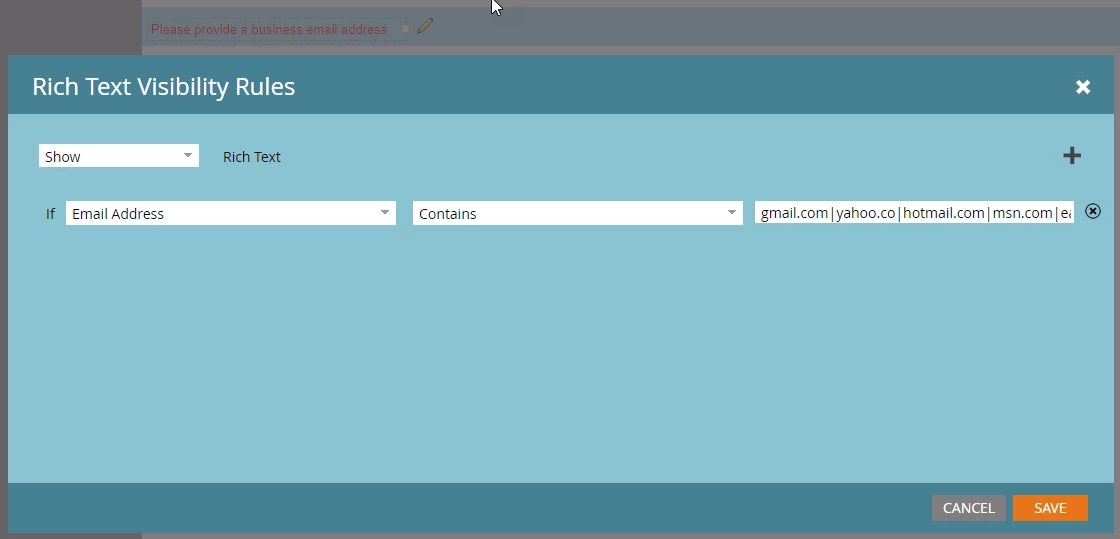
 

The problem is that the form only recognizes the first listed value.  The rich text will not populate for any of the subsequent criteria.  I'm curious to know if this is even meant to work this way.  
This post is no longer active and is closed to new replies. Need help? Start a new post to ask your question.
Best answer by SanfordWhiteman

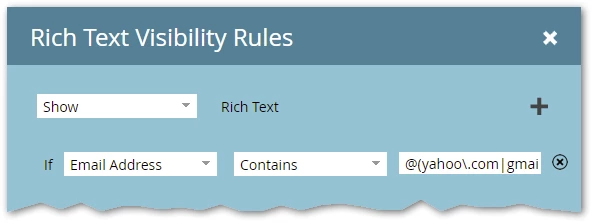
That functionality still works fine — not my usual way to deal with the "unwanted domains" concept but just have your VR like so:


Since you can't read the whole value in the screenshot:

@(yahoo\.com|gmail\.com|outlook\.com)$


Then the form switches accordingly:


1 reply

SanfordWhiteman
SanfordWhitemanAccepted solution
New Participant
April 17, 2021

That functionality still works fine — not my usual way to deal with the "unwanted domains" concept but just have your VR like so:


Since you can't read the whole value in the screenshot:

@(yahoo\.com|gmail\.com|outlook\.com)$


Then the form switches accordingly:


Jace_Garside1
New Participant
April 19, 2021

Thanks @sanfordwhiteman! That seems to be working.  In the VR, I had added 'yahoo.co' to account for yahoo.com and yahoo.co.uk domains - but that didn't work, so each regional email domain had to be listed out individually.  Thanks again for your help!