
Visit Web Page filter with landing page name vs actual URL | Community
Skip to main content
KanakoTone
New Participant
April 1, 2020
Question

Visit Web Page filter with landing page name vs actual URL

  • April 1, 2020
  • 2 replies
  • 3775 views

I have a trigger smart campaign based on the website visit activity for certain Marketo LPs with UTM tag. It looks like this:
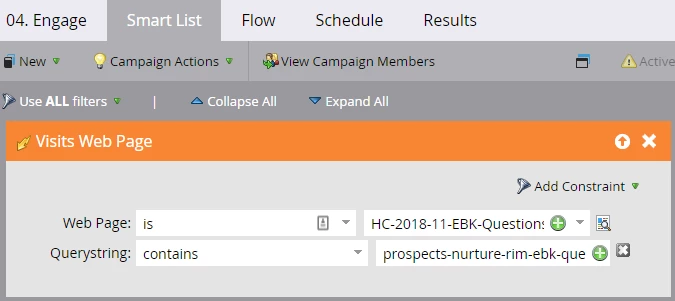
 

If you click the icon next to Web Page, it opens up the correct Marketo LP. 


Now, I noticed that this smart campaign has not been catching anyone, though I knew there were some people who should have been qualified for. When I created a batch campaign "Visited Web Page" with the exactly same filters as shows above, nobody is qualified either. I updated the "Web Page is" filter with the actual URL, then voila, there are handful of people qualified. I read somewhere that referencing a LP name (not actual URL) is the best practice and even Marketo support reps confirmed it with me. Now this reality seems to be contradicting with what I've been told. Can anyone help me understand what is going on?

This post is no longer active and is closed to new replies. Need help? Start a new post to ask your question.

2 replies

SanfordWhiteman
New Participant
April 1, 2020
I read somewhere that referencing a LP name (not actual URL) is the best practice and even Marketo support reps confirmed it with me.

It's the other way around. Support is wrong.

avictor
New Participant
April 1, 2020

Yes, using the landing page name for a Marketo landing page should be pulling the leads that visited the web page. Can you try removing the constraint - "QueryString" in the filter and, check if records qualify? If yes, can you verify if the "Query String" is mentioned as shown here - https://nation.marketo.com/t5/Certification-Study-Group/Tracking-UTM-Parameters/gpm-p/241415? If you are still facing the issue, I would recommend creating a ticket with support.