Web service error 1003 export | Community
Skip to main content
New Participant
March 23, 2023
Solved

Web service error 1003 export

  • March 23, 2023
  • 1 reply
  • 1298 views

Hi all,
I was wondering how can I export the "count" list of leads that encountered the error.
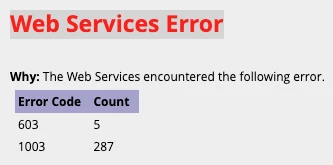
I managed to find them in the "sync error" tab of the salesforce integration (admin tab), but can not find a way to export them 😕😕

any Idea???


Thanks in advance for your help


Itai. 

This post is no longer active and is closed to new replies. Need help? Start a new post to ask your question.
Best answer by Darshil_Shah1

I don't think the web services error notification also stores the lead info. You can contact Marketo support to identify the exact time the errors are occurring and the source of these calls, but you'd need to check the service making these calls to troubleshoot and fix the error. If the service is able to provide you with the API call details of the failed calls, you can trace the leads using the lead-id/email in the body/parameter. You should check this thread: Web Services Error 1003 & 606 - Same time every day.


1 reply

Darshil_Shah1
Darshil_Shah1Accepted solution
Community Manager
March 23, 2023

I don't think the web services error notification also stores the lead info. You can contact Marketo support to identify the exact time the errors are occurring and the source of these calls, but you'd need to check the service making these calls to troubleshoot and fix the error. If the service is able to provide you with the API call details of the failed calls, you can trace the leads using the lead-id/email in the body/parameter. You should check this thread: Web Services Error 1003 & 606 - Same time every day.