Webhook Error
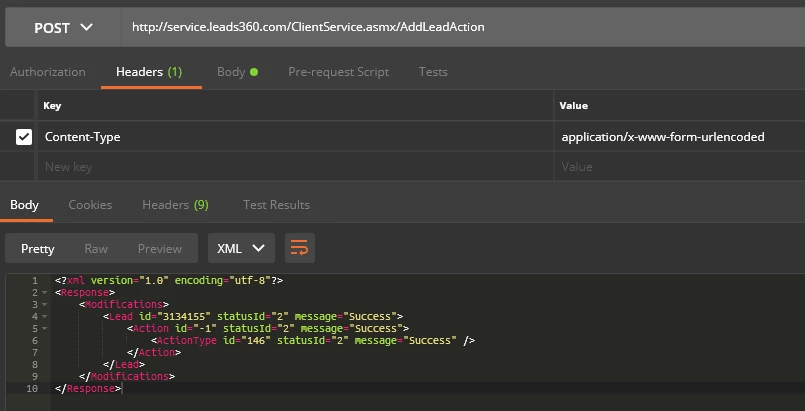
I am trying to execute this from the Marketo/Velocify integration guide, "Post must be set up in Marketo to update Velocify as Marketo Interesting Moments occur." The interesting moments for us is an Email Open and Link Click in an Email. We've written an HTTP Post using GET and POST and both are returning a HTTP Error 500: Server error. When we test it using Postman it works perfectly and the Action in Velocify is triggered.
Our current Webhook setup is...
URL: ClientService Web Service
Request Type: POST
Template: AddLeadAction?username=marketo.prod@cardinalfinancial.com&password=marketo2017&leadId={{lead.Velocify Lead Id:default=edit me}}&actionTypeId=146&actionNote=EmailClick
And this is what I am getting in response...
<!DOCTYPE html> <html> <head> <title>Data at the root level is invalid. Line 1, position 1.</title> <meta name="viewport" content="width=device-width" /> <style> body {font-family:"Verdana";font-weight:normal;font-size: .7em;color:black;} p {font-family:"Verdana";font-weight:normal;color:black;margin-top: -5px} b {font-family:"Verdana";font-weight:bold;color:black;margin-top: -5px} H1 { font-family:"Verdana";font-weight:normal;font-size:18pt;color:red } H2 { font-family:"Verdana";font-weight:normal;font-size:14pt;color:maroon } pre {font-family:"Consolas","Lucida Console",Monospace;font-size:11pt;margin:0;padding:0.5em;line-height:14pt} .marker {font-weight: bold; color: black;text-decoration: none;} .version {color: gray;} .error {margin-bottom: 10px;} .expandable { text-decoration:underline; font-weight:bold; color:navy; cursor:hand; } @media screen and (max-width: 639px) { pre { width: 440px; overflow: auto; white-space: pre-wrap; word-wrap: break-word; } } @media screen and (max-width: 479px) { pre { width: 280px; } } </style> </head> <body bgcolor="white"> <span><H1>Server Error in '/' Application.<hr width=100% size=1 color=silver></H1> <h2> <i>Data at the root level is invalid. Line 1, position 1.</i> </h2></span> <font face="Arial, Helvetica, Geneva, SunSans-Regular, sans-serif "> <b> Description: </b>An unhandled exception occurred during the execution of the current web request. Please review the stack trace for more information about the error and where it originated in the code. <br><br> <b> Exception Details: </b>System.Xml.XmlException: Data at the root level is invalid. Line 1, position 1.<br><br> <b>Source Error:</b> <br><br> <table width=100% bgcolor="#ffffcc"> <tr> <td> <code> An unhandled exception was generated during the execution of the current web request. Information regarding the origin and location of the exception can be identified using the exception stack trace below.</code> </td> </tr> </table> <br> <b>Stack Trace:</b> <br><br> <table width=100% bgcolor="#ffffcc"> <tr> <td> <code><pre> [XmlException: Data at the root level is invalid. Line 1, position 1.] System.Xml.XmlTextReaderImpl.Throw (Exception e) +88 System.Xml.XmlTextReaderImpl.ParseRootLevelWhitespace () +441 System.Xml.XmlTextReaderImpl.ParseDocumentContent () +356 System.Xml.XmlLoader.Load (XmlDocument doc, XmlReader reader, Boolean preserveWhitespace) +160 System.Xml.XmlDocument.Load (XmlReader reader) +135 System.Xml.XmlDocument.Load (Stream inStream) +160 LeadManagerService.ClientServiceNonRestProxy.ProcessRequest (HttpContext context) in F:\Build17\295\s\Services\LeadManagerService\LeadManagerService\ClientServiceNonRestProxy.ashx.cs:44 System.Web.CallHandlerExecutionStep.System.Web.HttpApplication.IExecutionStep.Execute () +508 System.Web.HttpApplication.ExecuteStep (IExecutionStep step, Boolean& completedSynchronously) +92 </pre></code> </td> </tr> </table> <br> <hr width=100% size=1 color=silver> <b>Version Information:</b> Microsoft .NET Framework Version:4.0.30319; ASP.NET Version:4.6.1590.0 </font> </body> </html> <!-- [XmlException]: Data at the root level is invalid. Line 1, position 1. at System.Xml.XmlTextReaderImpl.Throw (Exception e) at System.Xml.XmlTextReaderImpl.ParseRootLevelWhitespace () at System.Xml.XmlTextReaderImpl.ParseDocumentContent () at System.Xml.XmlLoader.Load (XmlDocument doc, XmlReader reader, Boolean preserveWhitespace) at System.Xml.XmlDocument.Load (XmlReader reader) at System.Xml.XmlDocument.Load (Stream inStream) at LeadManagerService.ClientServiceNonRestProxy.ProcessRequest (HttpContext context) in F:\Build17\295\s\Services\LeadManagerService\LeadManagerService\ClientServiceNonRestProxy.ashx.cs:line 44 at System.Web.HttpApplication.CallHandlerExecutionStep.System.Web.HttpApplication.IExecutionStep.Execute () at System.Web.HttpApplication.ExecuteStep (IExecutionStep step, Boolean& completedSynchronously) --><!-- This error page might contain sensitive information because ASP.NET is configured to show verbose error messages using <customErrors mode="Off"/>. Consider using <customErrors mode="On"/> or <customErrors mode="RemoteOnly"/> in production environments.-->
Any idea why this will work in Postman but not in Marketo?
Thanks!