What's the best way to delete a list of people from Marketo | Community
Skip to main content
New Participant
December 13, 2022
Solved

What's the best way to delete a list of people from Marketo

  • December 13, 2022
  • 2 replies
  • 3495 views

Hello,


We have been receiving unqualified contact us form fills . We are NOT sending them to SFDC , so they only live in the Marketo Database. I receive a weekly vetted  list of people who should not be in our Database ( based on the weekly form fills)


What is the best way to permanently remove a list of names from the Marketo Database? Do I need to delete them 1 by 1 or is their a way to upload the  list.


This post is no longer active and is closed to new replies. Need help? Start a new post to ask your question.
Best answer by Darshil_Shah1

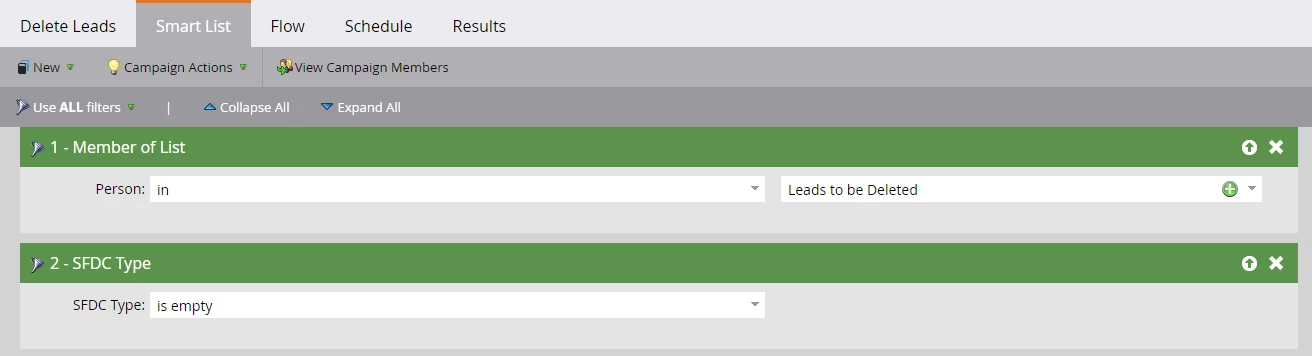
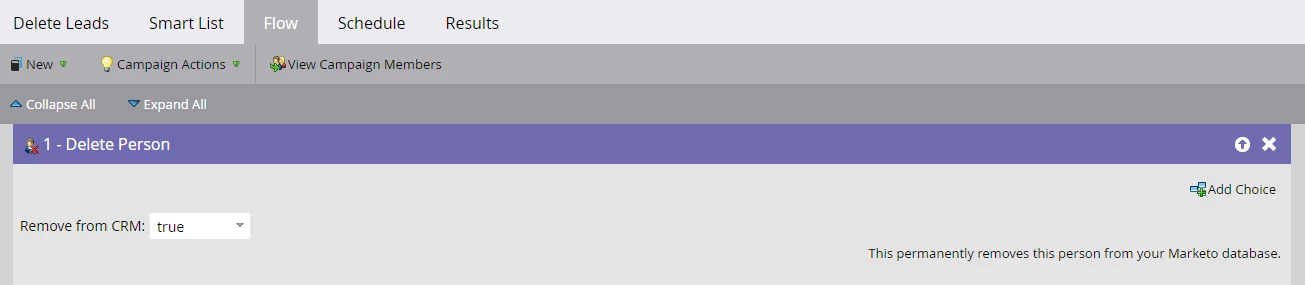
Agreed with @christianero1, setting up a smart campaign sounds like the apt choice for this. Also, FYR - list upload is used for importing/updating records in the DB (and cannot be used for removing people from the DB). You'd need to use the "Delete Person" flow step in the campaign flow; reference the list (smart/static) membership in the campaign's smart list criteria and since these people aren't synced over to SFDC, as a safety net you could also add the "SFDC Type is empty" filter to ensure that you're not letting any synced records to qualify.


You can also set a recurring schedule for this campaign, so it runs every week on its own (do this if you're sure that the people in the list are exactly the ones you'd want to remove permanently from the Marketo DB). Alternatively, you may also manually run this campaign on a weekly basis if you'd like to re-check the people qualifying for the campaign.


Campaign smart list (Add/Update filter logic, if required) - 
 

Campaign Flow - 
 

2 replies

Darshil_Shah1
Darshil_Shah1Accepted solution
Community Manager
December 13, 2022

Agreed with @christianero1, setting up a smart campaign sounds like the apt choice for this. Also, FYR - list upload is used for importing/updating records in the DB (and cannot be used for removing people from the DB). You'd need to use the "Delete Person" flow step in the campaign flow; reference the list (smart/static) membership in the campaign's smart list criteria and since these people aren't synced over to SFDC, as a safety net you could also add the "SFDC Type is empty" filter to ensure that you're not letting any synced records to qualify.


You can also set a recurring schedule for this campaign, so it runs every week on its own (do this if you're sure that the people in the list are exactly the ones you'd want to remove permanently from the Marketo DB). Alternatively, you may also manually run this campaign on a weekly basis if you'd like to re-check the people qualifying for the campaign.


Campaign smart list (Add/Update filter logic, if required) - 


Campaign Flow - 


Community Manager
December 13, 2022

You can always create a smart campaign that will handle this for you.  You can use normal smart list filters such as Member of List or Filled out Form, etc.  Then, in the flow step, you'd use "Delete Person" to remove the list. 


Always check your qualifying members (click the number after "Set to affect" in the schedule tab)  to make sure you're only deleting records that you want to delete.