Where is the Marketo 'Id' Field Pulling From!? | Community
Skip to main content
Virginia_Smith
New Participant
December 9, 2019
Solved

Where is the Marketo 'Id' Field Pulling From!?

  • December 9, 2019
  • 2 replies
  • 7995 views

Hello,

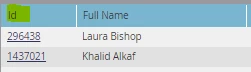
I am trying to create a smart list referencing the 'Id' field and I cannot figure out how to filter by this field. I cannot find it and none of the choices that pop up for me with Id in the title are even close. Has anyone else run into this problem?
Thanks,

Virginia

This post is no longer active and is closed to new replies. Need help? Start a new post to ask your question.
Best answer by SanfordWhiteman
Yes, but why can't I find it when I try to add it as a filter in a smart list?

Because (for reasons incompletely explained, but we live with it!) it's not a supported feature.

Now, what you can do (and what I was holding off on until I heard your case) is have another custom (String) field that you keep in sync with the Lead ID using a Change Data Value flow step, then you can search on it. As you might imagine you need to be careful during merges.

2 replies

SanfordWhiteman
New Participant
December 9, 2019

... and it's uncommon to want a Smart List based on this field (doesn't make much sense because it's immutable for a given lead, and a List with those leads in it is exactly as granular).

What's your exact business case?

Virginia_Smith
New Participant
December 9, 2019

I did some duplicate management and I have about 89 records that I cannot merge due to a system error. I was going to filter by the 'Id' of the records that are not syncing properly and mass purge them.

SanfordWhiteman
New Participant
December 9, 2019
I did some duplicate management and I have about 89 records that I cannot merge due to a system error.

Does this error show up in their Activity Log as a filter in itself?

SanfordWhiteman
New Participant
December 9, 2019

That's the Marketo Lead Id: the most important core attribute of a lead/person.

Virginia_Smith
New Participant
December 9, 2019

Yes, but why can't I find it when I try to add it as a filter in a smart list?

SanfordWhiteman
SanfordWhitemanAccepted solution
New Participant
December 9, 2019
Yes, but why can't I find it when I try to add it as a filter in a smart list?

Because (for reasons incompletely explained, but we live with it!) it's not a supported feature.

Now, what you can do (and what I was holding off on until I heard your case) is have another custom (String) field that you keep in sync with the Lead ID using a Change Data Value flow step, then you can search on it. As you might imagine you need to be careful during merges.