White space being added to email sections | Community
Skip to main content
May 31, 2016
Solved

White space being added to email sections

  • May 31, 2016
  • 2 replies
  • 4089 views

I've noticed that whenever I edit an editable email section in my template using the editor, <p><br /></p> is added at the bottom of my HTML. For example, if I put in:

<table class="one-column" style="background-color: #ffffff;" width="100%" bgcolor="#FFFFFF" border="0" cellpadding="0" cellspacing="0">

      <tr>

         <td style="text-align: center;">

            <table style="border-spacing: 0;" width="100%" border="0" cellpadding="0" cellspacing="0">

                  <tr>

                     <td class="text" style="font-family: Helvetica, 'Helvetica Neue', Geneva, Verdana, Arial, Tahoma, sans-serif; color: #333333; ;font-size: 14px; mso-line-height-rule: exactly; line-height: 19px; text-align: left; padding: 25px 15px 15px 15px;"><span style="font-size: 16px; font-weight: 600;">Do you have the real-time visibility you need to deliver the best quality products to your customers?</span><br />Frameworks and tooling around agile and DevOps have evolved to help, but value streams still go dark during the last mile of software delivery as ideas get converted into digital bytes. As we continue to scale agile across our enterprises, the ability to manage value streams from idea to end-user is becoming a critical requirement.</td>

                  </tr>

              </table>

         </td>

      </tr>

</table>

it gets changed to:

<table class="one-column" style="background-color: #ffffff;" width="100%" bgcolor="#FFFFFF" border="0" cellpadding="0" cellspacing="0">

      <tr>

         <td style="text-align: center;">

            <table style="border-spacing: 0;" width="100%" border="0" cellpadding="0" cellspacing="0">

                  <tr>

<td class="text" style="font-family: Helvetica, 'Helvetica Neue', Geneva, Verdana, Arial, Tahoma, sans-serif; color: #333333; ;font-size: 14px; mso-line-height-rule: exactly; line-height: 19px; text-align: left; padding: 25px 15px 15px 15px;"><span style="font-size: 16px; font-weight: 600;">Do you have the real-time visibility you need to deliver the best quality products to your customers?</span><br />Frameworks and tooling around agile and DevOps have evolved to help, but value streams still go dark during the last mile of software delivery as ideas get converted into digital bytes. As we continue to scale agile across our enterprises, the ability to manage value streams from idea to end-user is becoming a critical requirement.</td>

                  </tr>

              </table>

         </td>

      </tr>

</table>

<p><br /></p>

This added HTML is causing unwanted gaps in the email design.  Has anyone else experienced this, and is there a way to avoid it?

I've attached my email template.

Thanks in advance for any help.

Evan

This post is no longer active and is closed to new replies. Need help? Start a new post to ask your question.
Best answer by Grégoire_Miche2

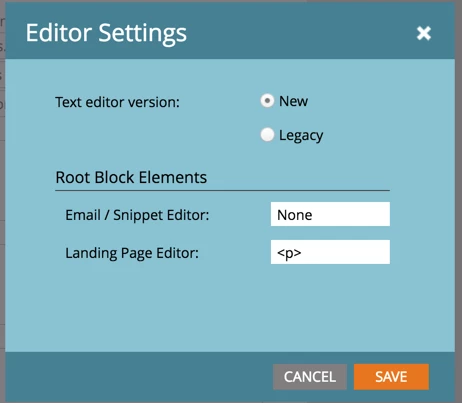
Likely that your editor settings is set to add a <p> when none exists in an email editable zone.

Go to admin->email->Edit Editor Settings. The dialog is as is:

Set the email/snippet to "None".

Be aware this has some drawbacks though (see some of @Justin Cooperman  comments in this Thread New Text Editor is **** ). BTW, Justin, are your concerns still true with the new release ahead?

-Greg

2 replies

Nicholas_Manojl
New Participant
June 1, 2016

I put in empty div tags in the template (I've bolded the addition below)

  1. <td class="text" style="font-family: Helvetica, 'Helvetica Neue', Geneva, Verdana, Arial, Tahoma, sans-serif; color: #333333; ;font-size: 14px; mso-line-height-rule: exactly; line-height: 19px; text-align: left; padding: 25px 15px 15px 15px;"><span style="font-size: 16px; font-weight: 600;"><div>Do you have the real-time visibility you need to deliver the best quality products to your customers?</span><br />Frameworks and tooling around agile and DevOps have evolved to help, but value streams still go dark during the last mile of software delivery as ideas get converted into digital bytes. As we continue to scale agile across our enterprises, the ability to manage value streams from idea to end-user is becoming a critical requirement.</div></td>
Grégoire_Miche2
Grégoire_Miche2Accepted solution
New Participant
May 31, 2016

Likely that your editor settings is set to add a <p> when none exists in an email editable zone.

Go to admin->email->Edit Editor Settings. The dialog is as is:

Set the email/snippet to "None".

Be aware this has some drawbacks though (see some of @Justin Cooperman  comments in this Thread New Text Editor is **** ). BTW, Justin, are your concerns still true with the new release ahead?

-Greg

Justin_Cooperm2
New Participant
May 31, 2016

Yes, nothing changes about the text editor with the release of the Email Editor. Customers can control what the "root block" is for their text as Greg references above. It's totally up to you to decide what is best. Some templates may expect a <p>, some may expect nothing. It's possible to code the template to handle either.