Why is Marketo creating a duplicate form Label? | Community
Skip to main content
Homero_Cavazos1
New Participant
January 15, 2019
Question

Why is Marketo creating a duplicate form Label?

  • January 15, 2019
  • 1 reply
  • 2614 views

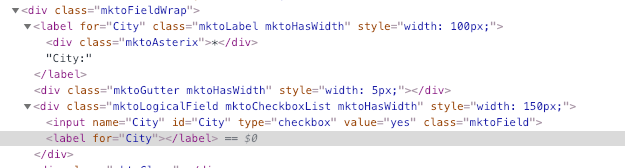
In trying to stay ADA compliant but the form generator creates a blank duplicate label for checkboxes. Is this a bug? Is there a fix? See screenshot.

Thanks in advance
This post is no longer active and is closed to new replies. Need help? Start a new post to ask your question.

1 reply

SanfordWhiteman
New Participant
January 15, 2019

It's because of the possible different order of Checkbox and Checkboxes fields relative to their labels.

You can delete the empty labels using JS if you want, this should do it:

MktoForms2.whenRendered(function(form){

  var formEl = form.getFormElem()[0],

        emptyLabels = formEl.querySelectorAll("label:empty"),

        arrayify = getSelection.call.bind([].slice);

  arrayify(emptyLabels).forEach(function(labelEl){

    labelEl.parentNode.removeChild(labelEl);

  });

});

New Participant
June 15, 2020

I am see four <labels> for each checkbox, all with the same id. This is invalid HTML as well as not being ADA-compliant. 

I believe that Marketo should not rely on site implementors to correct these problems.


<label for="OptInProduction" id="LblOptInProduction" class="mktoLabel mktoHasWidth" style="width: 300px;"></label>
<div class="mktoAsterix">
<label for="OptInProduction" id="LblOptInProduction" class="mktoLabel mktoHasWidth" style="width: 300px;">*</label>
</div>
<label for="OptInProduction" id="LblOptInProduction" class="mktoLabel mktoHasWidth" style="width: 300px;">Tick to Opt-in and receive information from Xerox</label>
<div class="mktoGutter mktoHasWidth" style="width: 10px;"></div>
<div class="mktoLogicalField mktoCheckboxList mktoHasWidth" style="width: 150px;">
<input name="OptInProduction" id="OptInProduction" type="checkbox" value="yes" aria-labelledby="LblOptInProduction" class="mktoField" />
<label for="OptInProduction" id="LblOptInProduction"></label>
</div>