Why Lead source and Lead Status is "Not available" while taking report in Revenue Explorer? | Community
Skip to main content
New Participant
November 2, 2022
Question

Why Lead source and Lead Status is "Not available" while taking report in Revenue Explorer?

  • November 2, 2022
  • 1 reply
  • 2002 views

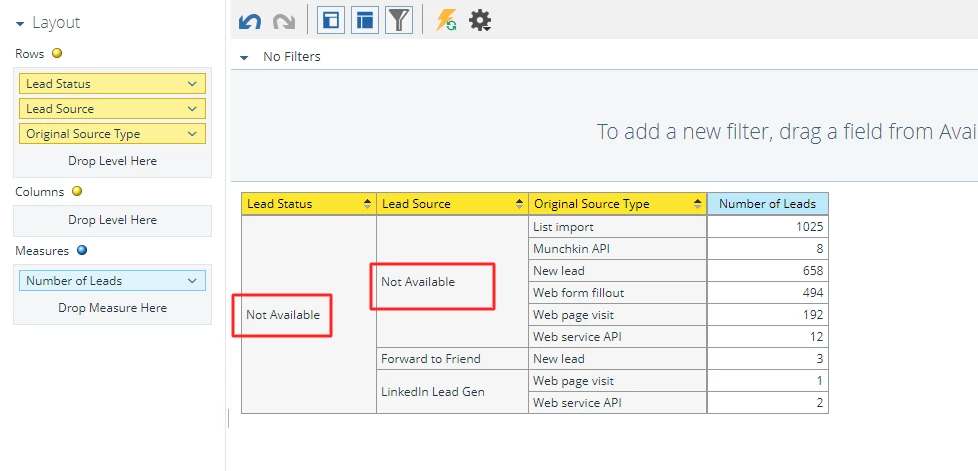
Please refer my screenshot below, I don't know why "Not available" is showing, could any one help me regarding this?
 

This post is no longer active and is closed to new replies. Need help? Start a new post to ask your question.

1 reply

Darshil_Shah1
Community Manager
November 2, 2022

That is because you do not have values for "Lead Status" and "Lead Source" fields for some records in your database. "Lead Source" and "Lead Status" are standard fields that come OOTB in Marketo but they are not populated by the system. You're responsible for populating the data in these fields (typically using a CDV step in the smart campaign). Typically, you'd have a set of pre-defined and documented set of values for these fields, taking into account all the different source and status values identified. 


Note that many integrations like LinkedIn Lead Gen integration also populate the Lead Source field during the lead creation process in Marketo.


If you pull in the Email Address as a measure in the report, you'd be able to see the email addresses of people who don't have values in the respective fields (you can create a SL in the Marketo as well to identify people who do not have values in these fields).


RathiRAuthor
New Participant
November 2, 2022

Thanks for the prompt reply.


But I have another doubt. 
You mentioned that using Change Data Value filter in smart campaign to set the pre-defined value.
I checked in smart campaign, there is no option shown in the name of "Lead Source" and "Lead Status".

Could you please help me this?

Michael_Florin-2
New Participant
November 2, 2022

A Marketo field only has a "pre-defined" value if that list of values comes from your integrated CRM. Meaning: Marketo in and by itself doesn't have the field type "pick list".


What Darshil means, is that you should define a list of Lead Source values that fit your business and assign them through CDV flow steps. This list can vary very much by business and use case, but it could be something like this:

Person Source
3rd party
Advertisement
Customer Seminar
Personal Contact
Public Relations
Social Media
Trade Show
Webinar

Don't have too many values to not impede your comparability. Probably think about having another field like "Lead Source Details" to go more into detail.