Your browser is unable to make a network with Adobe Marketo Engage | Community
Skip to main content
New Participant
January 9, 2024
Solved

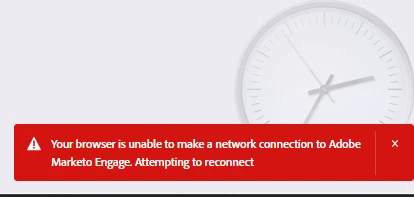
Your browser is unable to make a network with Adobe Marketo Engage

  • January 9, 2024
  • 4 replies
  • 5344 views

Have you ever seen this message? it appears constantly and I don't know the reason why.


I'm using the Google Chrome browser 

any help will be appreciated


This post is no longer active and is closed to new replies. Need help? Start a new post to ask your question.
Best answer by Darshil_Shah1

I don't think there's a way fix to that; it's something that Adobe has introduced in their product to signal when the connection is lost with the browser (probably due to the browser terminating (maybe partially) the connection after a period of inactivity).

4 replies

New Participant
January 23, 2024

Hi, Did you find a fix for this issue? Me and my team are having the same problem.

ArturoOliAuthor
New Participant
January 23, 2024

Hi @haroonra 


I couldn’t solve the problem yet.


Regards!

Arturo.

Michael_Florin-2
New Participant
January 23, 2024

Is this really a problem? I see that message sometimes too, and yes, it's mildly annoying, but eventually it's inconsequential, so I just ignore it and keep on doing what I'm doing. 

Zoe_Forman
Community Manager
January 10, 2024

My default browser is FIREFOX, but sometimes I jump into Chrome or EDGE, and the red warning appears across all browsers.


My observations are it is not necessarily related to inactivity but mostly when downloading HTML files and usually just flashes up for a second and disappears not causing any slow down.

I only started seeing this at the end of 2024 and a few times this year so maybe a recent update change?

New Participant
January 23, 2024

Hi, We started to have the same issue in our office.


Did anyone find a fix for this? Is it Marketo or some proxy settings?

Darshil_Shah1
Community Manager
January 10, 2024

I have also been this after a period of inactivity, particularly after installing new browser (Chrome to be particular) updates! I never saw this before, so Adobe might have implemented this recently; they may have replaced the "Can't Reach to Marketo" error dialogue box that used to appear on the screen with this little prompt.

New Participant
January 23, 2024

Hi Shah, Did you manage to fix it? me and my colleagues have exact issue stated.

Darshil_Shah1
Darshil_Shah1Accepted solution
Community Manager
January 23, 2024

I don't think there's a way fix to that; it's something that Adobe has introduced in their product to signal when the connection is lost with the browser (probably due to the browser terminating (maybe partially) the connection after a period of inactivity).

SanfordWhiteman
New Participant
January 9, 2024

Are you behind a corporate proxy that may have trouble with websocket connections (a specific type of client-server connection that some intermediate servers still struggle with)? That would be the most common cause if you’re seeing this all the time.


I’m not behind such a proxy and still see the error after periods of inactivity, though not while in the midst of work on my many instances.

lorie_witmer4
New Participant
January 9, 2024

I am getting this all the time as well, in the last 2 weeks.
