
Monthly Hot Topics from your Workfront Scale Customer Success Team | Community
Skip to main content
CynthiaBoon
Employee
October 4, 2023

Monthly Hot Topics from your Workfront Scale Customer Success Team

  • October 4, 2023
  • 28 replies
  • 20575 views

Welcome to our Monthly Hot Topics Blog!  

First things first – if you’ve seen our Hot Topics posts in the past, you may have noticed that this update is posted as a Blog instead of a Discussion.  

Why did we do that? Our hope is to make our recurring updates and our series updates easier for you to find, AND to provide a way for any “non-Sys Admins” to receive notifications when we share upcoming events and hot topic posts.  

How will this work? Each month we’re going to post a new Comment with all the latest events, news, and posts to (hopefully) make finding updates much easier.  

To make sure you get the latest, you’ll want to subscribe (and make sure to encourage your Group Admins and Power Users to subscribe too). How do you do that?

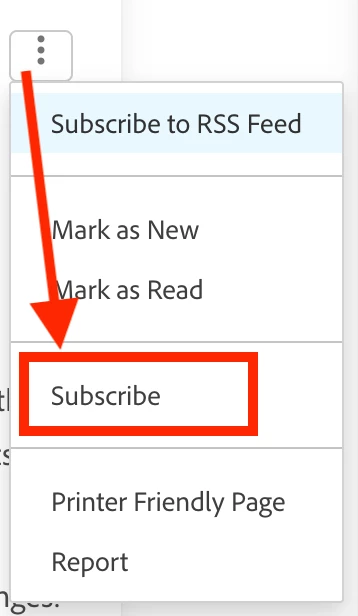
  1. Click the 3 dots in the top right of this post. (It’s called the Kebab Menu! Just learned that today!) 
  2. Click Subscribe. 
  3. Then relax and wait for the notifications to come in every time we add a new comment to this post.  

Here’s a screenshot: 


If you have any questions in the meantime, please don’t hesitate to reach out via email at csatscale@adobe.comWe look forward to connecting with you! 

Cynthia, Leslie and Nichole 


Quick links to all the Hot Topic Posts! 

October 2025

September 2025

August 2025

July 2025

June 2025

May 2025

April 2025

March 2025

February 2025

January 2025

December 2024

November 2024

October 2024

September 2024

August 2024

July 2024

June 2024

May 2024

April 2024

March 2024

February 2024

January 2024

December 2023 

November 2023 

August + September + October 2023 

June + July 2023 

April + May 2023 

March 2023 

February 2023 

28 replies

CynthiaBoon
Employee
October 30, 2025

November 2025 Hot Topics 

Halloween is minutes away, so that means November is almost here! Let’s get going with some cool advice and hot tips! 

ICYMI! The Adobe Workfront Fourth Quarter 2025 Release was deployed on October 16th! Interested in the new features, including the New Request Experience? Make sure to read through the release notes on Experience League so that you're up to date on what changed and what was deprecated. 

Speaking of events, we have nine coming up in November!  Check out what’s on the calendar and catch up with anything you might have missed in October: 

Advice from your Adobe Workfront Champions! Your Champions have been busy this past month, sharing their knowledge - hosting events, posting advice in the Experience League Community, and leading discussions during local Workfront User Groups!  

Events: 

Community Discussion Posts: 

Workfront User Group Recaps: 

We have a “sharing is caring” update this month.  Did you catch the Workfront Pro Tips for Governance, Execution, & Adoption event earlier this month?  If not, here are some great additional tips that were shared by attendees in the chat.  Look out for a Part 2 of this event coming soon! 

  • While Workfront does have the Log In As feature within Setup, consider implementing browser profiles within Google Chrome to enable simultaneous login as different users for quicker testing.   
  • Frequent the Workfront Community forum to crowdsource answers and knowledge share with other like-minded Workfront admins   
  • Governance requires establishing a committee with system administrators, group admins, and other leaders to oversee instance management across multiple organizational units. Download the Governance Blueprint here (this will auto-download a file)  
    • Key governance components include group administration models, request queue management, naming conventions, and new process integration procedures 
    • Governance committee size can be based on the number of groups, departments, and the complexity of workflows rather than total user count. Aim for at least one representative per group or major workflow, ensuring they can speak to their team’s processes; if they also serve as system or group admins, plan roughly 3-5 admins per mid-to large-sized group.  
  • Naming conventions using three-letter prefixes help organize and search for objects across different groups, with spaces in custom field names improving searchability  
  • Execution focuses on using native Workfront features like milestones, approvals, workload balancer, and logged time rather than building custom solutions  
    • External lookup fields (in your custom forms) can be a great option to help with automation, improved reporting, and form complexity! While custom field logic controls which questions appear, external lookup fields control which values are available within a field.  
  • Adoption improves through reducing complexity in templates and processes, customizing layout templates for different user personas, and eliminating unnecessary clicks  
    • Consider simplifying lists (views, filters, and groupings) 
    • Take advantage of sharing/merging columns in your lists or reports to combine multiple pieces of information into a single column. Learn more in the video, Top 3 Reasons to Create a Shared Column Report 

Last call for Chicago-area customers! We have a couple of seats left for the November 12th in-person meetup for an informal lunch and learn/networking event and chat about Workfront Governance with the Workfront Customer Success Scale Team. 

We’ve got one more Hot Topic post left for 2025, so we’ll see you in December! 

CynthiaBoon
Employee
October 2, 2025

October 2025 Hot Topics 

Autumn is here, and along with all of the pumpkin things, let’s have a hot cup of updates! 

Congratulations to our inaugural Adobe Workfront Champion class of 2025-2026! Adobe Champions are more than just product experts — they’re catalysts for change and they will help shape the future of Adobe applications. 

Calling all Seattle Workfront Fusion customers! Interested in participating in a FREE, hands-on lab in Seattle, for a day of in-depth exploration of the capabilities within Adobe Workfront Fusion? Click here for event details and registration information! 

Calling all Chicagoland customers! The Workfront Customer Success Scale team will soon be visiting Chicago and are working to pull together a Lunch & Learn for November 12th.  If you will be in the area that day, and you are interested in the details, please email us at csatscale@adobe.com. 

Adobe MAX & Adobe Summit are coming in hot!  

  • Adobe MAX is coming up in Los Angeles and online on October 28-30, where global creative customers attend to hear the latest product announcements, learn new skills, and find inspiration through our amazing lineup of speakers and hands-on sessions. Check the pricing and register today! 
  • And save the date for Adobe Summit! Join us April 19–22 in Las Vegas or online for Adobe Summit 2026 — and save US$600 on registration when you subscribe to the mailing list. Sign up and save today! 

The Fourth Quarter release of 2025 is coming up on October 16th and you won’t want to miss out on the latest features.  This release includes some exciting new enhancements including: 

Register today for the Fourth Quarter (25.10) Release Event scheduled for October 9, 2025, at 8:00 a.m. PT.  Here's the registration link: Adobe Workfront Fourth Quarter 2025 Release Webinar 

And don’t forget to register for the Experience Cloud Roadmap Webinar Series, where the Product Team shares a high-level preview of what’s coming in the months ahead. 

Speaking of events, we have TWELVE events coming up in October.  Check out what’s on the calendar and catch up with anything you might have missed in September! 

Hot off the press! We have two new posts to help add value to your Workfront journey, and both posts include bonus content! 

Don't start from scratch! Check out the latest Blueprints! 

  • Active User Analysis Reports: This blueprint contains a dashboard to help administrators validate user setup, identify misalignments, and ensure configurations support intended application use.  
  • Baseline Dashboard: This blueprint contains a single dashboard with 4 reports that show task and project changes from the baseline(s) captured at either the beginning or during the project. Use these reports to see important timeline and effort changes that may differ from the original baseline or subsequent baselines. 
  • Looking for more? Here's the list of all current Blueprints. 

October WUG Events! Workfront User Groups (WUGs) are your chance to connect locally! Here’s 5 reasons to join a WUG (from So. California WUG co-leader, Becky Barus).  

  • SoCal: Fall Happy Hour (10/8)  
  • Colorado: Unlocking Fusion (10/14)  
  • Central [MO, AR, IA, KS, NE, OK]: Boosting Adoption (10/20)  
  • Toronto: WUG Kick-off (10/22)  
  • Ohio: Tricks and Treats of Workfront (10/27)  

These groups have kicked off and will have more soon!  

Central [MO, AR, IA, KS, NE, OK] | Colorado | Ohio | Philadelphia | Pittsburgh | So. California | Utah | Toronto | DMV [DC, MD, VA] 

Have you signed up yet? Be sure to check the Chapters page for updates on new chapters in your area! 

Have a fabulous October, and we’ll see you in November! 

CynthiaBoon
Employee
August 29, 2025

September 2025 Hot Topics 

With the start of September, our minds might be turning towards cozy coffees and falling leaves, our topics are still hot! 

The Workfront Skill Exchange was last week! Hopefully by the time you are reading this, the session recordings will be posted, but in the meantime, some of our presenters (and Workfront Rockstars!) already posted their slides and resources in the Community. 

Let’s talk about the MEGA WUG! Do you want to connect with other Workfronters and go deeper into the Skill Exchange topics?  Sign up for the MEGA WUG today. All are welcome! 

Speaking of WUGs – Just a reminder that Workfront User Groups (WUGs) are your chance to connect locally! Here’s 5 reasons to join a WUG (from SoCal WUG co-leader, Becky Barus). Coming to an area near you:  

Speaking of Events, we have so many exciting sessions scheduled for September! 

Do you have opinions about the future of Workfront? Of course you do! Don’t miss out on your chance to share your feedback. 

And speaking about the future of Workfront, Adobe hosts the Experience Cloud Roadmap Webinar Series twice a year  for the portfolio of solutions, offering customers a high-level preview of what’s coming in the months ahead. The Adobe Workfront product team will share an inside look at recently released features, upcoming enhancements, and what’s on the horizon for the Workfront roadmap. This 45-minute live session offers a unique opportunity to preview what’s coming next, ask questions in real time, and engage directly with the team shaping the product’s future. 

  • Click here to register and explore the full webinar schedule! 

Workfront Planning turned 1 year old this week! To celebrate, we had an amazing customer, Heather MacDonald from SNHU, share how her team uses creative approaches with Planning. Check that session out along with the other events in our series below.

See you again in October with more updates! 

CynthiaBoon
Employee
August 1, 2025

August 2025 Hot Topics 

August is here and the temperatures are rising, so let’s cool down with some cool updates! 

Headline News! It’s Skill Exchange time! The Workfront Skill Exchange session is scheduled for August 21st, so don’t miss this opportunity to gain best practices, explore innovative strategies, and connect with peers through shared learning. 

  • Check out the Skill Exchange Event page for more info and save the date! 
  • What makes this event special? These sessions are led by other customers just like you who will share their own proven strategies, lessons learned, and real-world results! 

Speaking of events, we have so many on tap for you this month! 

The Latest on WUGs! Workfront User Groups are your chance to connect locally! Here what’s coming to an area near you:  

Our next quarterly release is scheduled for October 16th Make sure to bookmark the Fourth Quarter 2025 release overview page to stay up to date on the latest enhancements before they go live. 

From our “sharing is caring department”, did you miss this month’s Workfront Collective? We talked about ways to quickly train your end users on the system, processes, and updates.  Here are some of the tips from the session:  

  • Hold regularly scheduled office hours, lunch and learn sessions  
  • Get on HR's radar to be notified of new hires  
  • Consider using your champions as mentors (and as Group Admins that can help with training)  
  • Create training projects with tasks and hyperlinks to applicable content, similar to the Workfront Training for New Users Blueprint  
  • Consider also using a fun “Getting to Know You” project to help train your users  
  • Everyone shared different tools and ways of recording, but this is a great addition to your approach to training users.    
  • Also, slide decks are good, but one-pagers might be more accessible  
  • We also received lots of ideas for communicating changes, whether it be via the Announcement Center messages, email newsletters, SharePoint, Teams, but you can also use Workfront Projects and Dashboards, pinned to users Layout Templates with links out to helpful documentation or videos  
  • When thinking about how to communicate training updates, consider a 1-question survey.  You might be surprised by your user’s communication preferences!  
  • When holding training, consider whether you are training on the Process or the Tool, and which order that makes the most sense. (Also, and whether someone from the business org should lead the process training.) 

Our topic for the August 25th Collective will be how customers document the management of their instance. Sign up today to join the conversation and share your best practices! 

September is just around the corner, so we’ll see you soon (dreaming about autumn)!  

CynthiaBoon
Employee
June 27, 2025

July 2025 Hot Topics 

Surprise!  We published our updates a little early this time to make sure that you all had the latest news! 

First up, a reminder that your Workfront Scale team will be taking a break the week of June 30th – July 4th but never fear, Experience League is always open, and Workfront Customer Support is available 7 days a week, 24 hours a day.  

We also wanted to make sure we shared these important announcements on some integration and version updates. 

Speaking of updates, the Third Quarter release of 2025 is coming up on July 17th and you won’t want to miss out on the latest features.  This release includes some exciting new enhancements including: 

Don't forget to register for the Adobe Workfront Third Quarter 2025 Release Webinar scheduled for July 10, 2025, at 8:00 a.m. PT.   

So many more events are coming up! In addition to the registration links for our upcoming events, this post includes links to some of our most recent on-demand posts! 

New (free) course alert! The Workfront Planning course is now available for free! No subscription or individual course payment required.  Learners will still need to long onto the ADLS website, learning.adobe.com. 

  • BONUS! If you weren’t aware, the Worker Fundamentals course is also free for learners!  

New Perspective alert! Two of our amazing Community Advisors, @kurt_jones and @skyehansen, share their personal journeys — from being “voluntold” to becoming certified Workfront experts — highlighting how certification helped elevate their knowledge and impact. 

Lastly, are you looking for a practical and comprehensive checklist to navigate the complexity of your Workfront Reporting? You’re in luck! Download the guide, 8 steps to create simple, effective reports in Adobe Workfront, to build reports with ease and confidence.  

We’ll have more updates in August, including the details for the Workfront Skill Exchange on August 21st! 

CynthiaBoon
Employee
June 2, 2025

June 2025 Hot Topics 

Where them fans at?!  Let’s kick up some dust and get moving with our June updates! 

First things first – we're on the clock! Applications are now open for the first ever Adobe Workfront Champion Program, and they close on June 10th.  If you are passionate about Workfront and love connecting with others about the solution, complete your application today!  Need more information first? We’ve got you! 

Speaking of time, don’t miss out on your chance to share your Adobe Workfront Experience on Gartner Peer Insights! Reviews of Adobe Workfront on Gartner Peer Insights will directly influence Adobe’s position in upcoming Gartner Magic Quadrant reports and help buyers of work management products make confident, informed purchase decisions. 

The survey will take around 10 minutes, and the deadline is Friday, June 6, 2025. You will have the option to receive a $25 gift card as a thank you when your review is published. 


New On-Demand Resource! We’re always looking for inspiration for creative ways to use Fusion, so just in case you missed it, our Field Engineering group presented their recommendations during an event in April, and we have the recording available below: 

Looking for more events? In addition to the registration links for our upcoming events, this post includes links to some of our most recent on-demand posts! 

Speaking of cool ideas? Did you attend the Creative Ways of Managing Resources in Adobe Workfront event on May 20th? It’s hard not to be inspired by all of the unique, outside the box approaches to using Workfront!  That session created a lot of buzz around leveling up reports with charts and matrices, so if you’re just getting started, check out these resources: 

We all know how amazing our Workfront Community Advisors are, and they are absolutely raising the bar.  Last month, they hosted an AMA event about all things Proofing, and next month they are sharing their best practices on getting your Workfront certifications. Interested in reviewing resources before the June 10th AMA? Check out the links below: 

Workfront User Groups are heating up! WUGs are active for Southern California, Michigan, New York City, Pittsburgh, Central Missouri, DC-Maryland-Virginia, and Boston/New England regions. 

Have you signed up yet? Be sure to check the Chapters page for updates on new chapters in your area! 

Gentle reminder that your Workfront Scale Team will be off the week of June 30th – July 4th, but as always Experience League is always open, and Workfront Customer Support is available 7 days a week, 24 hours a day.  

Your next Hot Topic post will arrive the week of July 7th! There’s already a full week of sessions, so don’t miss out and register today. 

See you next month! 


CynthiaBoon
Employee
May 1, 2025

May 2025 Hot Topics 

It’s Gonna Be May! 

May is a longer month, and we are taking advantage of those extra days with no fewer than ten (yes, 10!) Workfront events this month.  In addition to the registration links for our upcoming events, this post includes links to some of our latest on-demand events. 

Are you passionate about Workfront and eager to share your expertise with the community? The Adobe Champion Program is a prestigious opportunity that extends to top product users of Analytics, AEM, and Marketo, and NEW this year, Workfront. Interested? Learn more below! 

Update on Workfront User Groups! We introduced the new WUGs a few months back, and they are growing!  Check out the latest below, and if you’re interested in joining, or maybe even leading one in your area, please submit your name. 

Short on time? Check out the latest short-form videos, starting with the fabulous (@Lyndsy-Denk)! 

Speaking of Lyndsy, she, along with Monique (@MoniqueEvans), and Richard (@Richard__Carlson), are hosting a Community Advisors AMA event answering your questions around Proof.  Keep in mind this is a text-only event, there is no link/video to join! Just post your question as a reply to the thread and it will be answered during the 1-hour “event”.  Add it to your calendar today! 

From the fantastic advice department, we spent some time during this month’s Workfront Collective discussing Resource Management in Practice.  Just in case you missed it, here are some of the great tips shared by customers in the chat: 

  • I'd argue that all of it is process. If you can't quantify it as a process with the people in place, then tech isn't gonna do anything  
  • We don't do timesheets in WF, but we do make people log hours so we can get accurate estimates of task time.  We do an annual template review and adjust our planned task hours based on this data.  
  • Our PMs do their best to build out project plans with hours and user assignments and update them weekly. We pull the team information from Planner weekly and have a conversation with all the leaders/managers to discuss the week's workload and priorities and rebalance work as needed.  
  • While there are still some limitations, I pose that it's essential to:  
    • Build Schedules in Setup.  
    • Assign Schedules to each user based on their location.  
    • Consider telling the project which Schedule to use.  
  • We default projects to schedule tasks based on user schedules, but in the case of sending emails, we sometimes change the project schedule to the one associated with the country/time zone in which the email is going to deploy.  
  • We allow people managers to make assignments on their teams as needed, but my team (I'm not really a PM, but the others are) meets weekly to view workload balancer and make group decisions about moving work around to prioritize and not overload teams/individuals.  
  • For some of our learning projects, we've tried to pare down the durations/planned hours for the actual tasks, but we added buffer tasks in front of them--the buffer durations can be expanded or shrunk to make sure they happen when capacity is available.  
  • We have a universal schedule for packaging since holidays don't matter, and all of those projects use that schedule  
  • My thinking has long been that if people aren't actually working together on a task, directly communicating and collaborating, then only one person should be assigned  
  • Update the system each year with the different holidays in the countries of your users.  I also make a global calendar, so everyone knows when the holidays are  
  • We have a field in the project form where the PM can enter reason for delay of project. Usually the delay is client approval or scope creep. 

See y’all in June! 

CynthiaBoon
Employee
April 1, 2025

April 2025 Hot Topics 

April has arrived and we have a host of new updates –no pranks included! 

It's a wrap for Adobe Summit 2025! Whether you attended in-person or virtually, you have a second chance to check out the amazing sessions from the conference. Here are a few of the highly recommended events:   

Speaking of events, check out the events scheduled this month and links to the on-demand sessions from last month! 

The Second Quarter release of 2025 coming up on April 10th and you won’t want to miss out on the latest features.  This release includes some exciting new enhancements including: 

Don't forget to register for the Second Quarter (25.4) Release Event scheduled for April 3, 2025 at 8:00 a.m. PT.  Here's the registration link: Adobe Workfront Second Quarter 2025 Release Webinar 

Speaking of releases, have you tried out the new personalized homepage on Experience League? Discover a smarter way to learn with Experience League and start saving time, building skills, and growing your career like never before.   

From the ICYMI Department: 

More updates to come in May! 

CynthiaBoon
Employee
February 28, 2025

March 2025 Hot Topics 

March has arrived and spring is almost here! Hoping everyone is seeing better weather and clear skies.  We have tons of updates hot off the press, so let’s get into it! 

New Blueprint Alert! This one is a game-changer if you’ve been building your own Workfront training efforts. The latest Blueprint was just released to help System/Group Administrators responsible for training new Workfront users. Creating enablement materials can be time-consuming, but we’ve lightened the load by curating three project templates, organized by persona, to assist you with training new users in Workfront. 

  • Project Managers  
  • Workers / Assignees   
  • Contributors / Requestors / Reviewers 

To learn more about this Blueprint, check out this post on Experience League!  

The full library of available Blueprints is available from the set-up menu within Workfront. 

Network and collab with peers! Workfront User Groups (WUGs) are back for 2025! These customer-led groups bring together regional Workfront users virtually and/or in person to create open and inclusive communities to: 

  • Network with peers 
  • Collectively problem-solve 
  • Share tips and best practices 
  • Provide ongoing education for skill improvement 
  • Help users succeed with Workfront 

The first two chapters just launched – WUG-Southern California and WUG-New York City. 

Want to get involved? Visit (and bookmark) the WUG site to join a chapter or volunteer to be a User Group leader by filling out this form. Don’t see a chapter near you? Check back often as new chapters and events are always being added. 

We’re just a couple of weeks away from Adobe Summit – Last call before the big show! If you are planning to attend in-person, let us know by commenting on this post! In-person networking opportunities in between keynotes, labs, and sessions are being organized and we want to make sure you’re in the know. 

If you can’t make it in person, make sure to register for the virtual conference where you can watch select Summit sessions online to learn about the latest digital trends and broaden your skillset.  Build your conference schedule with the Session Catalog here. (Select in-person sessions will be available on demand in late March.) 

Whether you’re attending in-person or virtually, don’t miss the most popular Workfront session at Summit! The Future of Adobe Workfront: Join Adobe Workfront product leaders to get a sneak peek at the roadmap and future of strategic planning and workflow. 

In addition to Adobe Summit, we’ve so many events on tap for March.  Make sure to register today! 

Speaking of events - Did you miss any events in February? We’ve got the follow-up links for your convenience below: 

Best practices alert! We received so much fabulous advice in the chat during the Securing Executive Sponsorship event, that we had to share it! 

  • Set up a governance process and workflow for Workfront projects to ensure alignment with business goals.  
  • Implement a cadence of regular meetings with business sponsors and executive leadership to showcase Workfront's impact and value – focus on the metrics that matter, things like time/cost savings, efficiencies.  
    • Qualitative metrics like visibility and productivity are also valuable   
  • Dedicate time with teams or individuals who are invested in Workfront. With their engagement, you can stabilize and optimize their use of the system. When other teams see and hear about their successes, you may find them knocking on your door. 
    • Encourage employees who are enthusiastic about Workfront to share their success stories - word of mouth can be a powerful motivator. 
  • Track YOUR work in Workfront and set up a proper funnel for work requests  
    • Show what Workfront can do with your own work. Help yourself by delivering a dashboard that helps executives guide your priorities.  
  • Ask qualifying questions (5 “whys”) before starting projects to get to the root problem and showcase your investment in learning more   
  • If you inherited a Workfront instance and users are challenged with the initial setup, take the time to learn and assess the current situation: the data, the processes, the roles and responsibilities  
    • Option to conduct interviews to understand the issue and then craft a business plan to fix or solve the problem  
    • Workfront will not fix a broken process so take the time to think though, define, and document processes before implementing them in Workfront 

Looking forward to sharing more updates next month after Adobe Summit! 


CynthiaBoon
Employee
February 3, 2025

February 2025 Hot Topics 

February is the shortest month, so let’s get going before time slips away! 

Speaking of time flying, Adobe Summit is just around the corner and the session catalog has been posted. The conference is back in Vegas, March 18–20, 2025, with preconference sessions scheduled for March 17.  

  • Register now to take advantage of the reduced price through February 13. Still making the case to go? We've attached an updated version of last year’s Convince your boss letter to the blog below to help you make your case! 

January was busy! We were able to offer several events last month and share those recordings, so if you missed any, check out the session follow-ups below: 

Our next quarterly release is scheduled for April 10th Don’t miss out on the new features listed on the Second Quarter 2025 release overview page.  Just in case you missed our first quarter release webinar with Product, we have the recording link for you.   

You get an event, you get an event, everybody gets an event! We have some amazing events this month, so register now! 

Did you miss January’s Admin Chat session? We had a fantastic discussion about the pros/cons of changing or not changing dates in your project timelines! Here are the tips/best practices that were shared by customers during the event  

  •  Whatever route you choose, be consistent and do what works best for your organization, your processes, and your people. There are plenty of reports that can be run that support either way!   
  • Understanding the object hierarchy and 1:1 vs 1:many (collections) relationships in Workfront. When thinking about how objects are structured in Workfront, you have Portfolios – Programs – Projects – Tasks, for example. Because a portfolio can have multiple programs, a program can have multiple projects, and a project can have multiple tasks, when you go to report on those objects, you’re looking at collections (top down). To avoid text mode, always start at the “bottom” object so that you’re reporting up – 1:1 relationships. A task can only be associated with 1 project, a project can only be associated with 1 program, a program can only be associated with 1 portfolio. 
    • If you’re interested in learning the basics of text mode and text mode collections, check out the on-demand event, 10 Text Mode Tips in Adobe Workfront (the beginning 10 minutes is an intro to text mode)  
  • Recommendations for adding forecasted work/projects in Workfront:  
    • Leverage a Forecasting portfolio to easily filter this out of reports  
    • Utilize statuses (Planning) or custom statuses (Forecasting) until it’s ready to be worked on  
    • Build a request queue to capture issues/future projects if work is being requested by teams or departments – convert them right away  
    • Look at past YoY data and then create placeholder projects so you can forecast how much work you anticipate. Revise placeholders as you get more information.   
    • “Planned work does not need to be requested” - go straight to project creation!  
    • Custom forms: You can add up to 10 custom forms on an object. If you are going to have multiple forms on an object, the same custom field can appear in each form. However, if it is a calculated field, each form must use the same calculation, or you will get an error.   
  • Status Timestamps: If you want to create a calculated custom field to track the date/time a status was first triggered, use this calculation. Keep in mind that you need to create the field first (format = Date), click Apply, and then go back in to add the calculation.   
    • IF({status}='STATUS KEY'&&ISBLANK({DE:Name of calculated custom field}),$$NOW,{DE:Name of calculated custom field}) 
  • Along with the status timestamps, you can also use a Completion Status calculated custom field that provides in words a comparison between the planned and actual completion dates.  
    • IF(WEEKDAYDIFF({plannedCompletionDate},{actualCompletionDate})<0,"Ahead of Schedule",(IF(WEEKDAYDIFF({plannedCompletionDate},{actualCompletionDate})=0,"On Schedule",(IF(WEEKDAYDIFF({plannedCompletionDate},{actualCompletionDate})>0,"Behind Schedule","")))))  
  • Organizing and reporting on campaign-related projects: For larger projects/campaigns, you can create "master projects" and then use those projects to “hold” sub projects or leverage cross-project predecessors to tie them together. Option to use parent and child projects for multi-deliverable projects. Each deliverable is a project.  
    • If you are interested in connecting with Professional Services for a review and optimization package (custom session tailored to how your organization is using Workfront), reach out to your Account Manager to learn more! 

We’ll be back in March with more updates!