Business Case for Workfront Fusion and Excel | Community
Skip to main content
KellieGardner
New Participant
February 29, 2024
Solved

Business Case for Workfront Fusion and Excel

  • February 29, 2024
  • 2 replies
  • 962 views

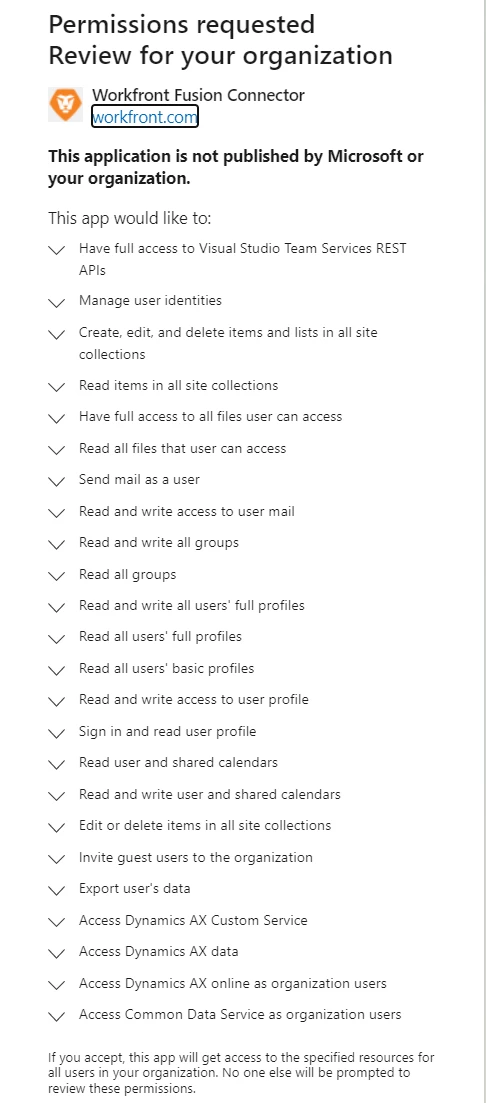
I'm creating a business case for connecting Workfront Fusion to Excel (aka SharePoint) via a Microsoft Form. To do so requires approval from our IT Admin department. I would like to provide them with some technical documentation around what will happen when I allow access to my account. Things like, what all does it have access to, ability to read, ability to write, etc. What are the security risk and implications?


I have not been able to find any of this information on experience league. When I reached out to support in short I was told there isn't any documentation on it available which isn't proving fruitful in my use case in showing the organization that it won't pose a risk.

"The permissions that you are going need are going to be dependent on what you want to use the connection for. In other words, you get to decide what permissions are allowed from the SharePoint side. This would be why there are not more specific technical specifications. It could be as simple as allowing them to read a list "Sites.Read.All" or it could utilize a custom API call which could use any number of scopes in SharePoint depending on the call that is utilized. The best option would be to first decide what you are going to utilize Fusion for, then determine which scopes are necessary, and set those permissions for the account that is used with Fusion."


Has anyone had to create a business case for doing this and if so, could you share any insights into working with the team to get something like this approved. 

This post is no longer active and is closed to new replies. Need help? Start a new post to ask your question.
Best answer by Rafal_Bainie

Hi Kellie,

I can share experience, although it isn't a positive one.

Enabling SharePoint connection in Fusion requires basically allowing for full access to the SP (all sites).

IT team at my organization wasn't comfortable with doing so, because after granting permissions it would be up to Fusion designer to decide what and how to edit. Normally they would prefer to have control over this.

I would love to see Fusion connector is only requesting access to specific collection or site. That way it would be way easier to convince someone to grant the access.

That's my experience

2 replies

KIMBERLYREA
New Participant
March 13, 2024

Hi Kellie, What is your usecase for this? I'm curious because we have been looking into this option as well. Is this to gather survey data from MS Forms and place into an excel file in Sharepoint? 

Rafal_Bainie
Rafal_BainieAccepted solution
New Participant
March 1, 2024

Hi Kellie,

I can share experience, although it isn't a positive one.

Enabling SharePoint connection in Fusion requires basically allowing for full access to the SP (all sites).

IT team at my organization wasn't comfortable with doing so, because after granting permissions it would be up to Fusion designer to decide what and how to edit. Normally they would prefer to have control over this.

I would love to see Fusion connector is only requesting access to specific collection or site. That way it would be way easier to convince someone to grant the access.

That's my experience