
Extract specific column from Data Store | Community
Skip to main content
lgaertner
New Participant
September 15, 2023
Solved

Extract specific column from Data Store

  • September 15, 2023
  • 1 reply
  • 972 views

Hello,


In the course of formulating this problem, I keep thinking that this should not be a challenge after all. Unfortunately, I've been trying around here for ages without success.


I do have a Data store containing multiple rows of contacs with multiple columns like name, category, email, ...


Now I want to fetch all email addresses of the people who have a specificcategory.

So I added a Data store module using the filter category = xy to get those contacts. Afterwards I want to just process the email addresses of those contacts to insert them into an array field in WF. But unfortunately I have no clue to do so.


I tried around with array aggregators, text aggregators and so on. Perhaps someone could help me to get back on the correct track.


Thanks in advance.


Regards

Lars
This post is no longer active and is closed to new replies. Need help? Start a new post to ask your question.
Best answer by cverges

Wait, I re-read your message and think I now understand.  How about this?

I'm attaching the blueprint for your reference/inspection.

1 reply

New Participant
September 18, 2023

Hi Lars,

I'm trying to follow the actual ask, so apologies if I get something wrong.  I think you have a data store structured like this:

  • Email Address
  • Category

If the Category is a value of xy, then you want to process those values, such as aggregating them together.

So you'd want something like this:

Where the search on the data store is like this:

And the text aggregator is like this:

(You can obviously use a different text aggregator approach as needed!)

Does that answer your question?

CV

cvergesAccepted solution
New Participant
September 18, 2023

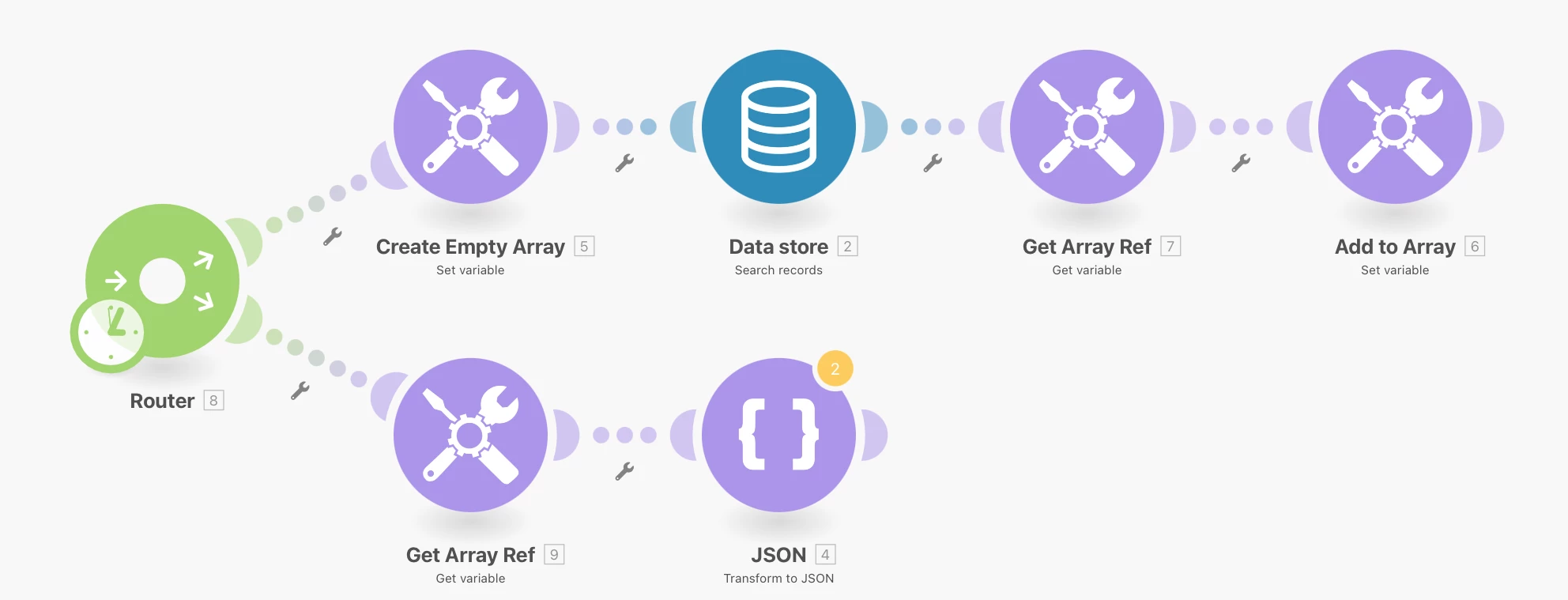
Wait, I re-read your message and think I now understand.  How about this?

I'm attaching the blueprint for your reference/inspection.

lgaertner
lgaertnerAuthor
New Participant
September 19, 2023

Hey CV,


Wow, thanks a lot for your effort! It is working as expected but at the moment I do not really understand why. 😂

I also worked with set / get variable when trying around on my own. But it did not work then. 


So in the upper string you are calling Get variable right behind the search operation on the Data store. I did not do that before, what led to the fact, that although there are multiple entries in the data store matching to my filter only the last one was saved to the array variable.

So my mistake was to reference the wrong state of of the array.


Thanks a lot for this solution!


Regards

Lars