Fusion Date functions: locate objects updated within last 2 days | Community
Skip to main content
New Participant
January 9, 2024
Solved

Fusion Date functions: locate objects updated within last 2 days

  • January 9, 2024
  • 3 replies
  • 875 views

Hi. What would be the syntax in Fusion when I want to retrieve and object only if it was last updated within the last 48 hours or 2 days: 
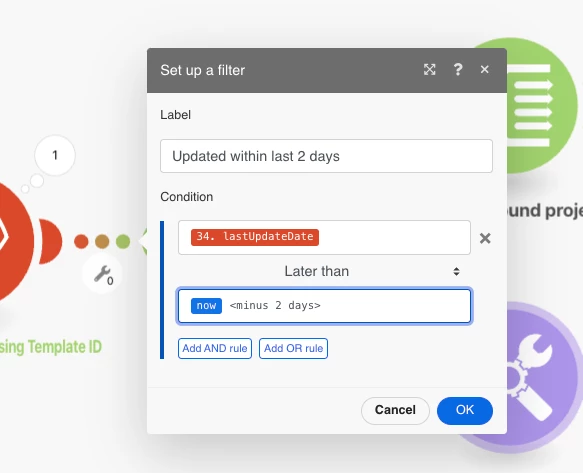


Sorry if this is documented elsewhere, but I couldn't locate this detail in my Searches. 



This post is no longer active and is closed to new replies. Need help? Start a new post to ask your question.
Best answer by KellieGardner

you would want to do add days and then use a negative number to go back 2 days. 


addDays({now};-2)


There is some documentation here on functions in fusion


https://experienceleague.adobe.com/docs/workfront/using/adobe-workfront-fusion/functions-in-fusion/date-and-time-functions.html?lang=en

3 replies

ChrisStephens
New Participant
January 10, 2024

Instead of doing it in a filter, you could just add it as a parameter to your query, to the effect of


lastUpdateDate = {today -2}

lastUpdateDate_Mod = gt

KellieGardner
KellieGardnerAccepted solution
New Participant
January 9, 2024

you would want to do add days and then use a negative number to go back 2 days. 


addDays({now};-2)


There is some documentation here on functions in fusion


https://experienceleague.adobe.com/docs/workfront/using/adobe-workfront-fusion/functions-in-fusion/date-and-time-functions.html?lang=en

Mylah_DAuthor
New Participant
January 9, 2024

I think I found the solution on this thread: https://experienceleaguecommunities.adobe.com/t5/workfront-fusion-2-0-questions/wildcard-date-filters-in-fusion/td-p/491963


Does this look right?: 

Thanks in advance for your help.