Notify Multiple Users on Task Release | Community
Skip to main content
RAshley
New Participant
July 25, 2024
Solved

Notify Multiple Users on Task Release

  • July 25, 2024
  • 2 replies
  • 2496 views

A group in our org has 9 custom user fields on the Project object that are various points of contact for the projects. They also have a custom task status called "Released". The requirement is that, when a task is set to Released, those points of contact are notified. Each POC field may or may not be populated. What we DON'T want to do is create an update for each POC, as that would junk things up.


Here's my current scenario. We're creating an "empty" update for each POC (no text), which results in no update actually being created. This works, but the notifications aren't informative (because the update is empty). They need to at least see the Task name and that it was released.
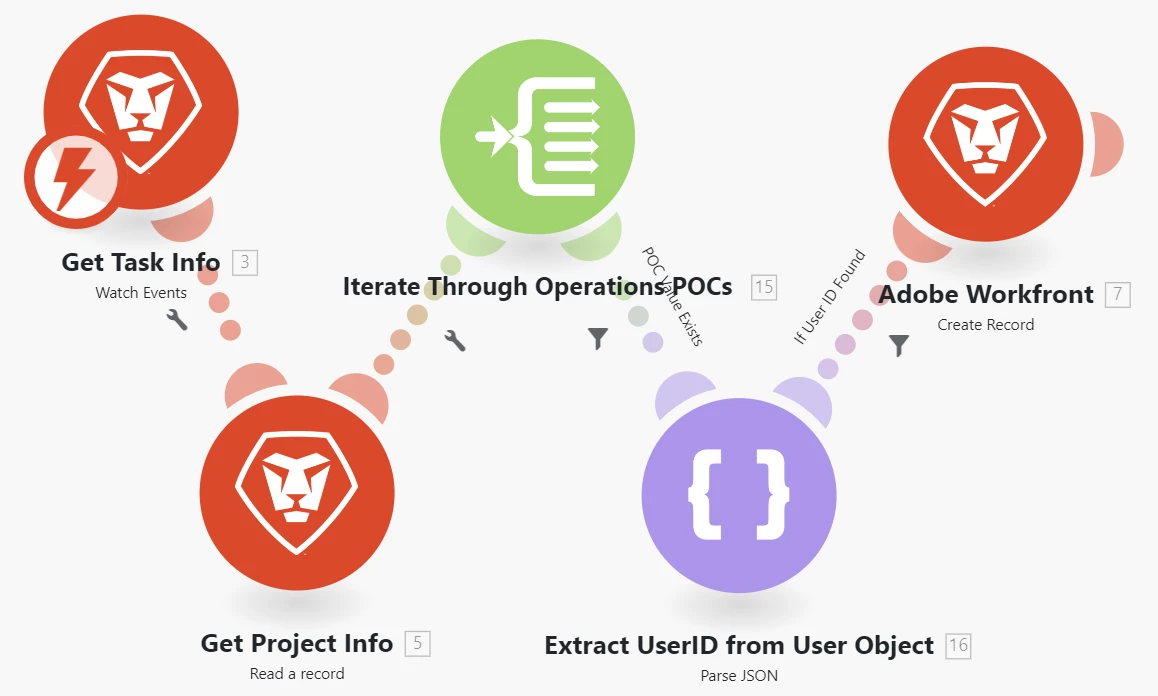
I'm inclined to think the solution is to create a single Update with the needed text and then somehow send multiple notifications (after validating the presence of data in each POC field) on that Update. But how?


1. How it SHOULD work is to build a dynamic array that's passed to the Notify field on the Create Update module. From what I can tell this doesn't work, and in fact creates individual updates per notification.


2. As an alternative, I could @mention each POC in the text, but I haven't been able to figure out how to build the HTML for that.


Any ideas on how to get either of these solutions to work?

Any approaches I haven't thought of?


Thanks

Best answer by KristenS_WF

I ran my scenario in the sandbox preview.  I got both in-app notifications and emails (when I put myself as one of the contacts).

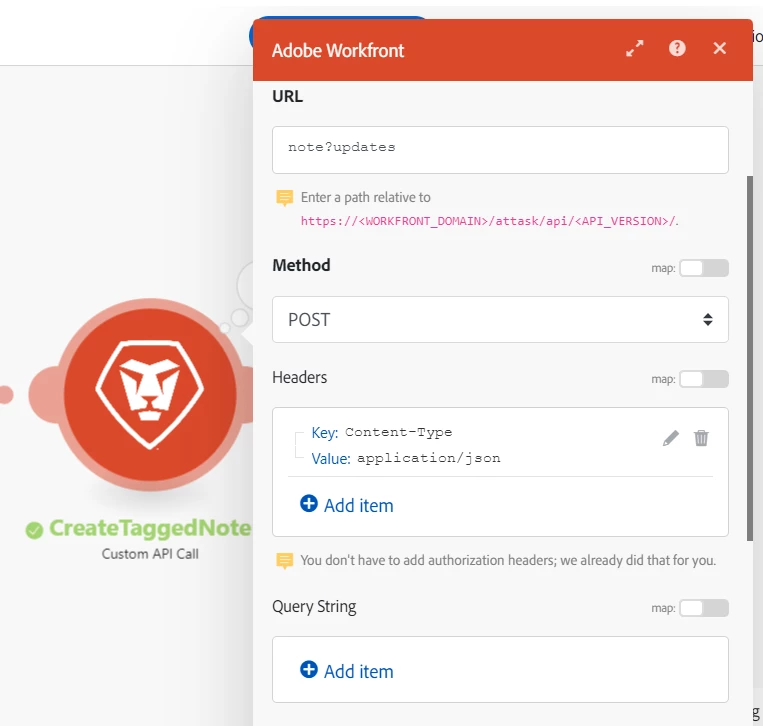
I do wish that the API had something similar to predecessorExpression (in the Task object) for Notes.  I was able to use a Custom API Call module to create a tagged note, but I had to break out the different user notifications (it'd be nice just put them in a delimited string like you can with task predecessors).  It may be possible to incorporate all the needed syntax (e.g., curly brackets) with the user IDs and pass all of that as one big variable to the Custom API Call (thus eliminating the need for the router paths in my original scenario), but my brain's a little too fried at the moment to figure that out.


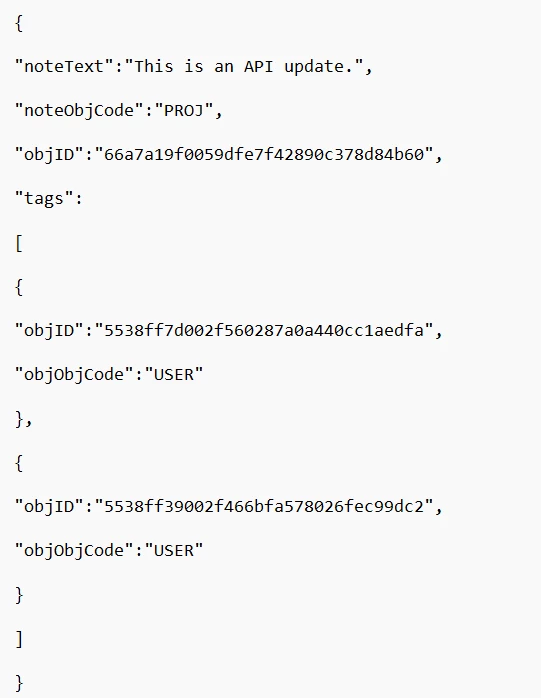
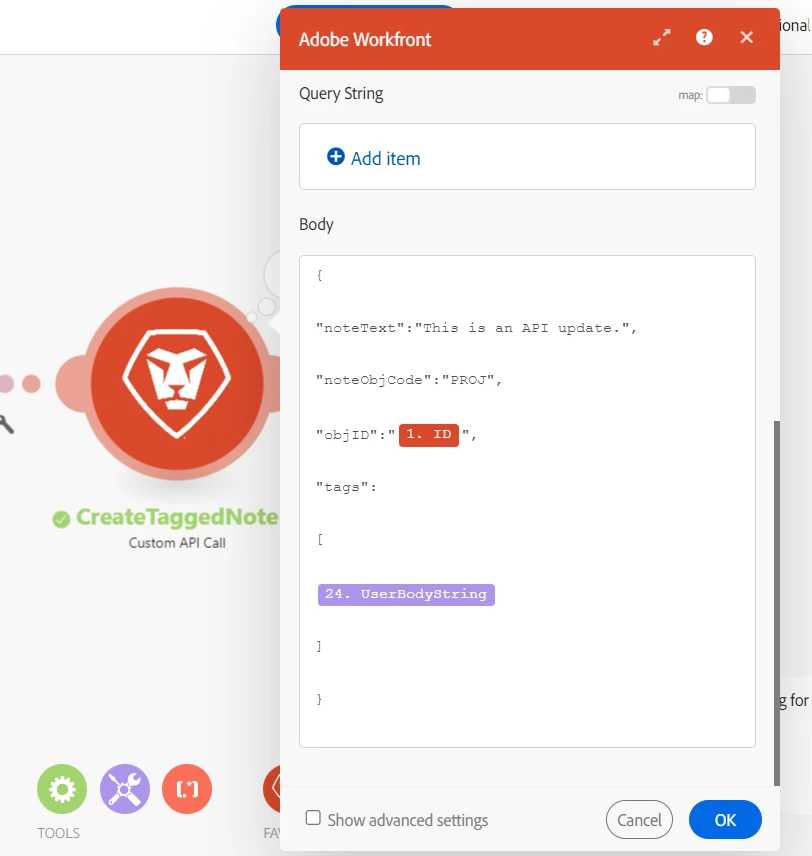
Hey--my brain wasn't so fried after all!  I figured out a way to make the scenario work without the router and all those router paths.  I first tested that I could create a tagged note using a Custom API Call module.  Here's that test module (for 2 tagged users)--the body was too large to fit in one screenshot, so I pasted it into Notepad and screenshotted that.

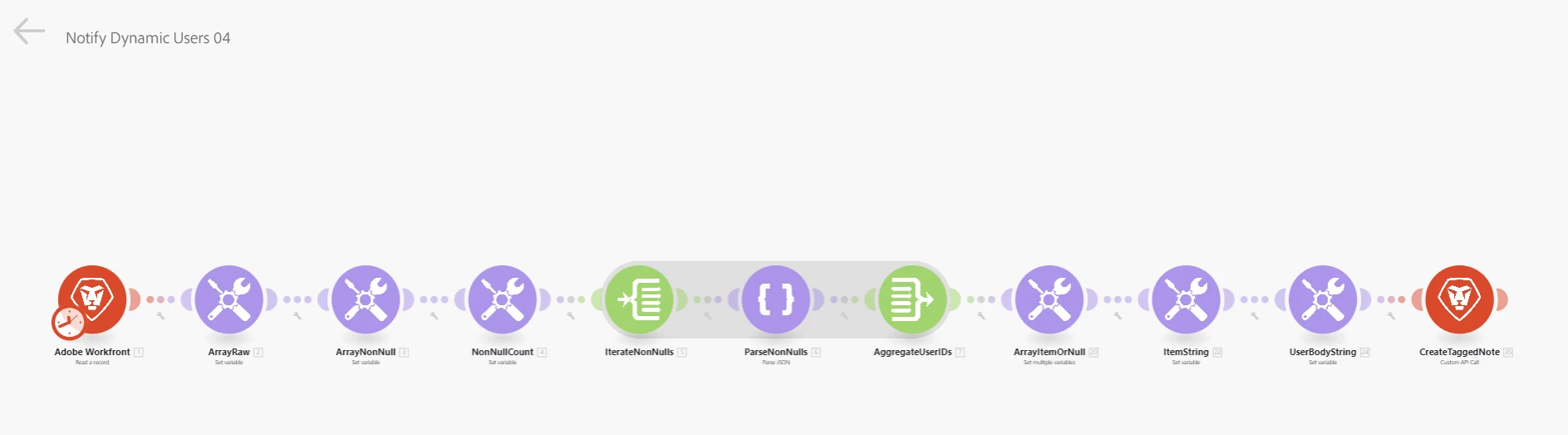
I then went to work trying to make a dynamic API call.  I cloned my original scenario, getting rid of the router and its paths.

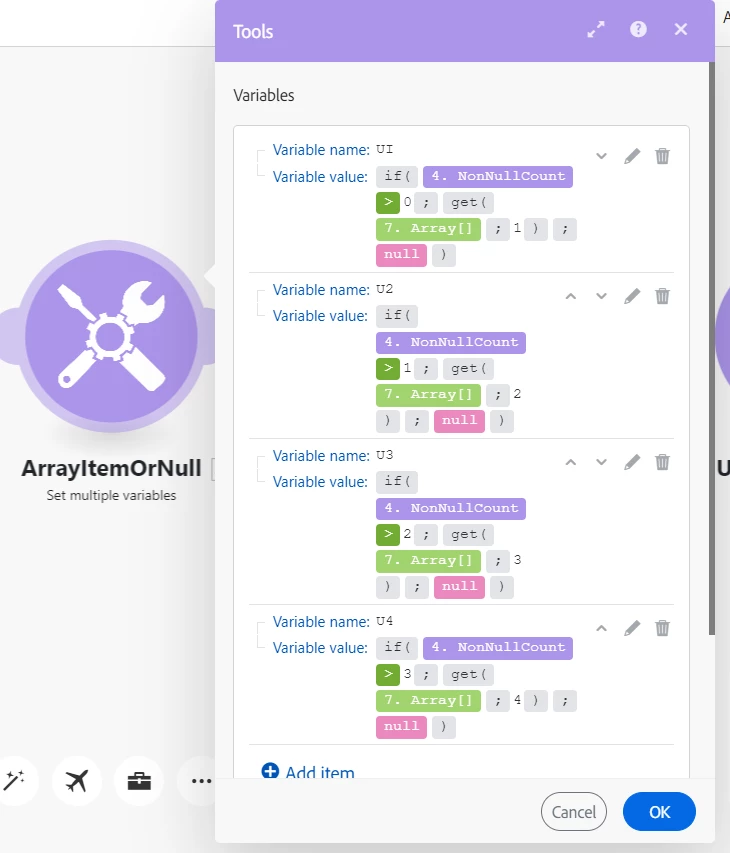
I then created a group of variables--if the non-null count was greater than zero, then I got the first item in my array as user 1 (otherwise, the variable is null); if the non-null count was greater than 1, then I got the second item in my array as user 2 (otherwise, the variable is null); and so on.

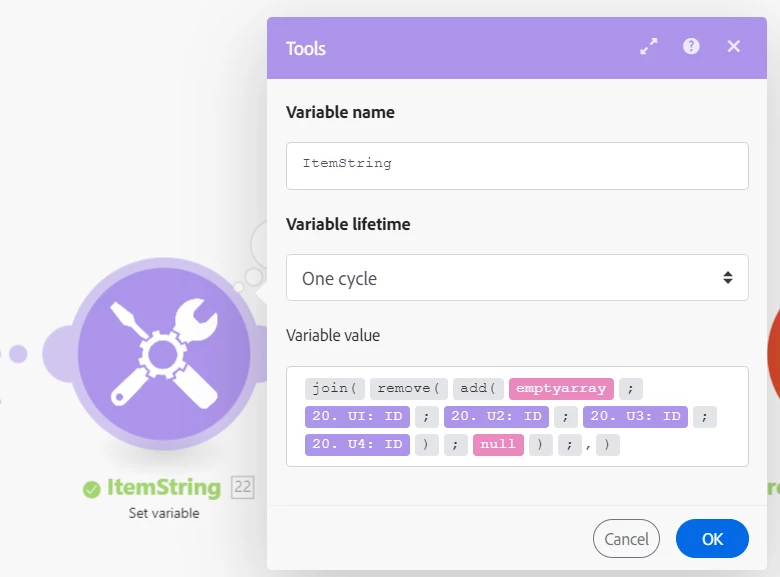
Next I created a new array of the ID values of these variables, removing the null values and concatenating the result into a comma-delimited string (when first building the scenario, I did need to have all 4 of my test fields populated with a user so I could pull the IDs).

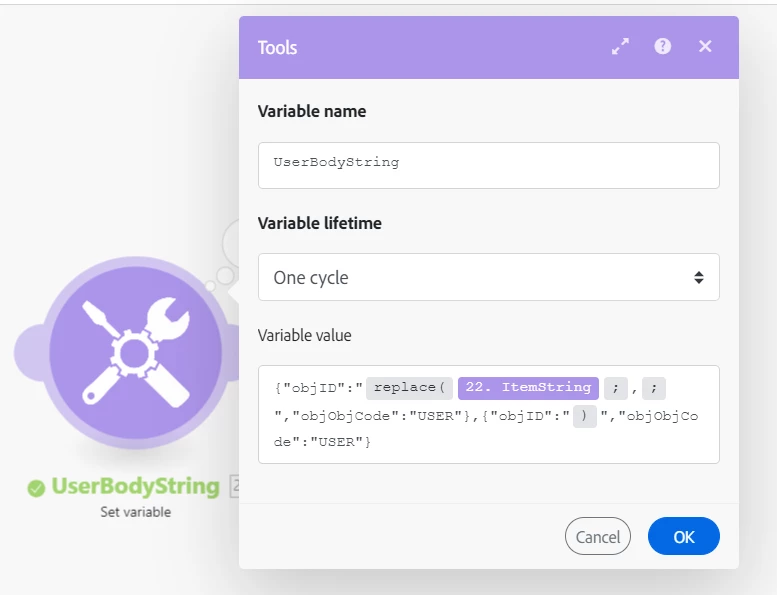
I then formatted this string for use in the body of a Custom API Call module.  I added the syntax needed at the beginning and end of the tagged users portion and used the Replace function to insert the syntax between the IDs.

Lastly I added this to the body of my Custom API Call module.

This seems to be working.

Again, a notifyExpression object in the Note API would be ideal, but this is a bit shorter than all the router path work.


2 replies

KristenS_WF
New Participant
July 25, 2024

There's a 'Note Tag' record type option under the Create Record module.  It feels like this should work (adding a tag to an existing note), but it keeps throwing an error when I try running it.

My other (clunky) thought was to (1) determine the total number of POC fields that are populated; (2) pass those non-null values through a router (with separate paths for each possible total, 0-9); (3) and break those POC IDs out into separate user entries under the Notify option in the Create Record >> Note type (e.g., if your total is 4, you should have a module with inputs going into four different user slots under the Notify option).  Honestly, this approach feels like a lot of work--perhaps someone may have better luck with creating a Note Tag record than I've had.

KristenS_WF
New Participant
July 30, 2024

Okay, I was able to make it work using the second method.  It might be overkill and you might be able to streamline this a bit, but it did work when I tested it.

For my test I just used 4 custom user fields; I made them user typeahead fields on a project form.  I didn't want to fool with creating a webhook (and that's not the part that's giving you trouble), so I just used a single test project and manually ran my scenario after populating and/or de-populating the user fields.

Here's my overall scenario.

I used a Read a Record module to output my project ID and 4 user fields.  I then created an array of these 4 fields.

Next I removed the empty fields from the array.

I then did a count of the items in the non-null array (for use in creating the router filters).

Next I added an iterator to go through the items in the array.

The only way I could figure out how to extract the User ID from the user fields was to add a Parse JSON module.  I had to create a data structure to identify the three components of the typeahead field--objCode, name, ID.

I then added an Array Aggregator with the Iterator as the source module and the user ID as the aggregated field.

From here I could add a router and build filtered paths for each of the possible totals of non-null user fields (note: I did not test the scenario with all 4 users fields being blank--it may be necessary to add some error handling to account for that possibility).

I created set variables / create record modules for each path, with the number of variables and notify item slots corresponding to that path's non-null total.  Here's the path where 2 of the user fields were filled out and 2 were left blank.

Again, this is a bit much, but it worked for my test.  Hopefully it can give you some ideas.


RAshley
RAshleyAuthor
New Participant
July 31, 2024

I have a few kinks to work out but initial tests look good. Thank you!!!


That being said, there really should be a simpler way to do this.

New Participant
July 25, 2024

Hi,


I'm struggling with similar issue as I need to add one update, but notify multiple people.

I was able to add @266741 tags to my note text by mimicking the WF link:

1  - add them as html to text aggregator as

<a target="_blank" href="https://{your_link}.workfront.com/user/{user_ID}" style="background-color: var(--spectrum-blue-100); padding: 0 2px; border-radius: 2px" data-mention="USER_{user_ID}" data-lexical-mention="true">@{user_name}"</a> (your values are in {})

2 - add this text to your note text


This will add it to the comment, but it does not send notification to anyone, and I can't figure out how to achieve both (1 note/update and multiple notifications to different users)