
Triggering A Scenario On A File Upload (Task Level) | Community
Skip to main content
Eric_D_Miller
New Participant
June 27, 2025
Question

Triggering A Scenario On A File Upload (Task Level)

  • June 27, 2025
  • 2 replies
  • 400 views

I am attempting to trigger a scenario when a file is uploaded on to certain tasks on a project. I thought using the Template Task ID to narrow down my trigger would help but I don't seem to trigger anything when uploading. I also tried adding the PortfolioID to narrow down my trigger but that also seems to cause the scenario to miss my file uploads.
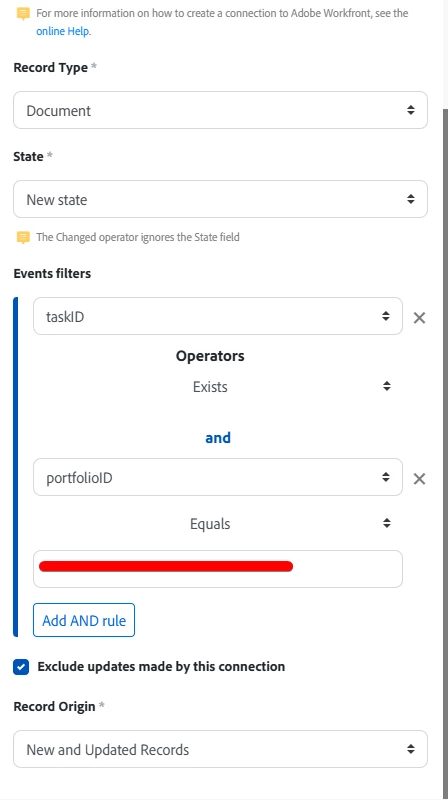


Any off in my webhook here? The file I am uploading is on the Task level, FYI.


2 replies

kautuk_sahni
Employee
September 1, 2025

@eric_d_miller Just checking in. Were you able to resolve your issue? We’d love to hear how things worked out. If the suggestions above helped, marking a response as correct can guide others with similar questions. And if you found another solution, feel free to share it — your insights could benefit the community. Thanks again for being part of the conversation!

Kautuk Sahni
IvanBebek-iX
New Participant
July 2, 2025

Hi @eric_d_miller,

For whatever reason Workfront is not saving the portfolio ID on the Document, but is does save project ID.

If Task on project use Task ID exists and filter per project ID (I would assume the tasks would be on one project)
Please check the screenshot I provided and tested.

 
Also please note the checkbox "Exclude updates made by this connection" if you have an automation that is uploading the files you will have to disable this checkbox, also if you only want initial upload you should be aiming for only "New Records".


Hopefully this helps.

Best regards,
Ivan Bebek

Sven-iX
New Participant
July 7, 2025

FYI this is because documents in program and portfolio are their own collections, independent of project docs. 


@eric_d_miller maybe you could attach a calculated field to the document (e.g. in a hidden form) that references {task}.{templateTaskID} and filter on the calculated field?


The module pulls only direct attributes - and from a document you'd have to look for task:templateTaskID - it doesn't support that.