Using Workfront Fusion to post an update in Program | Community
Skip to main content
New Participant
September 3, 2024
Solved

Using Workfront Fusion to post an update in Program

  • September 3, 2024
  • 2 replies
  • 1703 views

I am trying to use Workfront Fusion to post an update on the Program level. The use case is when projects are created and added to the program, an automatic update will be posted on the Program to notify users that projects xyz are added. I don't see an 'statusUpdate' field to map from the drop-down. Is this option not available on the Program level?

This post is no longer active and is closed to new replies. Need help? Start a new post to ask your question.
Best answer by Lawson02

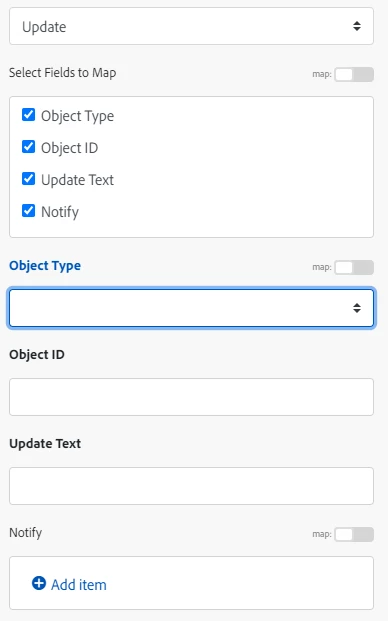
This is what you should see, I didn't have it directly because the servers were down for me yesterday. Fill it out like I have listed above. Select Program for the field. Put the Program ID in object ID. The message in update text. Lastly the specific users/team to @ in notify.

2 replies

RiteshY18
New Participant
September 4, 2024

Create a new scenario > Setup/ configure trigger module  > Add search module to search for a program where the update is required > Add update module to post an update in the identified program> Compose/add a message for identified program update

Lawson02
New Participant
September 3, 2024

Have you tried Create Record -> Update, Select all fields except last if not applicable:

OBJ code "PRGM"

Program ID

Note Message

Notify user(s) or team(s) if applicable

AnnieXLeAuthor
New Participant
September 4, 2024

I'm not seeing Program ID and Note Message as available fields to map when I use the Update module. 

Lawson02
Lawson02Accepted solution
New Participant
September 4, 2024

This is what you should see, I didn't have it directly because the servers were down for me yesterday. Fill it out like I have listed above. Select Program for the field. Put the Program ID in object ID. The message in update text. Lastly the specific users/team to @ in notify.