6.4 no longer allows custom themes? | Community
Skip to main content
New Participant
July 10, 2018
Solved

6.4 no longer allows custom themes?

  • July 10, 2018
  • 14 replies
  • 9577 views

Hi!

In our 6.2/6.3 installation, I had set up a custom template and theme using the process shown at AEM 6.0 Forms Help | Creating custom adaptive form themes​.

We had no entry on the "Adaptive Form Theme" property of the Form Container - we would set the dropdown to blank and our template would force all look and feel.

Now we are building a clean installation of 6.4, but our above solution no longer works. I don't want to recreate all the work I did in LESS to a new Theme, and I find the the Theme Editor to be very clunky and difficult to use. Is there any way to point the theme to a "blank" theme that will allow the original template to be used?
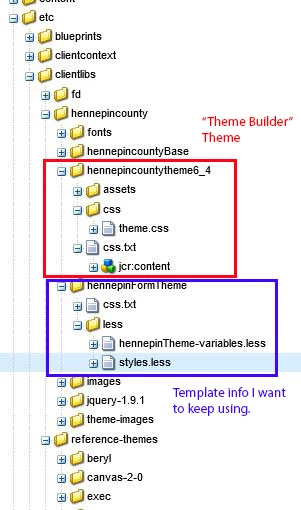
Thanks!

This post is no longer active and is closed to new replies. Need help? Start a new post to ask your question.
Best answer by Khushwant_Singh

The documentation is being updated. It will be published once ready.

14 replies

Khushwant_Singh
Khushwant_SinghAccepted solution
Employee
July 12, 2018

The documentation is being updated. It will be published once ready.

baronforoAuthor
New Participant
July 11, 2018

Thanks! I'll be looking for updated documentation, but will test in the meantime.

smacdonald2008
New Participant
July 10, 2018

Also - i am checking with the team to see if this document has been updated for 6.4.

smacdonald2008
New Participant
July 10, 2018

One big difference between AEM 6.4 is older versions is clientlibs are recommended under /apps now - as opposedto /etc. If you place your clientlibs under /apps with the required CSS - it should work the same.