Added action is disabled in XML source on a PDF form | Community
Skip to main content
New Participant
March 22, 2021
Solved

Added action is disabled in XML source on a PDF form

  • March 22, 2021
  • 3 replies
  • 1398 views

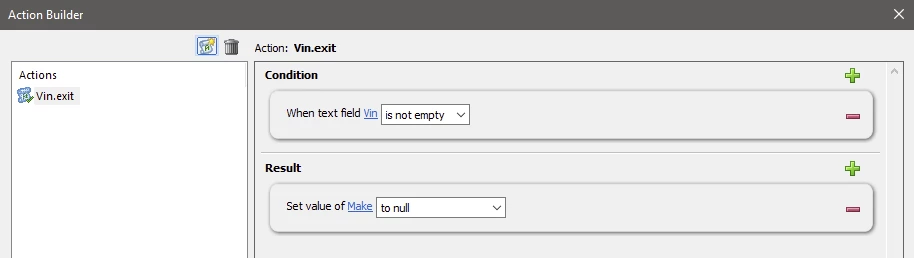
Hello, I am working with AEM Designer to map a PDF form and use actions on the form.  I added two text field objects and bound data to each of them.  Then I added an action to set the value of one of the fields to null if the other field is not empty.  I am able to save the action and do not get any errors, but upon previewing the form, the action does not work.  In the XML source, I noticed that the action was added as a comment:

//+ Type: Action
//+ Result1: SetFieldValue("$Node2","tonull","")
//+ Node2: FormType[0].Page1[0].Make[0]
//+ Node1: FormType[0].Page1[0].Vin[0]
//+ Condition1: TextField("$Node1","notempty","")
//+ ActionName: Vin.exit
if ((this.resolveNode("$").rawValue != null && this.resolveNode("$").rawValue != "")) {
this.resolveNode("Make").rawValue = null;
}
//-

Can anyone tell me why the action was commented out?  This is the first time I am working with actions so I am wondering if maybe there is some other form setting that I am missing?  Thanks

This post is no longer active and is closed to new replies. Need help? Start a new post to ask your question.
Best answer by Kosta_Prokopiu1

Hi, it is NOT commented. // are line comments and not comment ranges. The actual code line is active. When I do the same thing here it works as expected. The way this is done is that on exiting the field in the action (here Vin) the code gets executed. So you must exit Vin before you see the result.

Before Exit:


After Exit:

The action:


3 replies

Kosta_Prokopiu1
Employee
March 24, 2021

@tk0215 Different situation - it is a print PDF that you fill based on incoming data. Here my assumption: The data can contain both data values, if it does then VIN shall take precedence and clear field make. You have to remove the current action as it will not help you. A simple form with 2 text field. I simulate your data by using the Default value for both fields. In the initialize event of the field VIN I check the content and empty Make if it is filled.


Preview as Print, no logic applied, both fields show content

With logic in Initialize of Vin


if (this.rawValue != null && this.rawValue != "") {
Make.rawValue = null;
}

If Vin is empty then


TK0215Author
New Participant
March 24, 2021
This did the trick. Thank you very much for your help!
TK0215Author
New Participant
March 23, 2021

Thank you for the clarification.  In that case, perhaps I should provide more context because it is still not working for me.  We build static PDF forms in AEM Designer that get rendered through AEM servers with XML data based on a data schema.  For this test, I mapped a form with the two fields and added the action on one of the fields.  When I do a Preview PDF from within AEM Designer, the action does not work.  I even tried changing the order of the fields in the hierarchy and it still did not work.  Here is my action:


And here is the result in Preview PDF:


Any thoughts on why it does not work in Designer?


Kosta_Prokopiu1
Employee
March 24, 2021
As I mentioned in response to your PM, if this is a print PDF the action will not work. If this is interactive PDF then check your Preview settings under File - Form Properties - Preview to be Preview Type Interactive Form. If this is indeed a Print/static PDF you need to approach this differently.
Kosta_Prokopiu1
Kosta_Prokopiu1Accepted solution
Employee
March 23, 2021

Hi, it is NOT commented. // are line comments and not comment ranges. The actual code line is active. When I do the same thing here it works as expected. The way this is done is that on exiting the field in the action (here Vin) the code gets executed. So you must exit Vin before you see the result.

Before Exit:


After Exit:

The action: