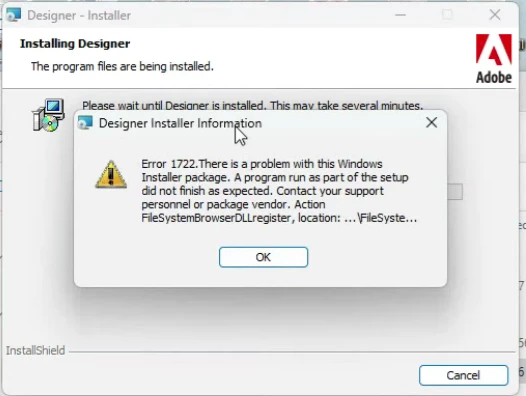
Hi @geetas51509541,
It seems that the installation might be corrupted due to which you are facing this error.
Follow these steps sequentially to resolve the issue:
1. Install Required Microsoft Visual C++ Redistributable
Ensure that all required versions of Microsoft Visual C++ Redistributable are installed:
2008, 2010, 2012, 2013, and 2015–2022 (both 32-bit and 64-bit).
2. Register Required DLL Files
Open Command Prompt in Administrator mode and run the following commands:
• C:\Windows\SysWOW64>regsvr32.exe "c:\Program Files (x86)\Adobe\Adobe Experience Manager Forms Designer\FileSystemBrowser.dll"
• C:\Windows\SysWOW64>regsvr32.exe "c:\Program File (x86)\Adobe\Adobe Experience Manager Forms Designer\ImageFileBrowserIDL.dll"
• C:\Windows\SysWOW64>"c:\Program Files (x86)\Adobe\Adobe Experience Manager Forms Designer\FormDesigner.exe" /regserver
3. Uninstall AEM Forms Designer
Use registry editor to delete specific keys:
Navigate to `Computer\HKEY_LOCAL_MACHINE\SOFTWARE\Classes\Installer\Products`.
Delete the node `447587581E0672840AA48EBDECD712E8` and all values under this key.
Delete the AEM Forms Designer folder from its installation directory.
4. Now you can reinstall the Designer.
We will suggest you to use the SP19(64-bit) full installer of Designer which you can find on Software Distribution or AEM Forms Releases doc.
https://experience.adobe.com/#/downloads/content/software-distribution/en/aem.html?package=/content/software-distribution/en/details.html/content/dam/aem/public/adobe/packages/cq650/servicepack/fd/Designer-Patch/sp19_x64/aemforms_designer_6_5_0_wwe_win.zip
Thanks
Pranay